I’ve been looking for this for a long time. Thanks! I cant find icon to give the reputation. Just great. Now I can really test bandwidth without killing the cpu.
The good news is this is a dedicated chr for btest. The other side of it is to share info. Is there a way to restrict some of the more sensitive config parts while still allowing some read? In the mean time i have restricted the box btest user to a limited test group.
I just wanted to say, thank you for the access to your test servers. Its helped me dearly to tweak my QoS rules so I can now saturate the line without breakups.
I have ironed out the permissions to “test” and “winbox”. It looks like permissions have not been working most of the day but i was just able to reset them and complete several tests. Have fun testing and thank you for recommending the permissions review.
Hello,
I am running CHR 3.37.3 on a t2.medium instance on AWS Singapore 1b.
Download I am getting ~140Mbps
Upload I am getting 1Mbps
Is anyone else getting slow upload speeds from AWS Singapore?
When I run a cli bandwidth from a centos 7 box behind CHR I am only getting 1Mbps download/upload.
Verify the license as a demo license is limited to 1mb/s and i cant remember what i had seen before, but i think it was a TX limit or a RX limit, not both. I have also run the CHR prior to production release like an RC and had odd btest numbers.
looks like ‘sensitive’ permission is what you’re looking for  uncheck it
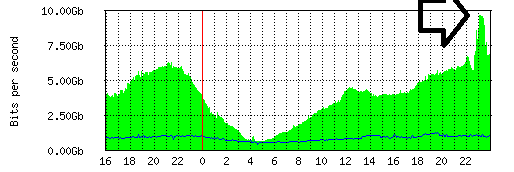
So, not sure who pulled this off, but a 9.9Gbps out bound test for several minutes? I realize the whole test was not that fast but happen to capture some data. I have also save a copy of the larger Observium graph for the time. I then though to capture the CPU load on the CCR 1036 that was performing the NAT from public to private IPv4 space in LAN. Notice in the year of 10Gbps internet I have not seen that kind of CPU load and sustained bandwidth usage.
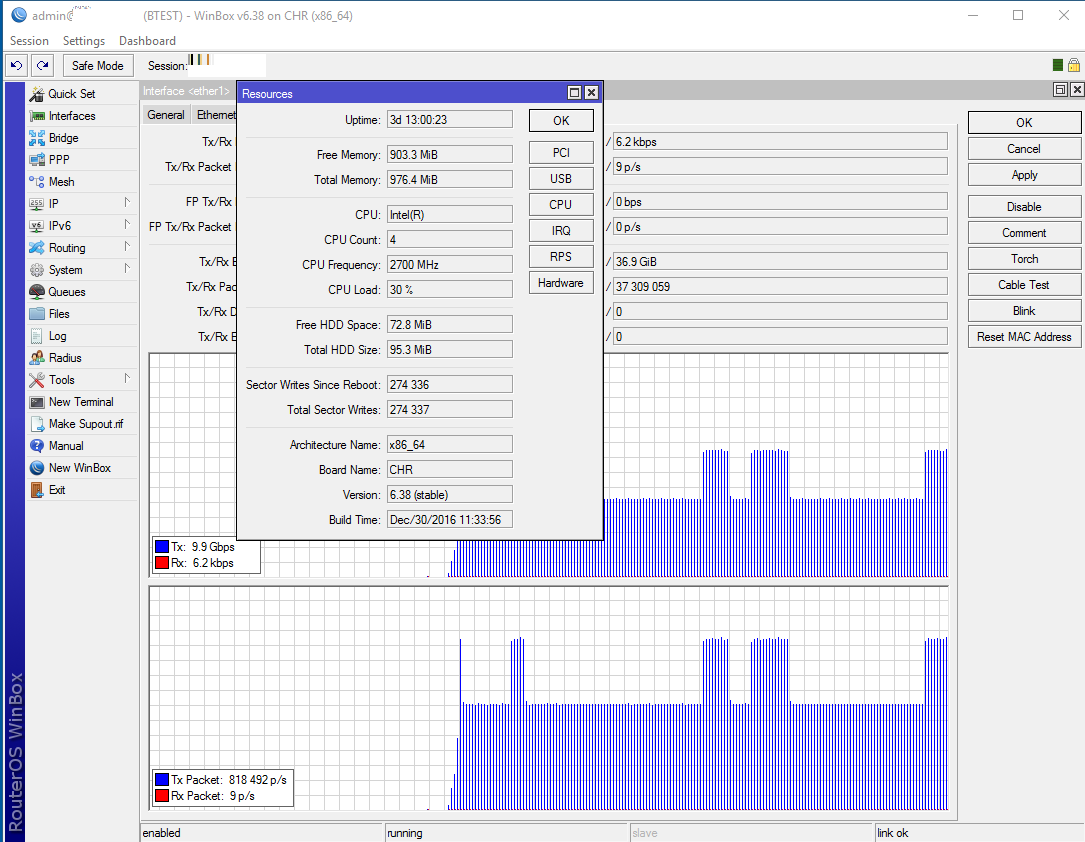
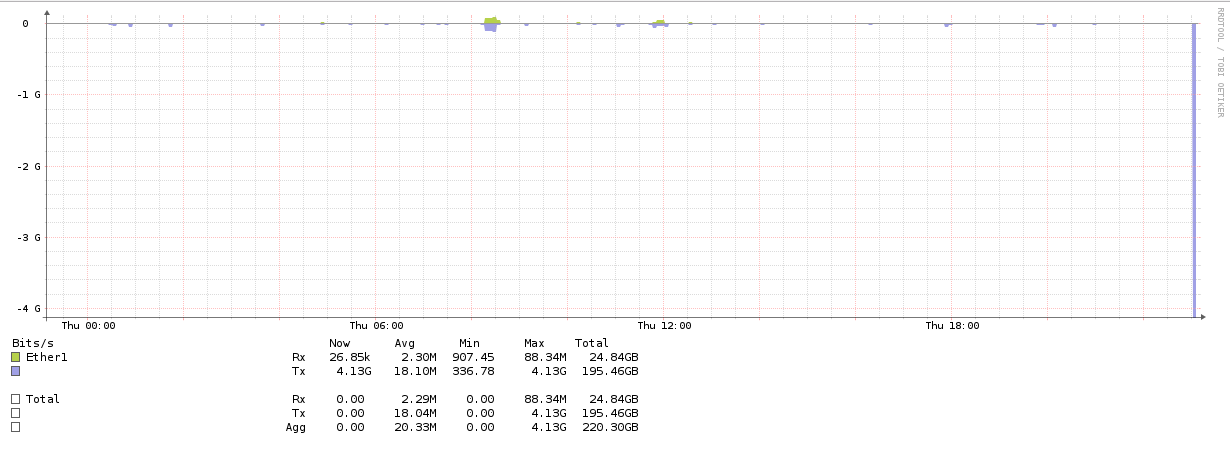
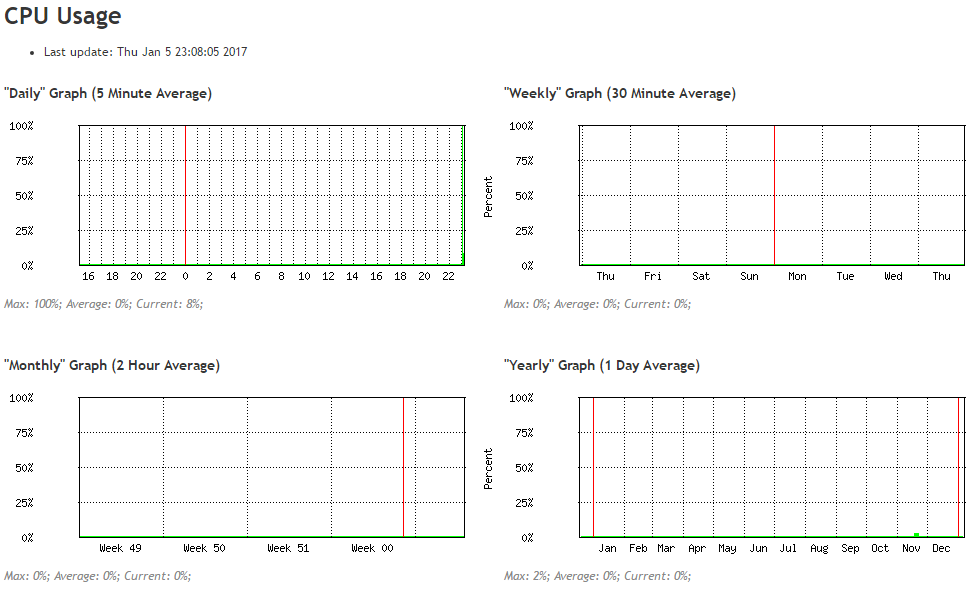
Thank you! Discovered my go-to speed-test servers were both out of service, just as I needed to use them to test and accept a speed upgrade cutover. Found yours in the nick of time. I need a good external speed-test server for about three minutes a half dozen times a year. Really, really hope you are able to keep offering this service without suffering abuse problems.
Thank you. This was the issue, after purchasing a P1 license I am now getting good transfer speeds.
On a t2.xlarge instance in Singapore I was getting ~370Mbps upload/download.
On a t2.nano instance in Singapore I am getting ~600Mbps download and ~190Mbps upload.
Here are some more stats:
Mikrotik Interface
https://btest.planetcoop.com:10443/graphs/iface/ether1/
Mikrotik Processor
https://btest.planetcoop.com:10443/graphs/cpu/
Observium Interface Daily
https://observium.planetcoop.com/graph.php?device=23&type=device_bits&legend=yes&height=300&width=1152
Observium Processor Daily
https://observium.planetcoop.com/graph.php?device=23&type=device_processor&legend=yes&height=300&width=1152
Just tried this for the first time. THANK YOU!!!
Numbers match speedtest.
I am in the DC metro area.
Your server tested from one of my APs.
65.6 Mbps/59.1 Mbps
My laptop against the Fios Server
65.48 / 57.88
ROS still not scale well over multi-core and many-core processors. (as does Linux they built ROS around)
orginal Tilera “Zero Overhead Linux” tailored by them for platform are built Enteriely differently with lot of stuff “in userspace”, which Completely interfere with “minimal footprint/bloating” ROS approach and “ductape netfilter to kernel” -esque minimalism
to achieve similar scalability without moving to similar framework MT may adopt LWKT from DragonflyBSD and DFBSD kernel in future.
combined with Erlang-written code it allow achieve Impressive scalabilty in many-core, and in Distributed systems.
Nice service !!! btw, our CCR1036-8g-2S+ can only btest 2.5gbit/s (cpu running btest goes to 100%).
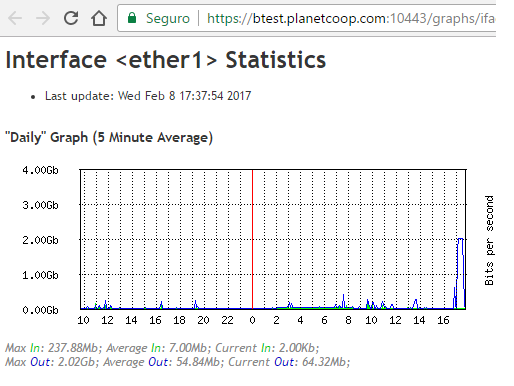
Nice test, i see the traffic. What connection type did you test with, Comcast Gigabit-Pro? I ask due to the locations you listed in your profile. My server is in Roseville, CA
Testing from Brazil (city: Sacramento, State: Minas Gerais)
17 hops away !!!
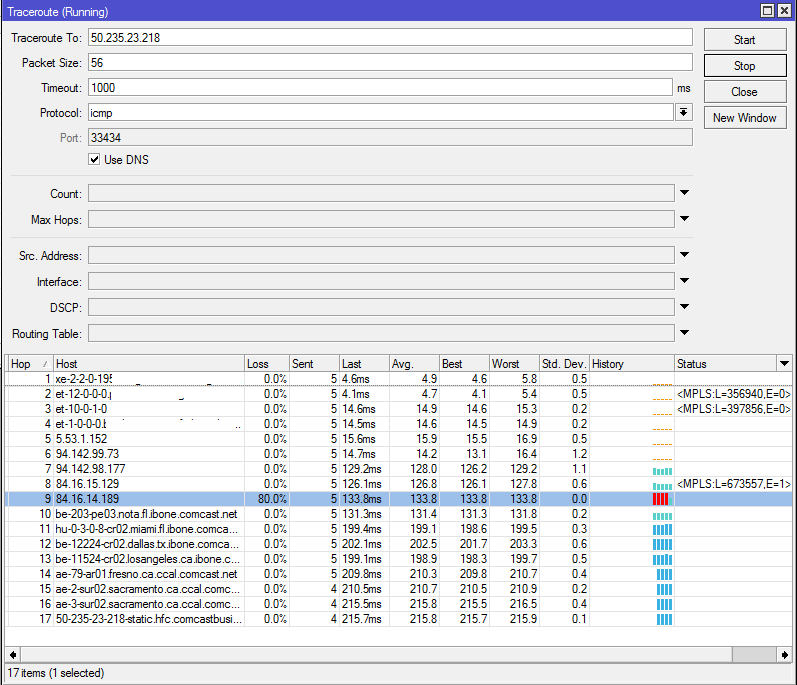
router interface:
Questions re the Mikrotik CCR1036-8g-2S and btest throughput
Q1: What kind of UDP bandwidth btest speed to you get when you test to 127.0.0.1 (your local loopback address) ?
Q2: Can the CCR1036-8g-2S be over clocked ? (Winbox → System → Routerboard → Settings → CPU Frequency)
If so, I have found the following results on all of my Mikrotik devices:
- #1; Overclocking to the second to fastest speed always works
- #2; Overclocking to the fastest speed -almost- always works (sometimes it is not stable and then I have to back down to the second to fastest speed available)
- #3; Overclocking always improves throughput. (to verify this - best to 127.0.0.1 at the default CPU speed - then btest again to 127.0.0.1 with the CPU overclocked).
- #4; Overclocking almost never increases Ethernet switched ports, but always increases Ethernet software bridged ports (and increases routing throughput).
- #5; I have about 100 Mikrotik APs (5 GHz running NV2) and throughput on all of them has increased some when the APs and/or/also Clients are overclocked.
- #6; I have a very busy, heavy traffic WDS link between two Mikrotik 922UAGS-5HPacD (AC only & HT chain 0-and-1 & NV2 & channel width 20/40/80) distance about 13 km & average link connect speed greater than 468 meg) , when both ends are overclocked to the maximum, it always runs much faster.
-
-
- If you test this , please post any btest throughput results. I am interested if others are also seeing a difference.
-
North Idaho Tom Jones
Q1: 900Mbit/s (cpu core goes to 100%)
Q2: max 1200mhz
FYI re: Q1
Slightly unrelated to a Mikrotik CCR1036-8g-2S
My Mikrotik CHR (public 207.32.195.2 btest server) - Virtual machine running on a very busy VMware ESXi server :
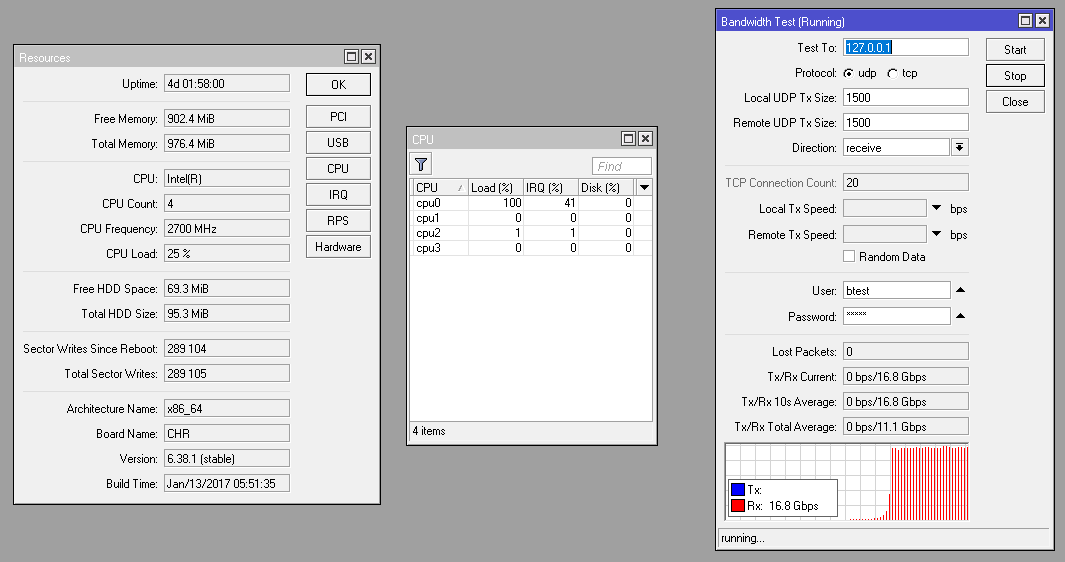
Just now tested: 18.2 Gbps
North Idaho Tom Jones
I did ok on a busy server and 4 core CHR @ 16.8Gbps. From what i have seen the btest application is single core per session test. its worth mention that my topology is a ccr1036 with 2sfp+ on the edge running IPv4 nat and IPv6 L3. The CHR is behind that with a nat’ed IPv4 and Public IPv6 address.
You can see the individual CPU cores on the CCR:
https://observium.planetcoop.com/graph.php?type=device_processor&device=1&to=1486664221&from=1486577821&height=300&width=1152
You can see the individual CPU cores on the CHR:
https://observium.planetcoop.com/graph.php?type=device_processor&device=23&legend=no&to=1486663766&from=1486577366&height=300&width=1152