Thx for this !!!
man, you are my hero for btest, i’m from Indonesia and this btest server is very usefull for our client test for international bw !!
+1
Thx for this !!!
man, you are my hero for btest, i’m from Indonesia and this btest server is very usefull for our client test for international bw !!
+1
Thank you Sir, you are a legend.
Nice comments are welcome.
Money is much more welcome - lol
thank you for the kind comment.
North Idaho Tom Jones
Woha Dude,
perfect. Works fine from Germany. Excellent Job. Thank you so much for sharing this.
Woha - you are welcome
Thanks for sharing. Works great from Niagara Falls Canada. I get my full 55 down 10 up 
chris.
Hi.Thanks very much for this.I am from South Africa and works fine
You are most welcome.
Thank you for posting your positive response
North Idaho Tom Jones
Hi, great work done.
We used to use a Mikrotik router from a friend’s network to do ‘real’ internet traffic test from our network towards his server. But his business is sold…
Anyway, I can use your’s now to test again.
We have a 300/300Mb simmetric line delivered to us over a dual hop microwave link from our provider. (24Ghz) After some ill experiances with previous provider we need to test that capacity once a month at least to see we really get what we pay for… so here your service comes in place.
We can use www.speedtest.net but results are all over the place and therefore very unreliable in my opinion. Either these servers at times, or part of my providers network or part of the rest of the (inter)network is saturated at times since sometime I can push my link to indeed 300 up and almost 300 down, but at time same PC connect to my CCR (=gateway) only gets 20Mb down…
Anyway I found your test server, very helpfull!
BUT;
I also have a multi session download bandwidth test program from Peplink (manufacturer for multy WAN load balancers) that works very nice (download only!) in downloading some standard files (MS-Windows upgrade for instance).
With this little program on my PC I can open several downloads (4 program sessions) for several files and it will fill the 300Mb pipe up to 285-290Mbps considered we already have some 90-140Mb client traffic running.
Done this many times and almost always can ‘fil’ by download pipe.
But just now did the MT-bandwidth test from same PC and can only ‘fill’ the same pipe to just over 200Mbps.
Actually, I could even run the bandwidth test from my CCR1016-12G and still can not fill the pipe. Max I’ll get is 210-220Mbps max.
Starting Peplink in parrallel and it puts another 60Mbps on top of it to fill the pipe to 260-270 this time…
We are now developing the ‘feeling’ something is wrong with our CCR settings.
We also never can get the clients assigned (simple queues by PPPoE-server) internet speeds as we sell. But internal MT bandwidth test always completely fill the client’s assigned queues.
Anybody has any advice where to look for?
Thanks! works great from Israel, 19 hops 
One thing I have noticed is that sometimes my virtual ROS x86 bandwidth speedtest server running under VMware ESXi will sometimes crash - interesting.
I can’t ping it or talk to it using IP. However the VMware ESXi console to the ROS is still active and the ROS does respond to console CLI commands.
I am kinda wondering if the problem is the IP stack dying when under extreme heavy I/O loads.
It’s a good thing this not also functioning at a production router under the same loads.
Anyways - a reboot appears to get thing up and running again for another week or so.
FYI - From my Cacti bandwidth graphs, it looks like my ROS bandwidth test server gets a bandwidth test around every 1 to 2 hours ever day.
North Idaho Tom Jones
could you make watchdog that genarates supout before it crashes and send to support@mikrotik.com
OK - I modified my auto-reboot - when I get a hit I will send an email to support
North Idaho Tom Jones
-- Thank you --
Netwatch: (Detect a missed ping to something)
Host: 192.0.2.254 (an IP in my network)
Down: log info "Netwatch missed a ping to 192.0.2.254 - starting 5 minute timeout script" ; /system script run NetWatchBoot-192.0.2.254
Scripts: (Verify not false alarm - verify the problem stays around and we lost connectivity)
NetWatchBoot-192.0.2.254
:local addresstoping 192.0.2.254;
:local interface "wlan1";
:local continue true;
:local counter 0;
:local maxcounter 18;
:local sleepseconds 10;
:local goodpings 0;
:log error "-----> Tom's Netwatch-Script-Warning - Netwatch could not ping $addresstoping - Will begin further testing in $sleepseconds seconds - and will continue for $maxcounter times $sleepseconds seconds";
:while ($continue) do={
:set counter ($counter + 1);
:delay $sleepseconds;
:if ([/ping $addresstoping interval=1 count=1] =0) do={
:log info "----->ping to $addresstoping failed on attempt $counter of $maxcounter -- Will try again in $sleepseconds seconds";
} else {
:log warning "-----> ping success on to $addresstoping attempt $counter of $maxcounter <----- No Further testing needed --- Program will exit -----";
:set continue false;
:set goodpings ($goodpings +1);
};
}
:if ($counter=$maxcounter) do={:set continue false;}
}
:if ($"goodpings" = 0 ) do={
:log info "-----> Rebooting in 15 seconds";
:delay 5;
/file print file=ScriptRebootReason
/file set ScriptRebootReason.txt contents="Rebooted by Toms script on $[/system clock get date] at $[/system clock get time]"
:log error "-----> Rebooting in 10 seconds";
:delay 5;
:log error "-----> Rebooting in 5 seconds";
:delay 5;
:log error "-----> Rebooting now";
:delay 1;
/system sup-output without-paging file=btest-server
:delay 20;
/system reboot
/system reboot
/system reboot
/system reboot
}
perfect!
27 hops from Slovakia,
930mbit up/ 930 mbit down
Perfect
Now that is what I like to hear
Am I correct in guessing you have a 1-gig Internet connection ?
I tried your server from Spain now several times and best I ever got download was some 100Mbps.
This is done directly from a CCR as our gateway router.
We are on a 300/300 symmetric line and with other programs can easy push over 250Mbps.
Doing same Mikrotik speedtest with its Window bandwidth tester from my PC gives me less than 1Mb, where a download progam with multiple connection almost inmediately downloads at 120-130 mbps and sometimes up to 280Mbps into my PC. (Still traffic from the rest of my WISP environment using the same 300/300Mbps.)
How come these huge differences?
I am guessing at some answers…
What is the best speedtest you get when using a PC computer testing to speedtest.net ? What do you get when testing to Seattle USA ?
Can you post traceroute from your location to 207.32.195.2
If you give me your IP address, I will post a traceroute from me to you.
Ok, Traceroute;
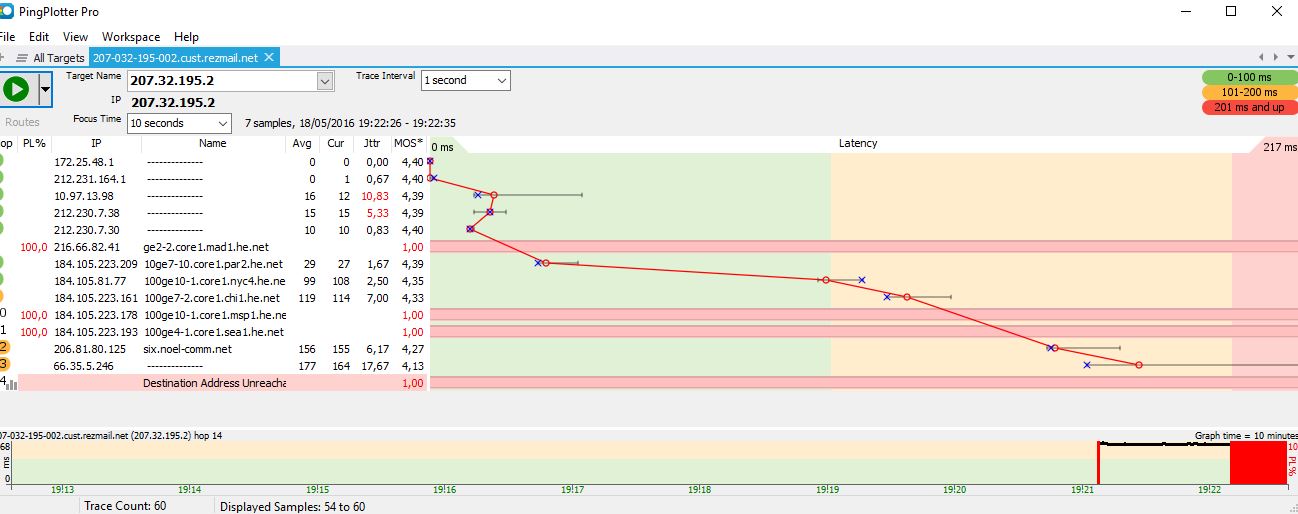
172.25.48.1 is my gateway, 212.231.164.1 is the cisco of my 300/300M provider.
udp speedtest from you to my CCR; Impossible
udp speedtest to you from CCR;
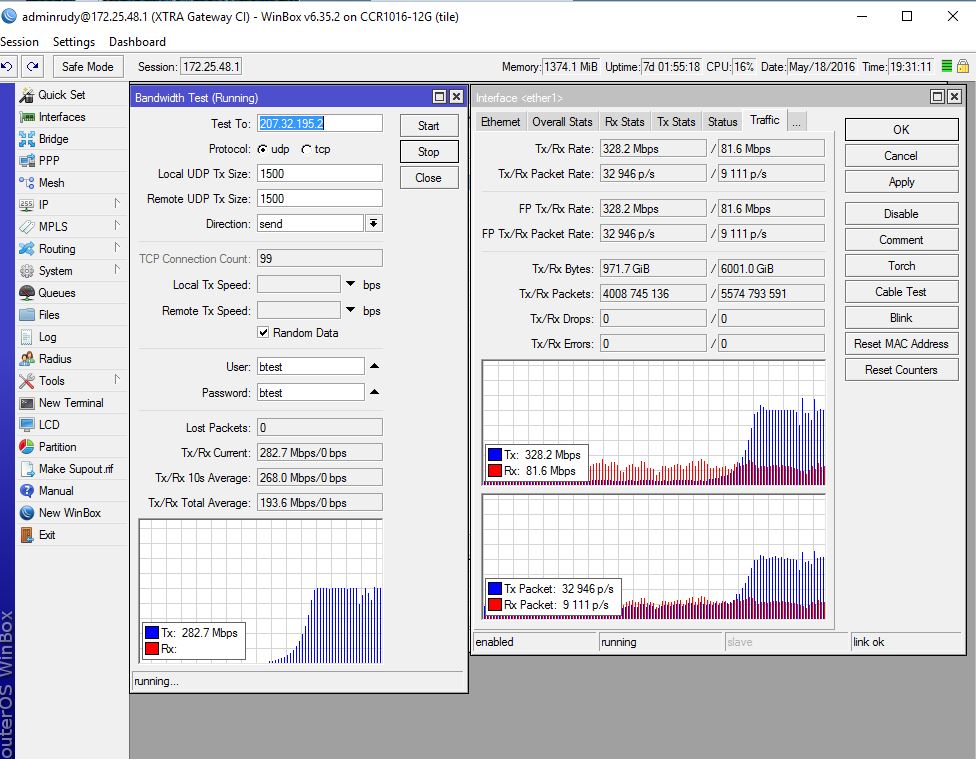
Good speed, 328Mb upload! (To where? Provider might drop these. Do they reach you, don’t think so…)
tcp speedtest from you to my CCR;
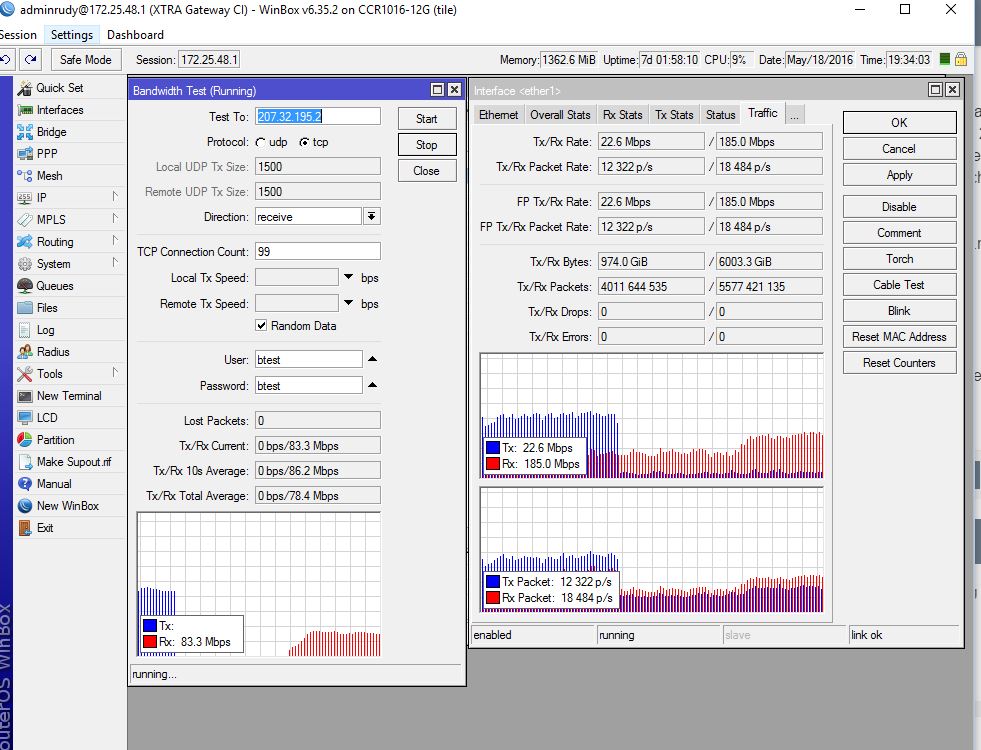
tcp speedtest to you from my CCR;
udp upload from my PC to you;
udp download from you to my PC; impossible
Peplink multi stream download from some servers;
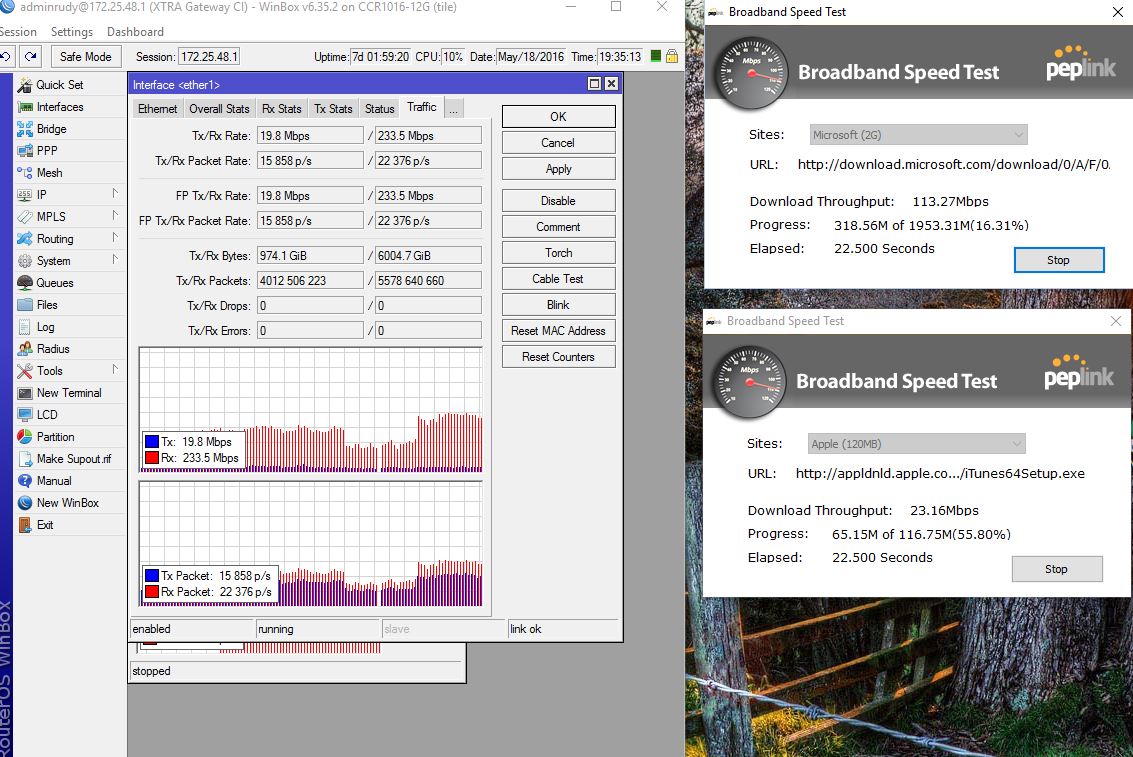
http://www.speedtest.net;
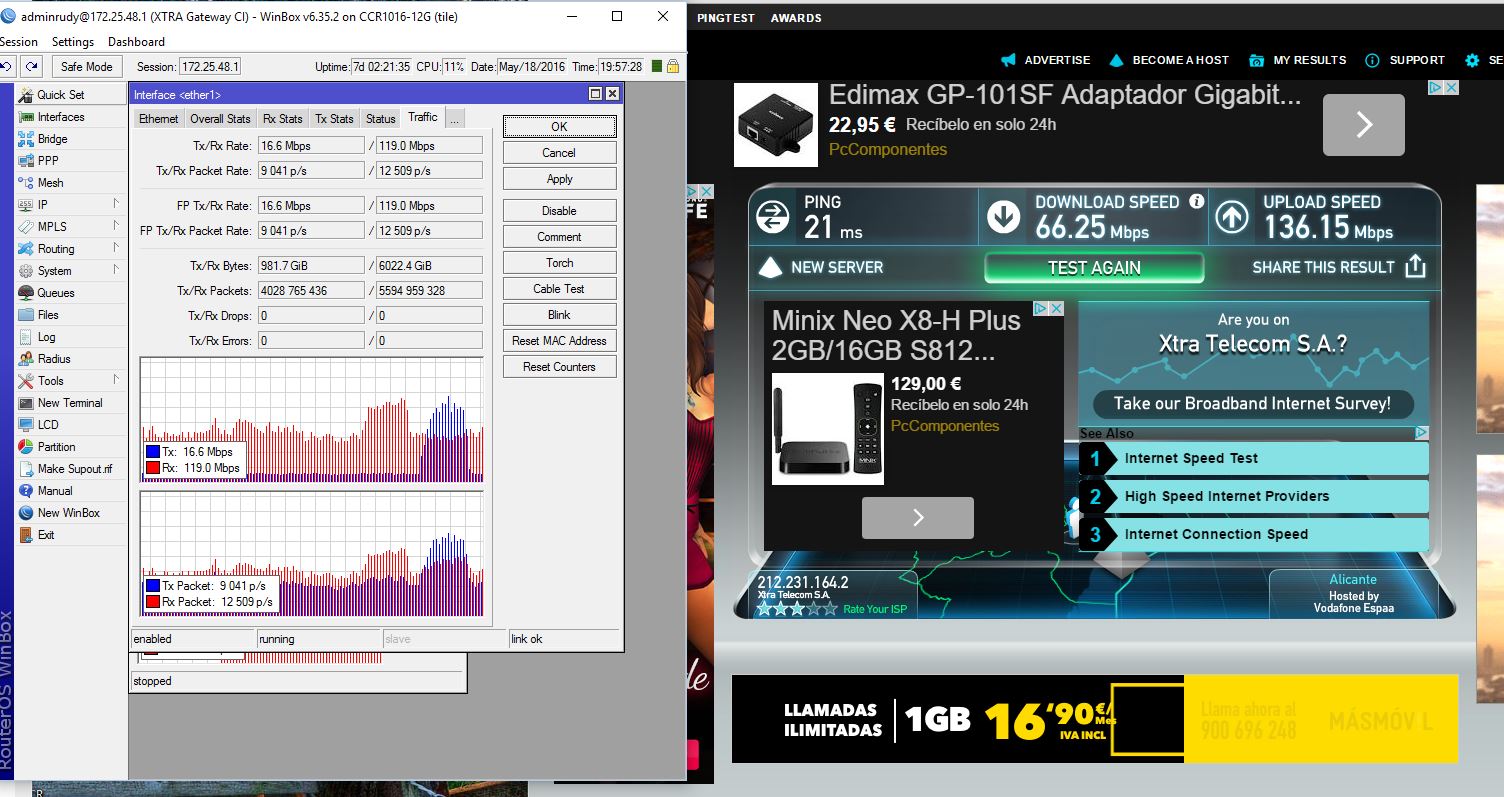
Both up as download on the main pipe reached 185mbps (roughly 100-140mbps client running)
I tried to do some http://www.speedtest’s to some servers in Seatle, WA. but speeds where in the range of 2-6Mbps at best. Not very useful…