Question: What is your IP address ? I will look at my access-lists.
Question: Has this ever worked for you in the past ?
Question: Can you ping 207.32.194.22 ?
Question: I want to verify → Are you trying to Bandwidth-Test to my Mikrotik BTest-Server IPv4 address of 207.32.194.24 using User: btest Password: btest ?
Question: Is the Mikrotik you are trying to Bandwidth-Test from directly on the Internet and no firewall ? Firewalls can prevent some UDP and/or TCP send and/or receive btest from running.
Hi,
Found my way here from Google.
I have 10Gbps located in Stockholm, Sweden. Using CCR1036-8G-2S+.
Tested on: 38.104.52.187
10sec average: 2.9 Gbps/74.2 Mbps
And also: 207.32.194.24
I achieved 4Gbps both send and receive, however I did not run both at the same time.
Now I can’t connect, but I guess (without reading trough every post here) that you have some sort of spam/flood protection that puts me on hold?
I don’t have any devices yet that can handle 10Gbps (they are on the way) and I would LOVE to try this beast out on it’s full capacity from the router itself.
I could also set up a BTest Server if anyone would like to try against my connection. However, this is a private resident with static IP and I don’t want to post my IP here. Private message, if that is possible on this forum would be preferred.
Also a big thanks to everyone here for publishing test servers.
Especially you TomjNorthIdaho.
Br
re: Now I can’t connect, but I guess (without reading trough every post here) that you have some sort of spam/flood protection that puts me on hold?
Yes , I do have a Simple-Queue which also uses an Address-List.
My address list has the following types of Names ( types ).
blocklist - IP address that are blocked from using my btest server ( bad guys who have abused my btest server )
previous - IP address that have recently used my btest server and are blocked for a couple of hours , then auto released
tester - IP addresses that are white-listed ( IP address that have unlimited access to my btest server - these are normally my networks that I manage ).
Also - my Simple-Queue limits the maximum speed of all running btest testing to 4-Gig ( all currently running btests at the same time in the 4-Gig rate-limiting queue ). This is to prevent my Internet connection from getting hammered.
I will be building a second private full 10-Gig btest server. If you are interested in performing a full 10-Gig btest , I am open to the idea.
Just installed a CCR1009 on a 1GB fiber connection. Wondering why i get must slower speed test results behind the CCR than just plugged into the fiber modem. Fast.com direct is 900mbps+ and behind the CCR is closer to 550. Ran the bandwidth test built into the router and Mikrotik app for Windows. Got different results there too.
Edit: Figured out that I forgot to enable fasttrack. Now I get full speed to this server when its not bogged down.
And while we are testing bandwidth… we might want a refresher on the affects of latency and loss…
Namely where your public test server is located, globally…
December 8th 2020 Notice; The public access btest server I manage was re-numbered into new/different IP addresses. This public btest server is now at the following IP addresses:
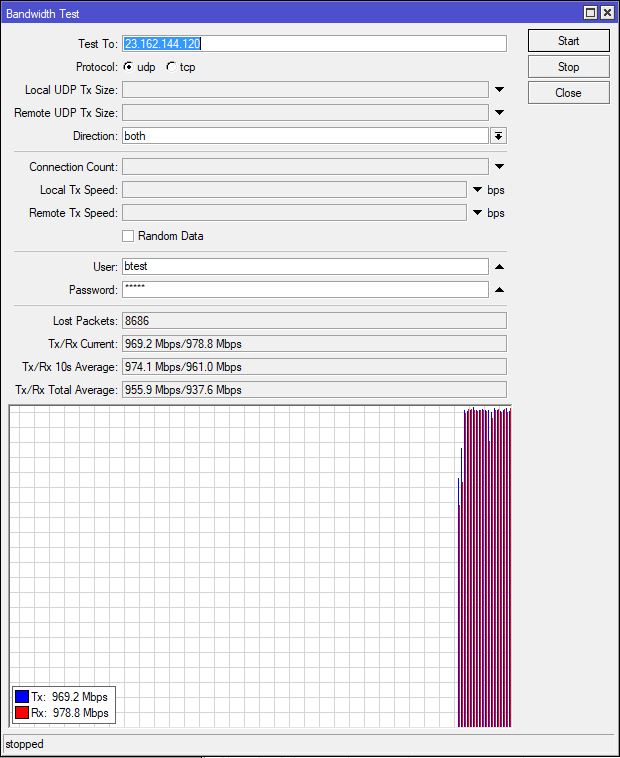
IPv4: 23.162.144.120
IPv6: 2605:6340:0:1b::4
btest username: btest
btest password: btest
Note; To use this Mikrotik public access btest server , you agree to the following terms and conditions: #1 - You will not use or create any automatic btest scripts on a timed schedule to automatically perform btest(s) to this btest server. #2 - You will not run extended btest(s) to this btest server which last longer than 30 seconds. #3 - The use of this btest server is only permitted to perform brief 30-second btest(s). #4 - You will never use this btest server to create a degrading bandwidth sustained load on your up-stream Internet provider. #5 - You agree that I ( the owner/operator ) of this btest server may post your remote btest IP address(s) you used to test to my btest server. #6 - All btest(s) you perform to this btest server will always be performed using a hands-on procedure without the use of any automated scripts. #7 - You will never attempt a “dude” connection to this btest server. #8 - You may perform up to 4 ( four ) btest(s) in a 24-hour period #9 - You will pause a minimum of 5-minutes between btest(s) #10 - Failure to follow the above listed requirements may result in actions on my part to permanently ban/block your IP addresses from my networks and this btest server. #11 - I ask ( not required ) , that you post in this Mikrotik forum what country/city your are located in and your btest throughput results. #12 - You understand these terms and conditions and you understand the purpose of this btest server is to assist all Mikrotik admins in determining the status/throughput capabilities of the networks they manage.
**** This btest server has the capabilities to perform brief btest(s) up to 4-Gig throughput
@TomjNorthIdaho was testing multi-threaded (30+), you may have seen requests for up to 200 threads (tested the same with public iPerf3 servers to detect if my ISP throttles per thread, which they do), in case your setup/logs thought it was an attacker, + have two ISPs (testing it out).
My ISP’s ASN:9829, should be enough for you to figure out which IPs were coming from me.
If you’re interested DM me, we can run more thorough tests with multi-threads exceeding the usual 8-20 limit as I have two ISPs (I use 24 threads on client devices and I’m able to pull aggregated bandwidth of both ISPs on the daily).
Re … Maybe some FQDN can help in long-term? …
One minor reason I don’t use DNS to point to the btest server is that if I renumber ( because of attack or some other renumber reason ) , it won’t have the script bots performing automatic btest following me. The script bots are the worst - automatic btest the moment my times-access-list times out , every hour every day every month every year. Yes I can configure firewalls and stuff but I also have a ISP/WISP I am busy running.