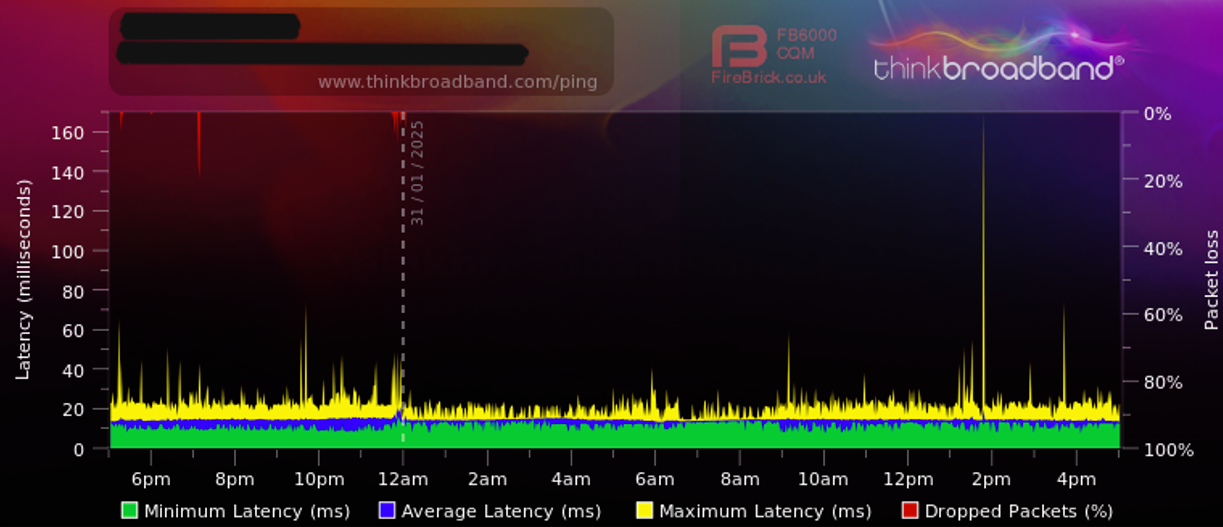
9.9.9.9 DOH still doesn’t work properly for me, I have serveral drops per day.
1.1.1.1 works a treat!
I watched a video from the Quad9 CEO [… —] I’d trust the Swiss to run DNS, more than these Californians billionaires >
FWIW Quad9 guy did another interview recently - I guess the all the tracking caused it to appear in my YouTube feed – https://www.youtube.com/watch?v=KDi0YvS2hFA&pp=ygUFcXVhZDk%3D
And to @rextended’s points and 9.9.9.9 DoH…
Adding also even more potentially fragile certificate checking on DoH that risk breaking stuff down the road. Apparently these DoH breakage happened sooner for @ToTheFull  .
.
And, on the later part of topic, for the record, I’m also not a big fan of an ANY “content filtering” - whether ads, porn, or tiktok — from the technical POV that the standard/protocols nowadays simply do not readily allow it. These modern React/etc website make it very difficult to do HTML modification on client-side, too. Just my opinion – but I’d rather see an ad than have a webpage take >100ms longer to load. And certainly don’t want to hear about why other people’s “web pages are slow” because I’m doing complex stuff on the network…
I’ve been using PiHole for a number of years and it works for me. It handles the DHCP and DNS for my network too. Occasionally, I’ll have to add something to a whitelist or blacklist. Also, best results are achieved when also using a good browser with a plugin like Ublock origin.
@Amm0 thanks for the context and points of view, also an interesting watch!. I honestly am still using Add-Blocking to stop some older devices from being bombarded with adds mostly on News Sites etc, also advertising to me is an irritation plain and simple. So infact I could argue that things for us at least in the main are less cluttered. Faster DNS responses… No!
From my experience regarding DNS privacy DoH/DoT is somewhat faster and much safer than recursive DNS on internet connection with higher latency like LTE. I have setup where Unbound is used as upstream DNS for Pihole and ROS DNS, both running in its ROS container. First Unbound was configured to be recursive DNS but I experienced high DNS response times for non cached DNS records due to my Internet connection latency, after switching to DoT it is faster.
Also I noticed that (in my country) requests to Cloudflare (1.1.1.1) and Quad9 (9.9.9.9) DoT DNS are routed to DNS servers hosted in my country and they are using upstream DNS of government agency and not acting as recursive (or they are recursive but intercepted) which raised privacy concern. Checked on several DNS leak sites. So I configured AdGuard DoT DNS (94.140.14.140:853) as Unbound upsream which is not hosted in my country and DNS leaks sites are reporting its DNS.
Update:
After experiencing some degree of failures loading a few websites (cnbc.com, aplus.net’s domain searching, and a couple of others) I decided to abandon the adlist DNS ad-blocking solutions.
This seems to be a pattern of mine: Every year or 2 I decide to do what the big boys indicate is better and smarter in this regard, and the costs/limitations/hassles are just too great.
All I have to answer to are family and guests – I can’t imagine supporting clients with an ad-blocking system (which appears to be all solutions) that breaks random web sites.
Maybe it’s a full-employment thing (
./.,
I had good experience with PiHole, but my personal favorite for small local DNS with or without filtering is Technitium (https://github.com/TechnitiumSoftware/DnsServer). It supports UDP/TCP, DOH with http2/3, DNS over TLS and DNS over QUIC all both as server and client. I’m running it in in both my home and my lab network in a container on a RB5009. Beside Docker/Container, it also can be natively installed on Windows, Linux, macOS and Raspberry Pi OS. I run it is a filtering forwarder to 9.9.9.9 with DOH. In my experiences the Technitium upstream DOH client is much more reliable compared to PiHole or ROS. It is very clever in reusing existing TCP connection and running upstream queries in parallel. All fully configurable.
If you run into issues with webpages or services due to DNS filtering with AdGuard/PiHole/Technitium is mostly depending on the filter lists in use. I recommend the 4 lists below, they are the ones used by uBlock origin in default configuration and a such very well maintained:
https://easylist.to/easylist/easylist.txt
https://easylist.to/easylist/easyprivacy.txt
https://malware-filter.gitlab.io/malware-filter/urlhaus-filter-hosts-online.txt
https://pgl.yoyo.org/adservers/serverlist.php?showintro=0;hostformat=hosts
I do suggest you give mozerds service a try.. if just for a month, I am curious as to what your experience will be like.
I predict you would be very content.
It’s just not that high on my priority list.
And, just about any level of hassle is more than have the time and patience for at this point. So, even if it (or any solution) works great, there will likely still be one of two web sites that are problematic and/or require a little tweaking, configuring, or compromise.
If 9.9.9.9 is good enough for so many knowledgable people, it’s good enough for me.
Well, blacklisting needs some time and effort until all works well. In my experience if you invest some time in the first few days to check the logs and create some exceptions, then it becomes almost completely hassle free. I need to add a new exception maybe once a year (mostly for my kids dubious games). It´s really easy to do on Pihole and and Adguard.
In contrast 9.9.9.9 has never blocked anything for me it should not have blocked.
This is fascinating. And confusing.
Doesn’t every user regularly visit new sites? If I visit even a small handful of sites that I’ve never visited each week, and there were 20 such users on a network served by an ad-protected DNS system, that’s 100 new sites/week.
No idea how many of those will be affected by the adlist, but even one or 2 means that every week there is tweaking to do, sometimes at the behest of a frustrated user (worst of whom would be me).
I’ve used every kind of dns/add-blocker over the years, I think pihole was the best for DoH but I’ve been using Mikrotiks offering for the last 3 months.
That is DoH with Adlists, I don’t need to see every detail or what people have looked @ not interested hence Adlists is fine.
Along that journey I’ve found hagezi’s pro list https://github.com/hagezi/dns-blocklists to be the best balance for me without having to meddle.
My problem with mikrotik has been over the said period 9.9.9.9 DoH is giving me various timeout /drop issues vs cloudflare. why that is I don’t know, it’s just easyer for me to just use Cloudflare DoH. Am i happy with that situation, No, but it must be better than Google!
Also I use a certificate to verify the addlist, could any of this break at any time, maybe. But I only have 4 people and 20 devices to look out for.
Then again, our lot are savy enough to bang 1.1.1.1/53 at any point they wish. or shout pause please if something isn’t working!
I´m not sure I get your point. The thing is, not every user visits new sites every time. Most of the traffic goes to the same sites again and again. Besides I don´t have to do anything most of the time if a user visits a new site. It will just work and most of the ads are hopefully blocked. If not a 100%, I don´t care much. Adguard is just one measure and UblockOrigin takes care about almost a 100% of annoying stuff and it almost never makes any trouble. I take action on Adguard mostly to add some white list items, seldom I do some blacklisting.
The results are not perfect, but better then just having nothing.
As for 9.9.9.9 and DoH: don´t use DoH, if you are just using it as your DNS server for your router over UDP 53 , then you will have zero issues.
Btw. I use one more trick in my network: to enforce everyone to use the same filtering, I Dst NAT every DNS request originating inside my net to my internal DNS server. That takes care of forwarding the requests over the enforced servers.
You could file a ticket with Quad9, since Mikrotik’s DoH DNS generally works, or at least not been wholesale complaints about it. There are a lot of Mikrotik in world, so they may want to know it’s flake or have some idea. Long short, but worth putting on their radar: https://www.quad9.net/support/contact
i.e. Quad9 DNS does document how to setup a Mikrotik:
https://docs.quad9.net/Setup_Guides/Open-Source_Routers/MikroTik_RouterOS_(Encrypted)/
My point is the likelihood of a user encoutering a site that has a problem, and thereby requiring work on my part, is too high.
In a few days of using adlist with a single list, I alone encountered several sites that had problems.
Hence why I keep harping you to try just for a month a service that is used for a wide variety of users with no issues… It may provide you sanity. 
Hi,
I really like the Quad9 9.9.9.9 using DNS over HTTPS. I have followed their quide how to setup Mikrotik. It is working but I have daily this in log: DoH server response not OK: 502: no downstream server available
Any solution?
Thank you
If it’s multiple people with Quad9 over DoH having issues, “someone” really should file a bug with Mikrotik and/or Quad9, if it’s repo’able. Mikrotik does not always take some action from the forum. DNS is so critical to things & ideally DoH be 100% reliable… but errors in DNS often causes subtle/hard problems sometimes, so deserves some attention if it’s multiple folks…
I’ve put a Ticket in to quad9 yesterday, nothing heard so far. Will update when I get any info.
I think I’ve already said multiple times it works with Cloudflare DoH fine. So i guess it can’t just be mikrotiks fault!
If i’m honest, yesterday wasn’t the best day to put a ticket in with problems going on near me.