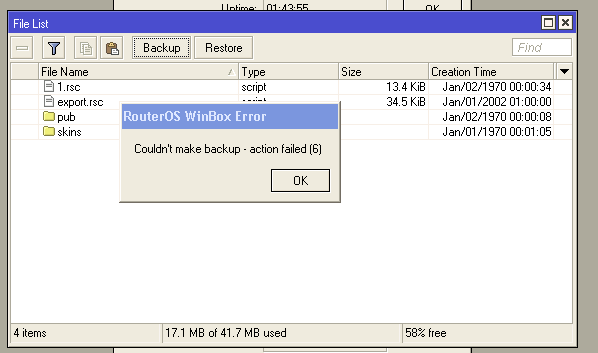
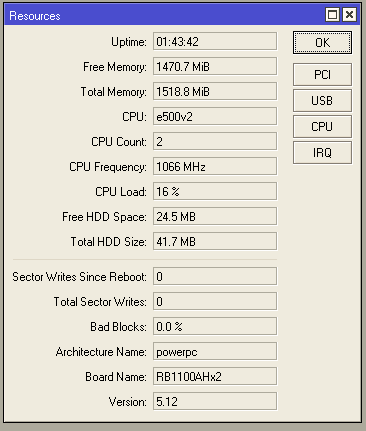
Recently got a RB1100AHx2 and it has been functioning fine it’s running ROS 5.12.
But today i had to upload a file to the system and discovered that it wouldn’t take the file via winbox i get “action failed (6)”, via ftp/scp it’s the same problem, i can’t write to the disk. I can’t supply you with a supout because, tadaaa it can’t write it to disk. I tried running /system check-disk but it gave me this error:
[admin@MikroTik] > /system check-disk
Router will be rebooted. Continue? [y/N]:
y
system will reboot shortly
action timed out - try again, if error continues contact MikroTik support and send
a supout file (13)
I then rebooted it since it is not yet in production i thought what the heck, this lost me the config since whenever this problem occured since it was only in memory i guess? (NB! How does mikrotik handle config saving? In IOS fx you have to write cfg from memory to store it..)
Excact same problem and almost identical usage on the disk also. I had hotspot function enabled and wanted to reset the html to upload some custom stuff, when i realised something was wrong, but i suspect it has been wrong for some time before that, because the config was pretty much my initial one when i booted it again.
Still have not had any luck, i was recommended to do a netinstall and remember not to fawk up the license stuff “don’t touch the license stuff”.
But since i have a pretty long way to the datacenter, i really don’t wanna do that. Hope mikrotik has some brilliant solution to this?
A netinstall will probably take around 45 minutes, which is what I had happen to me when I tried it.
Afterwards though, the routerboard seemed to work normally. I never run into the issue, that flash cannot be written,
but hat a different problem where the RB forgets about half of it’s configuration and kernel panics on reboot (there’s a different thread for that).
I think that there is some production issue with the flash device which makes it necessary to net-install the RB before you deploy it.
I set the routerboard to try ethernet once, then nand but i don’t get it in netinstall unfortunately enough. I don’t know if i have to wait for it though, or if i need to hand out dhcp to it upon boot? Know nevertheless i’t does not boot it seems to have broken completely. I gues i am gonna have to go onsite.
I would sure hope that a netinstall will solve the problem but i am a little nervous about putting it into prodution, if the NAND / flash is faulty and i suddenly loose it completely. Or do you reconn it’s just a problem with the software installed from factory?
I have Sextant:RB711 and the same problem.
[michal@Lukas_Nclient] /system> reboot
Reboot, yes? [y/N]:
y
system will reboot shortly
action timed out - try again, if error continues contact MikroTik support and sen
d a supout file (13)
RB is very slow for may commands. Terminal is openning ~3minutes. In the title of the winbox is not HW version of RB.
Also logging is not possible to setup/maintain and log window is empty. SSH session is extremly slow.
I have 4x Sextants, but only one have these problems. After installation of 5.14 all worked fine, but after some complaints from custoemr, I looked on this Sextant and I saw this behaviour.
This version 5.14 improved nv2 link stability, but this is very serious problem.
I get the “Could Not restore configuration, action failed(6)” I am trying to build a back up box for my boarder router, x86. I upgraded the current production MT Border x86 to 5.22, upgraded the the one I have here to 5.22 and sent the config file to the back up box and I get this error. Help?