If there is any means to check the power consumed by the SXT, in question and compare it with a new SXT, that will be nice. You might be surprised to find out that it takes more power than the router can support.
Everyone with this issue, could you please email support@mikrotik.com with your SN and supout.rif file? Thanks
Of RB3011 or unworking powered device ?
RB3011
same issue here. RB3011 + WAPac
The SPF port failed on my RB3011 today, it was working for about 6 months straight. The setup was SC fibre with opton 125G SM WDM31 S3D modules.
The RB3011 was connected to a mikrotik powerbox by fibre, I had the sfp port bonded with an ether port but no Ethernet cable connected to that ether port.
Anyone know what might have caused this to happen? The fibre cable is fine as I tested it with a light pen and the powerbox is recognizing the sfp module inserted but the RB3011 has RX Lose.
I tried replacing both opton 125G SM WDM31 S3D modules.
The modules are correct for sending and receiving with blue and yellow label blue is 31 and yellow is 55
any updates on this? Is there a fix?
I just encountered this after the FIRST power loss caused by an unplugging cord and my RB3011 stopped powering my wifi AP. RB3011UiAS. + Wireless AP Mikrotik RBwAPG-5acT2HnD
Same issue on rb760igs, ether 5 port after power loss no power on poe out (red led not on), but the settings on ether 5 poe show powered on
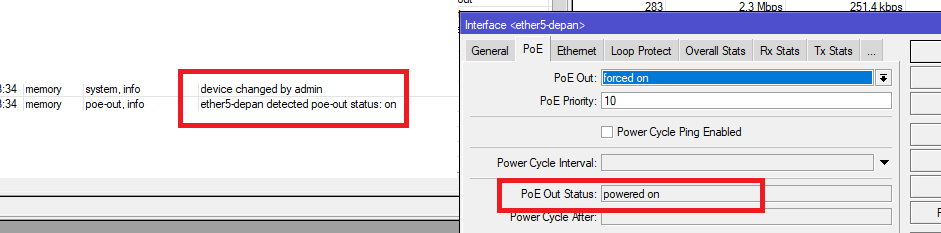
Same problem here, 2y without any problem, after last power failure poe is not longer working on my RB3011 and SXT5 Lite AC.
Tried SXT with external POE Injector and it works. Is there any solution?
Are you entirely sure that power loss did not come with some (minor) damage to the unit (3011) as well? Brownouts (and blackouts) are often accompanied by voltage spikes and what not.
The same here, PoE OUT Port10 died, RB4011  Seems a design flaw or shitty transformer
Posted here a dedicated thread for RB4011 https://forum.mikrotik.com/viewtopic.php?f=3&t=175562
I hope I can at least get replacement part to fix on my own router is out of warranty..
Perhaps. I have some out of warranty 3011’s on sites I wanted to use the PoE on to run new APs and much to my annoyance discovered PoE doesn’t work at all. I have little yellow PoE-World PoE-Detector and the green LED lights up telling me 24V PoE is available. It seems whatever switching mechanism is used to allow more current out doesn’t work even if I use Force On.
So far all the 4011’s PoE I have used work fine.
I’ve got a similar issue. I tried to power up an hap ac2 and it wouldn’t power up.
When I stuck a POE tester on the 10th port, it doesn’ matter if I force on/force off it always reads 6.7-7.4v.
I’m not sure if it’s actually safe to use as a non-poe port. Can anyone comment?
I’d expect if I turn POE to off, my testers should no show voltage on pins 4/5/7/8.
Any advice welcome.
My power adapter is 24v 1.2A.
Same problem here with a second hand RB3011: PoE on port 10 does not work. Forcing PoE on does not change anything. The port lED indicator just blinks faster when forcing PoE on. Also I can hear a faint “click” coming from the router everytime it blinks.
I bought it to replace an hEX-S and I needed the passive PoE. I am a bit disappointed.
Such are risks when using second hand gear.
Do you blame car manufacturer if your second-hand car has a failed cat?
__
It seems to me like mtest001 is not blaming anyone.
But I can well understand how he may feel a bit disappointed.
And I didn’t imply that. However, posting something about own disappointment on vendor’s discussion forum may imply something (and it’s everybody’s guess what the implication might be).
Actually after more testing it appears port#10 PoE works under certain conditions: I am not able to power a WiFi AP (error log shows “current too low” messages) BUT I am able to power my hEX-S, which is a good sign.
The hex s should be very low power (6 W without attachments):
https://mikrotik.com/product/hex_s
which would be 0.25A@24V or less than half what the RB3011:
https://mikrotik.com/product/RB3011UiAS-RM
should be capable of providing (0.60A@24V).
Which exact model is the WiFI AP that doesn’t work?
Is it possible that the 1.2A@24V power adapter is giving out not enough “juice”? (or do you have another adapter?)
It’s a TP-Link AP200 : https://www.tp-link.com/uk/home-networking/access-point/ap200/