I’m screwed as well. Very very not happy right now
Hi, yesterday i tried to upgrade my main RB5009 to version 7.19. As others already referred, RB5009 is now BRICKED!!! WTF???
Before that, i upgrade other unit (RV750Gr3) no problem at all. When it comes to the RB5009 after rebooting from the new Ros version installation, the unit never come back again. It stays with a blue led always on, and a faint green light on the eth2 port. Nothing more!!
I connected the unit to a power usage meter, and is taking no power at all! Seems dead completly! Tried reset, nothing…unit stopped working completly.
Well done mikrotik, well done!!!
200€ for trash bin!
+1
rb5009UG+S+IN
blue led + faint grren eth2
Everyone reporting this:
DO make sure to create a support ticket. Each and every one of you.
The more who make noise about this, the sooner they will look into it and fix it (or at least make sure it doesn’t happen again).
And I will gently hold off from upgrading my RB5009’s …
@strods from MikroTik has acknowledged this issue in the other thread http://forum.mikrotik.com/t/v7-19-1-stable-is-released/183849/1 Looks like you’ll need to return the router to the seller.
Pardon my ignorance but how does this work for a device that isn’t under warranty anymore? Will Mikrotik give some sort of authorization number that the distributor will recognize and accept? This is 100% entirely Mikrotik’s fault and I’m struggling with the idea of either having to replace a device that was running perfectly fine or paying money to repair it. I did nothing wrong and there was no way to know their software would bork my device. Anyone have experience they can share?
You did not hesitate to upgrade the bootloader on a “running perfectly fine” device - even though it was stated “DANGEROUS” (in all caps) in the documentation? Please do not get me wrong, it is Mikrotik’s fault for providing a broken bootloader. From this perspective I expect them to repair it free of charge.
If you do not update RouterBOOT using the v7 universal package for all architectures from this link, there will be no problem. The problem is caused by using this firmware update.
https://help.mikrotik.com/docs/spaces/ROS/pages/40992878/RouterBOARD#RouterBOARD-Protectedbootloader
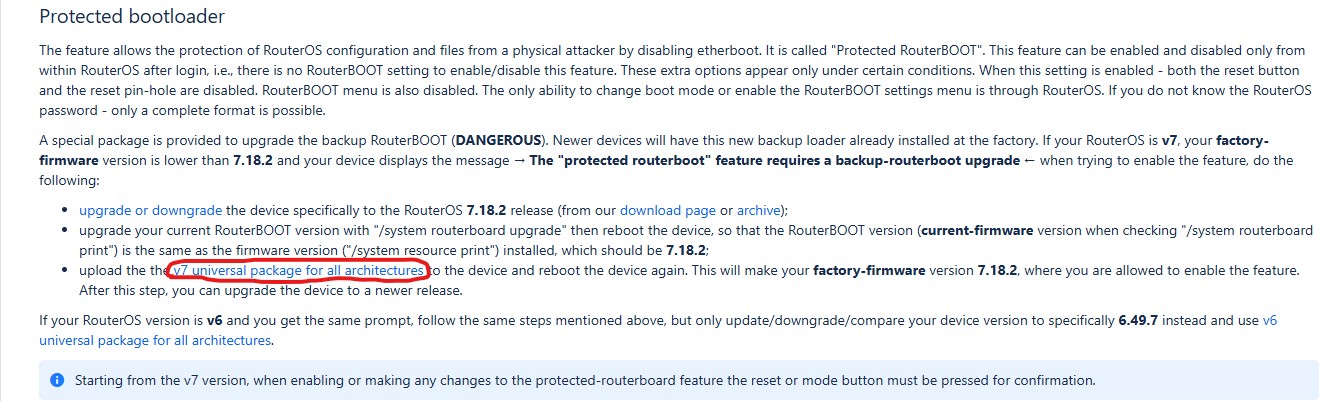
Router experiences problem when you install package from our help page: https://help.mikrotik.com/docs/spaces/ROS/pages/40992878/RouterBOARD#RouterBOARD-Protectedbootloader
This package is NOT required in order to use protected bootloader. It is required only if:
- Protected bootloader does not work out of the box
- Factory firmware is old
- And you see the warning stating that you must install this package
RB5009 did not show such warning. RB5009 can use protected bootloader without any universal package installation.
We have updated manual just now to make it even more clearer.
I want to be more blunt than my respected colleague Strods in the above post.
Why did you install some random bootloader file that is not meant for your device? Where did you read you need to do it?

@normis
If you want to believe that you are right, that your customers are demented and do silly things for no reason, you are welcome, but this time (and as often happens with Mikrotik help) the message was - to say the least - ambiguous.
blunt for blunt:
You can cry and stamp your feet as much as you want, but If something provided by Mikrotik should not be run on (say) a RB5009 because it can potentially brick the device, a proper programming best practice implies that the hardware is detected (and/or a number of checks for current versions and/or whatever is performed) and the execution on that particular hardware is prevented, anything else is sloppy programming.
I saw a discussion about updating to 7.18 firmware on the v7.18.2 [stable] released! page, and then found the v7 universal package for all architectures on the help page. If I saw the message “This section only applies to older devices that display a particular error message! Do not change the bootloader without seeing a message instructing you to do it.”, I probably wouldn’t update the firmware. I’ve been using RouterBOARD for so long, and I haven’t encountered a situation where I can’t enter the system due to an update, so I didn’t take the “dangerous” warning on the page seriously.
thank you for your work
Joining the club of the walking dead  .
.
My Router is on an UPS and powered through both the Barrel Jack and PoE. So I hope I can keep it running long enough until they release a 5009 successor  . Still have my 4011 lying around which I can use in a pinch.
This router is a few years old now, so I’m pretty sure I don’t have warranty on it any more. Pretty unfortunate to lose a ~CAD$300 router like that, but I think that’s just part of the MikroTik customer experience.
What exactly is ambiguous in the posted screenshot? The yellow highlighted text is perfectly clear. If you see an error message do the following.
This is why BOLD WARNINGS exist in that page.
I’m happy to provide feedback on how someone would get the idea to install a backup bootloader upgrade from this page even when they don’t technically need it.
But I’m not sure my feedback would be welcome (let alone seriously looked at) or if it would just be taken as an invitation to berate me for my own stupidity (which I am already well aware of, thank you ).
More assumptions. In critical network infrastructure, please do less assumptions and more technical reading. Thank you. (The manual has been clarified).
Updated my LAB RB5009UG+S+ and all went OK.
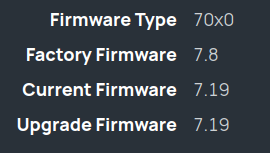
Daredevil ! 