Try to reverse your RX and TX cables. I was having the same issue until I did that. Now that I look at my Arduino again I think I see why as the label suggests the TX is actually TX from the target device into the Arduino. So, in reality, it’s RX.
I added a static aarch64 binary as well, so Raspberry Pi and other ARM users can use it more easily.
This elevates you to hero of Latvia status.
Somewhat OT, but does this process imply that you can get a regular serial console on the 5009 just by soldering a header on the board and connecting a a serial-usb adapter to it, or do you still need to change the boot firmware to enable the UART?
Lack of a non-usb serial console is a real negative on this device.
Thank you! I successfully managed to fix my board using a Raspberry Pi 4, where my RS232-to-TTL cable failed.
@felixka You are a hero!
I went and bought a cheap TTL adapter, fired up a live ubuntu and followed your guide. It went great!
My rb5009 was out of warranty and this was my only option. My linux skills are 0.
So happy i didn’t have to buy a new router.
Big thanks!
@felixka first of all this is some impressive engineering job well done here! 
I would like to ask something that I originally wanted to ask from MT support, but I’m sure you will have a much more proper answer. Also on Normis’ question why people upgrade their backup bootloader without being told to do so:
As a best practice I always netinstall every new MT device and update the primary bootloader. But additionally, I’ve been also upgrading the backup bootloader on certain devices to make sure everything is fully erased (when the device was previously owned). The reason: I don’t want to put a potentially compromised device on my network, and I don’t know any way to verify if a router is really factory brand new. Sometimes I even did this on new devices, because it is impossible to tell whether a device has been tampered with. Why:
- It comes in an unsealed box, and anyone could have returned after a few days of use - which is then simply re-sold.
- Been there - it already happened that the router I bought from an official distributor as new, had some previous user’s config on it.
- I had two routers - HAPACLite and HAPACLite-TC (purchased at the same time from the same place as new) where the syslog contents on initial boot was slightly different (according to support it was normal but still suspicious).
- I had multiple routers (purchased as new) where there was a package integrity error on initial boot while others of the same type didn’t
To be clear, I’m not assuming someone would specifically target MT devices on stock and tamper with them. The more plausible scenario: an unsuspecting user may download (compromised) firmware or WinBox from unofficial source and inadvertently infect their router. If such a device is then returned and re-sold (which can happen as we see), the new owner gets a compromised device.
I know that the ROS image is signed, but I’m not sure if the bootloader-, and especially the backup bootloader - as a separate package - is signed. Moreover, if the malicious code gains persistence through the primary/backup bootloader (which I guess is possible given it can be upgraded from a package), then even the signature check might be bypassed.
So the question would be:
- Are you aware of any way to tell if a device is really brand new and untouched (e.g. via checking the supout.rif on initial boot)? Best would be something like a one-time hardware fuse set on first boot, etc.
- Do you think it is enough to netinstall and upgrade the primary bootloader to make sure we get rid of any potential unwanted stuff (like a compromised firmware), possibly using advanced persistence practices?
- Do you think upgrading the backup bootloader is also necessary for this purpose?
PS: With newer devices where the “factory firmware” (backup bootloader) is already newer than the offered packages, this whole practice is probably no longer relevant, but anyway I would be curious about what others think about this topic.
Many thanks in advance!
Once you had found a way to recover it, did you repeat testing of the “bad” upgrade package? And if so, did it always wipe out the exact same number of bytes every time?
That’s a real bummer! I was hopeful that you could simply supply the missing ATF and it would resume booting normally after that, because perhaps BL33 was merely some SBL “stub” that jumped to the RouterBOOT offset within the NOR. Though I guess if that were the case, and if backup RBOOT is getting partially overwritten, that wouldn’t have worked anyway…
…although, hmm, do we know for a fact that backup RouterBOOT itself isn’t also actually similarly embedded within ATF? Perhaps “ATF” actually extends all the way from 0x0 to 0xAF000. (Might also explain why the MT upgrade package behaves the way that it does…) When you fed the MT ATF over UART, how much of the good NOR dump did you try to send?
I assume that for anybody who wants to try this from a host platform other than the one(s) that @felixka built statically-linked binaries for, but doesn’t want to take the time to try to build mvebu64boot themselves, they can try to use the mrvl_uart.sh shell script from u-boot instead? And that perhaps @felixka elected to build a static binary instead of using the shell script in order to avoid having to also build and bundle in a bunch of other dependencies. (mrvl_uart.sh appears to depend on bash naturally, as well as dd, stty, sx, and – perhaps most importantly – minicom.)
You do not need to patch RouterBOOT to enable its serial console, no. The CPU will listen over the UART for a boot payload before RouterBOOT has even started. This is not contingent on RouterBOOT supporting the serial console or not.
@NathanA thanks for the info, you obviously have a deep understanding of this boot process. I mostly looking to use a serial console to view/interact with the pre-boot processes (mostly RouterBOOT) like the other routers with a non-usb serial port. From other conversations here it seemed like RouterBoot disabled the UART for some reason. Would have been great if they had just included the port!
Thanks everyone for the kind words so far!
@NathanA:
I didn’t run the broken universal package again, so I can’t say. I did send everything up to 0xAF000 over UART and it didn’t boot from there.
The reason I switched from mrvl_uart.sh to mvebu64boot is that I found the latter to be much more reliable in my testing.
@NetworkJohn:
I don’t think there is a way to tell with 100% certainty that a device has not been tampered with just by looking at the SPI NOR flash. I haven’t looked into eFuses on this platform.
As to your other questions on whether malicious software could gain permanence by overwriting the backup bootloader and/or ATF: I don’t really have that much insight into the full boot process that MikroTik implements, so it would be unwise for me to speculate.
However, the reason we can just boot u-boot by sending a new ATF via the UART is specifically because the BootROM doesn’t validate the ATF. Given that the RB5009 does not use Secure Boot it would certainly be easier for a malicious payload to manifest itself when compared to a device that does use Secure Boot to validate the chain of trust all the way to the kernel being booted.
It doesn’t bother me personally, as it means the device is also more hackable for other power user purposes (such as OpenWrt).
Netinstall and primary bootloader upgrade would be sufficient, from my point of view, in pretty much any case.
A reprogramming of the ATF/backup bootloader is probably overkill, and also not as easily done (MikroTik doesn’t even give you the individual images for this, you’d have to extract them from the dpk packages). If you look at how MikroTik limits installation of those upgrade dpk packages to very specific RouterOS versions one could assume that those ship with certain protections disabled to facilitate the upgrade of the backup bootloader. But this is just speculation on my end, I don’t have any evidence for that.
@eltikpad:
For the purposes of using the UART as a serial console towards RouterOS: It’s useless for that, as it is disabled in the original bootloader. I haven’t tried any of the hacked bootloaders that enable UART to see if it also enables RouterOS console access though.
Ah, I misread your original question. In that case, yes, it is true that on the RB5009 + all of the other products that ship without a user-exposed console port, RouterBOOT has disabled the console. You need to patch RouterBOOT to enable it again. This apparently became much more challenging to do with the advent of RouterBOOT 7.x. There is a link to a script available here that will so patch it …but it is written against RBOOT 7.2rc1. You’d need to obtain a copy of that, or figure out the new offsets to patch in whatever version you want to use.
Thanks. That’s unfortunate though.
Many Thanks @felixka.
After receiving no support from the manufacturer, but also no support from the seller during the warranty period, I successfully put the device back into operation with your instructions.
Same problem here. Just posted a new 3d, did not see this.
I think is before the last update but this is my first time with mikrotik.
I found a temporary solution…if you unplug all the eth cable and leave only the power, it boot up normally.
try it
Since my router is working if I unplug all the eth cable, is there a way to restore it without flash with ttl convert etc? just downgrade ? is that enough?
Your problem has absolutely nothing to do with what is described on this topic.
Ok sorry sorry but the symptoms are the same. so what about my problem?
It’s offtopic here.
I couldn’t help myself 
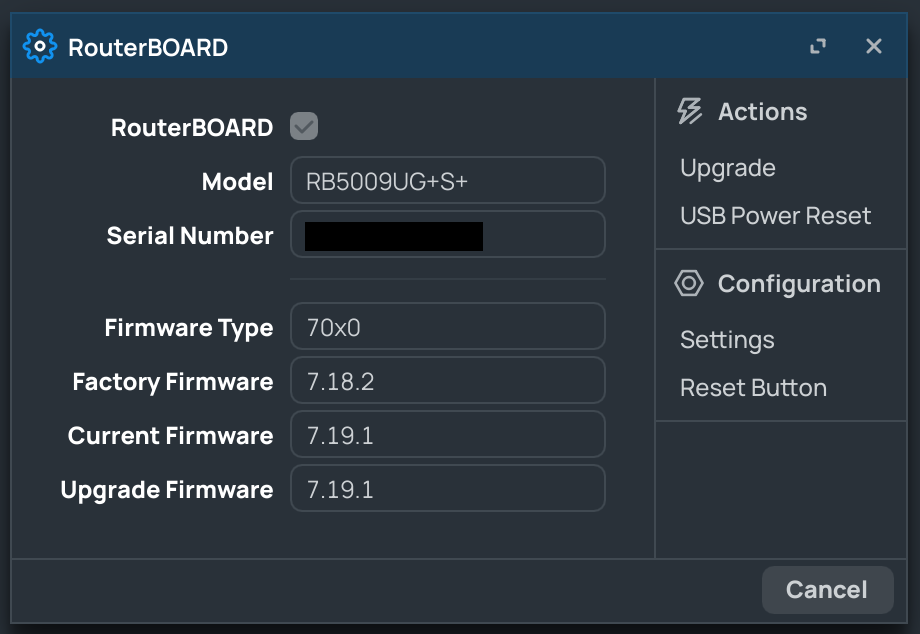
First I tried the bb-upgrade-7.6.dpk file and that installed the 7.6 backup bootloader (aka “Factory Firmware”) just fine. I was intrigued.
Then I extracted the backup bootloader for the 70x0 target from the bb-upgrade-7.18.2.dpk file and hand-patched it into a flash dump of my router.
The 7.18.2 backup bootloader itself works. Looks like the installation process has a bug that caused erasing of the flash without writing a new backup bootloader.
The 7.18.2 backup bootloader is a few bytes smaller than the 7.6. one. Maybe that’s what tripped up the installer.
Netinstalled 7.19.1 from the 7.18.2 backup loader successfully.
Either way. I’m all up to date now
Can you please consider updating the guide so that it actually installs 7.18.2 instead of 7.0.3?
Thanks.
Hi,
I’ve several running rb5009 and i upgrade the bootloader each time routeros.
The lab is updated and 1/2 weeks after, the rest (not only rb5009) is updated with a fully automated process… at this time, and all is working.
I’m thinking to disable this routerboot upgrade during few times.