Have a look on this topic http://forum.mikrotik.com/t/change-boot-device-from-openwrt/84793/1
Have you found a solution to install OpenWRT on a RB951G-2HnD with 4C:5E:0C:::* MAC and 3.16 firmware (upgraded from 3.17) ?
The purpose of this router is to be a openvpn-client over udp.
Thanks, I investigate it and became to one thing - that booting options can store in /dev/mtd0
so I make
dd if=/dev/mtd0 of=booter.hex
and got:
https://yadi.sk/d/F-N4prcLfGvyo
It consist of 4 same repeated 64kb blocks and it not same as http://i.mt.lv/routerboard/files/ar9344_3.19.fwf
Also i read topic you provide me by link and find out that boot settings you corrupt was make by rbcfg - so I look in sorce code of rbcfg (fyi - from rb 4xx series Only ) https://dev.openwrt.org/browser/trunk/package/rbcfg/src/main.c?rev=27315 and find that indeed settings stored in mtd0 in special format with crc check and some magicword(?)…
But i think my dump contain corrupted data (due to FW update fail), because of absence of additional data under firmware block (i think that it so).
I need additional dumps of /dev/mtd0 to compare and may be find solution to fix boot issue.
Thanks in advance
Could you be more specific, if I shall find some data ?
You know, if I will know what I should find exactly, may be I am already fix my issue.
Due to insufficient of source/raw data e.g. dumps of mtd0 or dumps of spi flash it’s unreal to analyse and fix something.
In my case(I mean my dump of mtd0) I can’t find any additional data after 0xB19E (from 0x0 till 0xB19E in mtd0 some kind of firmware - not same as in SPI flash)
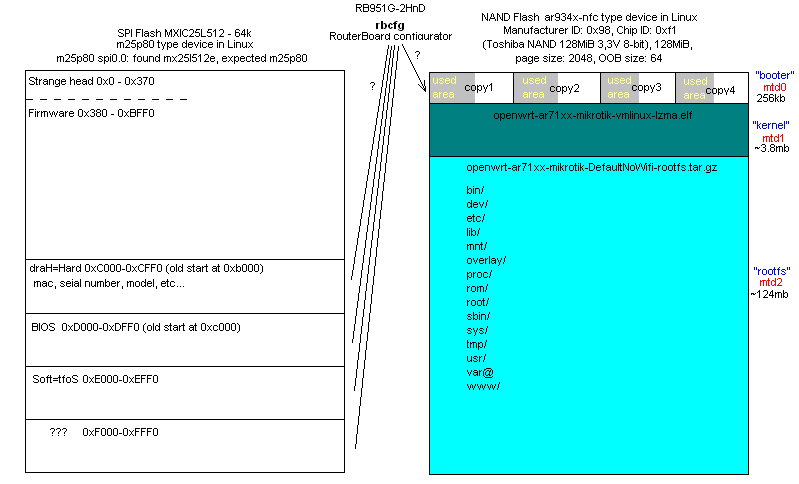
The structure of mtd0 (256kb) is - 4 repeated blocks with 64kb size:
1 block 0x0 - 0xFFF0 (64kb size)
2 block 0x10000 - 0x1FFF0 (64kb size)
3 block 0x20000 - 0x2FFF0 (64kb size)
4 block 0x30000 - 0x3FFF0 (64kb size)
So, area after 0xB19E till 0xFFF0 is empty - I think it should contain additional data like boot device, sequence etc…
Just FYI - my dump of SPI flash (not boot area “booter” from NAND flash) https://yadi.sk/d/OCAs7Zb7f4y8Z (64kb size) - seems here is boot options present, but I am have a doubt.
May be more experienced persons can help us, welcome please.
(my email metsys@gmx.com)
At any case it enough to boot from http://openwrt.ayufan.eu/rb951g/trunk-r35489/openwrt-ar71xx-nand-vmlinux-initramfs-lzma.elf via tftp+bootp and make dd if=/dev/mtd0 of=booter.hex and scp from device. It does not modify anything in device memory.
Can I flash openwrt if I:
boot through dnsmasq/tftp with Ayafan’s elf-file,
log into it on 192.168.1.1,
run the dd command
scp new OS and kernel from openwrt
and install with these instructions http://wiki.openwrt.org/toh/mikrotik/rb951g_2hnd ?
Or must the dd command be run from telnet with the RouterBoard OS before the dnsmasq/tftp-boot ?
As for me, I strongly recommend do not this until you make ALL backups: mtd0 on NAND flash (256kb) + mtd1(3.8mb) + mtd2 (124mb) + SPI FLASH (64kb).
mtd1,2,3 - is NAND and it could be backed up from openwrt loaded through dnsmasq/tftp
but to backup SPI FLASH needed spi programmer (something like http://pics.livejournal.com/wierus/pic/0002d93b )
It gives you chances to roll-back all changes (IMHO)
Because if you didn’t ALL backups (all!!!) - you may have different issues (including like me ))) ) without any 3rd party help (now I don’t expect help from this official forum - all “it’s up to you” in my hands).
But in my case I only try to upgrade firmware with stock software - netinstall (my story here http://forum.mikrotik.com/t/mikrotik-routerboard-951g-2hnd/85705/1).
Every time I try to boot it with dnsmasq/tftp it ends in the original MikroTik firmware on 192.168.88.1.
To me routerBoot 3.17 does not accept the openwrt-firmware, and reboots into the original MikroTik firmware.
Here is https://yadi.sk/d/O9xNL_0QfPGMF my boot image i used a couple hours ago.
You should preferably have direct connect between router and PC (without any other stuff like switches, etc), then launch dnsmasq (you can use this manual http://wiki.openwrt.org/toh/mikrotik/rb951g_2hnd) , then insert patch-cord to PoE port (first starting from left side, near ACT LED), then press and hold reset button and insert power plug. After power on, you should still hold reset button - ACT LED should start blink (you still hold reset button), and after it stops blink (ether port LED should turn off) - router should start connect to your PC (only at this point you can release reset button!) and you will see this process on screen. After that router should boot up from openwrt image and make 1 beep. Then you should connect cable to 2 port and try telnet 192.168.1.1 after ~ 10-15 seconds (required to boot openwrt).
What OS you are use on PC? Win or Linux?
I am using Ubuntu 14.10.
I have had succes with one router with routerboot 3.08 (I think). I have given up on 2 other routers with routerboot 3.17, 3.16 and 3.22.
Hi,
i hawe new Mikrotik RB951G-2HnD and I want to change the firmware OpenWRT.
it zmožné? Router I have 30 days and I can not get used to the their OS:-(
Info:

does anyone have a simple tutorial how to do it?
Thank you for reply
Hi,
I came across this thread as trying to find a minimum 16mb flash & 64mb RAM router with USB & 2.4ghz wifi we can install WRT on. Currently using open-mesh om2p but they dont have USB so no 3g/4g dongle can be attached.
Was keen on hAP and hAP lite however after reading this thread I have been heavily deterred as a company that turns its back on users who use hundreds of their units doesn’t seem to be one you can rely on.
There is a big difference between not supported and offering work around or transparency to clients.
Can anyone please provide an update on this matter or recommend ideal low cost devices that support WRT be it routerboard or other?
Hope those affected found a solution.
Please let me know if someone found the solution. I am struggling alone here 
There are hundreds supported devices on the openwrt webpage. Just look there and select a device that suits you the best.
There are a lot of different devices available, meeting your specs. I have done mods to OM2Ps FW (r481) and programmed different openwrt-devices (various TP-Links, no-name routers from China, WD myNet N600, mikrotik …), so you might mail me (augustus_meyerATyahoo.com) for more detailed info.
Now I have had success with the newer router with routerboot 3.17 (upgraded to 3.24).
I had to compile my own firmware like described here: http://wiki.openwrt.org/toh/mikrotik/rb951g_2hnd
They use a patch 4773. That is AFAIK for the old routerboot up to 3.08. I used this patch http://patchwork.ozlabs.org/patch/419857/
I pulled release 46767 to get as near to Chaos Calmer as I could get.
I have rooterboot 3.24. I don’t want to brick my device. Please how exactly do I flash 14.07 onto the router? Do I need to compile anythinga and apply a patch? Or can I use what is available here? What is the safest way?
http://downloads.openwrt.org/snapshots/trunk/ar71xx/mikrotik/
Many thanks!
Remember - you allways take a risk, when you flash firmware. But I have not bricked any of 4 RB951G’s. (One was close on bricked when I tried to downgrade with an old routerboot-file, but a good advice from Mikrotik support saved it).
I use this as my guideline http://wiki.openwrt.org/toh/mikrotik/rb951g_2hnd
Trunk is not 14.07. Don’t know if it is compiled with old or new patch.
If you can ping 192.168.1.1 after first boot from dhcp, when it has the right patch.
I cannot see a initramfs.elf file so I do not know, if you can make the first boot from your pc/servers dnsmasq.
It is not 14.07 but I have put my Chaos Calmer-files on google drive
https://drive.google.com/drive/folders/0Byl8hNKOHhD8WnhZaktpQjk1OTA
They are compiled with the new patch, LuCI, openVPN-openssl and Nano editor.
Stay on Mikrotik.
im curious what will be the advantage of dd-wrt over router os ??
Don’t know. This is a thread about openwrt, not dd-wrt.
Advantages of OpenWRT could be (for some users):
Simpler OS and GUI with less steep learning curve.
Can run OpenVPN over UDP with LZO-compression (my main reason).