You’re almost doing the suggested approach. Except where you’re not By this I refer to the two drop rules denying cross-network traffic between what I assume to be two internal networks 192.168.88.0/24 and 192.168.2.0/24.
While every principle is there to be disregarded sometimes (and what you are doing is not in any way terrible) - I would formulate the rules in a qay that focuses on what is allowed, instead of what is disallowed.
I only guess at your intent here, and if I guess wrong, either correct my proposed solution to suit your use case, or just state it clearly, and I’m happy to help. I assume you mean that each subnet is allowed to access external addresses (i.e. the internet), but they’re not allowed to access each other.
In this case my usual solution is to have an address list for internal networks,
/ip/firewall/address-list add list=internal address=192.168.88.0/24
/ip/firewall/address-list add list=internal address=192.168.2.0/24
And then simply allow traffic that is going to the outside (i.e. dst-address is not in the internal list):
/ip/firewall/filter add chain=forward action=accept src-address=192.168.88.0/24 dst-address-list=!internal
/ip/firewall/filter add chain=forward action=accept src-address=192.168.2.0/24 dst-address-list=!internal
In this particular case they can be contracted to:
/ip/firewall/filter add chain=forward action=accept src-address-list=internal dst-address-list=!internal
Whether you want to do certain contractions or not depends on how your network is structured in general. It is not always best to have the lowest possible number of rules, what is important is that they make sense to you. (And will do so even if you revisit the config months from now.)
@lurker888
You are complicating my view on firewalling factions, I thought one had to decide which gang to join, the rextenders or the anavites, it seems like there is a third one now, the lurkerans, right in the middle of the two.
It Is difficult to define that position, it seems like they could be called either tolerant rextenders or respectful anavites, each one clearly being an oximoron.
General rule of thumb for firewall rules is that
→ Interface lists are better designed to handle whole subnets.
→ Address lists are great when anything less than a whole subnet is involved with or without whole subnets ( could be users in one subnet or across many subnets)
→ For a single subnet simply use subnet address.
→ One exception to the above is that single subnet maybe the only subnet constituting an interface list (ex vlan99 interface-list=MGMT )
In the OPS example he has is not using a bridge or maybe one subnet is on the bridge servering ports 2,3,4 and one is off the bridge using ether5.
Could be two different vlans.
The whole point of the last rule block all else, means anything with the chance of connecting at layer 3 will not connect.
Thus the two rules are NOT required and should be removed. The router has no L2 connection path for these two separate subnets.
This rule blocks connectivity between them… add action=drop chain=forward comment=“drop all else”
Furthermore you have redundancy by keeping default rule and instituting new good rules.
Namely get rid of this rule. add action=drop chain=forward comment=
“defconf: drop all from WAN not DSTNATed” connection-nat-state=!dstnat
connection-state=new in-interface-list=WAN
If you can note, its designed to allow lan to wan traffic, and block Wan to Lan traffic except if port forwarded traffic, all to cute. Also hidden besides lan to wan allowing,
is that this rule also allows LAN to LAN traffic…which we want to control not allow unknowingly!!
Much better is what you already added: add action=accept chain=forward comment=“LAN to WAN internet traffic”
in-interface-list=LAN out-interface-list=WAN
what is missing is the port forward stuff covered by adding. add action=accept chain=forward comment=“port forwarding” connection-nat-state=dstnat enabled=no { enable if required or remove.}
Done…
+++++++++++++++++++++++++++++++++++
As for Lurkers lists… an excellent idea if one wants to identify local connected networks on the router for mangling purposes and mangling rules.
Yes but the fact that you have to double check yourself speaks to the lack of clarity of rules.
Much better to state cleanly add chain=input action=accept comment=“Lan users to router” in-interface-list=LAN
add chain=input action=drop comment=“drop all else”
Great for one user aka only the admin, but no one other than the admin requires access to the router for config purposes, so we carve out the users. add chain=input action=accept comment=“admin access” ********************************************
add chain=input action=accept comment=“Lan users to dns/ntp services” in-interface-list=LAN dst-port=53,123 protocol=udp
add chain=input action=accept comment=“Lan users to dns services” in-interface-list=LAN dst-port=53 protocol=tcp
add chain=input action=drop comment=“drop all else”
********************************* many options here. in-interface-list=MGMT
src-address-list=TRUSTED
in-interface-list=MGMT src-address-list=TRUSTED
@jaclaz: You’re too kind to assign me my own faction. I was under the impression that there are no factions and the usual posters around here (including me) are saying the same thing:
the default firewall is actually a good… well… default - so if you don’t have a good idea of what you’re doing leave it in place
well configured firewall good - misconfigured or no firewall bad
allow what you want, block everything else
+1: don’t create a collection of overly complex rules worthy of a magpie from too clever but often not very well informed Youtube videos
@anav: Blocking by source IP or ingress interface is basically the same. (For most home/office uses a proper network design usually has a single subnet per interface.)
What I was not going to discuss initially, because it never came up in these discussions organically, and I didn’t want to go off on a total tangent, but… either filtering by source address or in interface actually allows source address spoofing. (They do so in the opposite “directions”, and of course source spoofing is generally useless for TCP, and custom TCP-functionality-over-UDP protocols, such as QUIC.) With both approaches proper source address validation should be done in some way: the easiest for simple networks is setting RPF mode to strict.
While agree that rp-filter=loose is a good idea (and should be - but is not - the default). And if possible rp-filter=strict be a good idea — but that has side-effects if do anything more complex with routing (i.e. multiwan, VPNs, etc.) and so “strict” can break things.
Unless you do not have a default route (0.0.0.0/0) in your FIB for the table that handles the interface in question, then rp-filter=loose is essentially rp-filter=off. From my point of view, rp-filter in general is only really useful when you are defining all of your routes and are not using a default route otherwise you might as well turn it off because it isn’t doing anything. For the typical user, whether homelab, SOHO, university, and medium enterprise you will have some kind of default route for general WAN access and in this situation rp-filer=loose is not doing anything for you. Additionally, a properly designed firewall will drop packets coming from the WAN interface(s) that are not whitelisted or dNat’d to some specific service. Of course that leaves internal LAN clients to perform spoofing attacks which is always possible but if this is your threat model then you again should design your firewall to be more restrictive and not forward everything by default. TLDR, don’t look at rp-filter as some kind of security feature, it’s use cases are limited and really only beneficial when rp-filter=strict.
@Amm0 and @blacksnow: both your comments about RPF are appreciated. “Loose” mode only checks that there is a reverse path (through any interface), and therefore in this scenario it’s pretty useless. “strict” checks that the reverse path - when looked up - not only exists but leads through the ingress interface. It may be useful against source IP spoofing - and this is explicitly mentioned in several RFCs for best practices for network operators, including ISPs.
The state of RPF is not ideal in RouterOS, because it is not a per-interface setting. (The kernel has the capability of configuring this in a per-interface manner, so this would only require a ui change.)
The firewall can be used to filter these sorts of packets, and it actually takes very little to integrate this into any firewall design I’ve seen. I do it as a matter of routine. I intentionally don’t make recommendations like this in response to questions that are seeking some initial understanding of firewall fundamentals, because even though it may be simple and straightforward for someone used to reading firewall rules, any added intricacy may in fact detract the poster from their original goal and cause them to abandon establishing a better firewall: and in this sense I’m afraid that pursuing the perfect may be at odds with achieving “good enough”. I try to pick my battles.
As to the argument that if “anything internal is doing the spoofing, then you have bigger problems”… In terms of IT security we’re living a strange world. I’ve seen examples where if basically any public/guest type usage of your network is permitted, you will encounter devices that are somehow acting under the control of malware, possibly as part of botnets, and do their things accordingly. In my region it’s basically expected for any sort of business, coffee shop, hostel, etc. to provide internet access to their clients - it’s assumed to be most simple curtesy. By public/guest access I don’t mean that e.g. WiFi access is not password protected, but that (almost) anyone can ask for the password, and the devices they connect are not scanned, validated, preapproved, etc.
Yep , that is exactly the mid-way position I was talking about, between the two existing absolute positions:
Leave the default firewall as is! Don’t touch it! (whatever you change in it will almost invariably be wrong, dumb or dangerous)
vs.
Immediately change the firewall! identify wanted traffic and specifically allow that! Drop all else! Now! (whatever else will almost invariably be wrong, dumb or dangerous)
I think that there is wide agreement on the default input rules, that are actually made with the philosophy of a “drop all else” (limited to “from WAN”) rule at the end.
The debate (if any) is about the forward rules.
Noone seemingly wants to actually risk their setup with the simple (maybe too simple or stupid? ) experiment I proposed some time ago.
have the default firewall UNCHANGED
add AFTER the “defconf: drop all from WAN not DSTNATed” rule:
a) some (the needed/intended ones) explicit “accept” rules
b) as last rule the “drop all else” catchall one
If the default firewall is actually good, rules 2a) and 2b) should never be hit.
If something arrives past #2 (and is caught by either 2a) or 2b) then going through the trouble of changing the default firewall has some merits.
Of course there may be particular setups where you need anywyay to modify the default firewall, and if you do the “drop all else” at the end of the forward looks simpler and probably it is safer against possible mistakes in the earlier modified rules, but those should be exceptions in particularly complex (or complicated) setups.
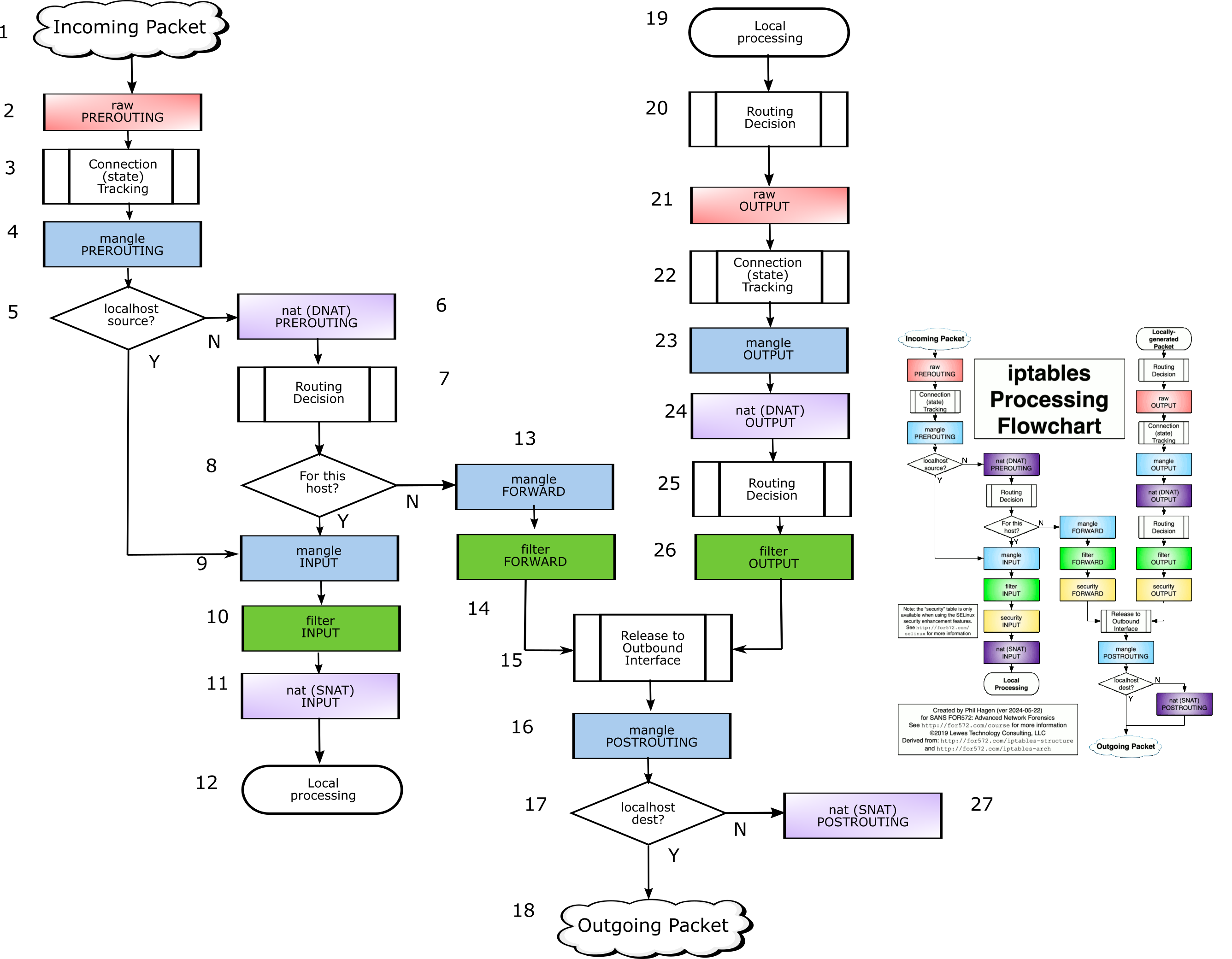
About the (very nice ) iptables diagram you posted a link about: https://stuffphilwrites.com/2014/09/iptables-processing-flowchart/
do you think we can derive from it an “ultimate flowchart” specifically applicable to Mikrotik RoS by removing the “security” blocks and correcting the (as I see it) inconsistencies?[1]
If you are game for it, I could try doing my best re-creating an editable version, but I am not knowledgeable enough in either general Linux iptables or specific Mikrotik’s behaviour to actually validate the result, and need your review and corrections.
[1] just like the mentioned vagueness on the flowchart posted by chechito mentioned earlier, this one has ambiguous “Routing decision” blocks, in this case the routing decision is represented in three instances as a rectangle with side bars (Predefined process) and so it is NOT a decision, that MUST be a rhombus/diamond and have two exits.
As I put a little more thought into it, you might actually be more right about my position than I hastily was.
Just to clarify:
I agree with, with the clarification: only break this rule if you know what you’re doing. and
the big danger of allowing traffic to “fall through” a chain where you intend to do filtering, is that - while initially the setup may be totally correct - if you later modify your network without adjusting the firewall related settings (which would include interface list and address list memberships), you’re quite likely to let though more traffic than you intend. The “drop all else” part handles this well - if you haven’t modified your ruleset to allow what you want, things won’t work and you will be forced to investigate. In the case of allowing too much, no such investigation is “forced” and the error is only highlighted after possibly something bad has happened. In this sense the “drop all” is a form of self-imposed discipline.
I’m willing to do any such experiment (within reasonable bounds of effort involved.)
I actually construct my firewall rules like this, and have for a long time done so. I can confirm that they work absolutely fine. And as you propose, the last “drop all” rule is very rarely hit. The rare hits are because some devices with built-in firmwares (yes, from the usual suspects) have networking stacks that become - let’s say - confused. I have actually logged these packets, and they are invariably malformed.
I’m actually planning on putting up on this forum a “defconf script with vlan filtering” script, which employs such a firewall setup. An excerpt from the forward chain:
	filter add chain=forward action=accept connection-nat-state=dstnat \
		comment="allow dstnat connections"
	filter add chain=forward action=accept src-address-list=internal \
		dst-address-list=!internal \
		comment="allow all internal networks to internet"
[...] - detailing the reachability between VLANs
	filter add chain=forward action=drop comment="drop all"
(I tend to use address lists instead of interface lists, as you might have guessed from the above.)
About the (very nice > > ) iptables diagram you posted a link about: https://stuffphilwrites.com/2014/09/iptables-processing-flowchart/
do you think we can derive from it an “ultimate flowchart” specifically applicable to Mikrotik RoS by removing the “security” blocks and correcting the (as I see it) inconsistencies?[1]
If you are game for it, I could try doing my best re-creating an editable version, but I am not knowledgeable enough in either general Linux iptables or specific Mikrotik’s behaviour to actually validate the result, and need your review and corrections.
[1] just like the mentioned vagueness on the flowchart posted by chechito mentioned earlier, this one has ambiguous “Routing decision” blocks, in this case the routing decision is represented in three instances as a rectangle with side bars (Predefined process) and so it is NOT a decision, that MUST be a rhombus/diamond and have two exits.
It would be absolutely nice to create a Mikrotik-specific version of it. The good thing about this particular diagram is that it was actually created by a long standing contributor to netfilter, and is actually correct and unambiguous. Most of the other versions have some parts that are either unclear or when applied to certain edge cases, simply wrong.
What would need to happen for it to become Mikrotik-specific is two simple things:
remove or cross out the security chains - these are only applicable to installs using SELinux
Mikrotik has a slightly different naming scheme for the firewall tables/chains, and while it can be figured out with a minimal effort, I think it would be helpful to actually have the Mikrotik naming right there (I would actually prefer if the original iptables name was also present in small print, but that’s just my preference)
If you are willing to do that work, I think many would be grateful. I’m willing to provide the translations.
About your [1]: The routing decision is a “decision” in that the packet is handed off to the fib_* calls in the kernel that deal with selection of (“deciding on”) the route to be used and the nexthop. It is not a “decision” in the flowchart sense of the word. Depending on the result of this decision the packet quite often proceeds in different ways, but the “routing decision” step only annotates the packet (with e.g. its expected egress interface) and the actual points where what happens to the packet diverges are specified as firewall rules matching on these additional annotations. So again, the divergence in path is related to the routing decision, but it’s not actually performed in that step.
@lurker888
Attached a re-working of the IP tables diagram (only removed the yellow security-related boxes).
In .png and .svg (inkscape) formats.
Boxes are numbered from 1 to 27.
Tell me, with a list 1 to 27, which text should go in each box (and please find a synonym for the “Decision” in process boxes) to make it more Mikrotikish (and what text in Linuxese/iptablian should be put in smaller characters in the same box if different).
Then I will try to make it a little more pleasant to the eye (I might need to resize some boxes to fit the text in it), re-aliogn the boxes chack the connection arrows, etc. Mikrotik_firewall_flowchart.zip (212 KB)
Kinda, remember from the other topic that I created a separate “guest” LAN2 and so I (against your advice) created a second bridge (and second everything else needed) for my LAN2. 2 ports on LAN1 and the other 2 are on LAN2.
So if I understand you correctly, traffic between my LAN1 (192.168.88.0) and my LAN2 (192.168.2.0) is already blocked by the last “drop everyting else” rule, thus the 2 rules I created to block that traffic are not needed? You are pretty clear but I just want to make sure that I am understanding you right.
This I’m not as clear on. I don’t need the DSTNATed rule at all anymore because I created the LAN to WAN rule and drop all else rule? (I’m not doing any port forwarding that I know of)
Obligatory nitpick: you missed the outgoing arrow for NAT postrouting.
Regarding the “routing decision” thing: I tend to agree with you that an alternative wording would better convey what’s going on. The actual function (if I recall correctly) is called fib_lookup_in_table(), so “FIB lookup” would be most accurate. I also think that’s kind of opaque and hard to understand, so I suggest “routing lookup”. I also would like to make it clear that for locally originated packets there is an “inital” and a “final” lookup.
Please bear in mind that I’m used to seeing the in-kernel terminology, but however precise that might be, that in itself is not a guarantee that it’s useful to the intended audience. What I’m saying in so many words is: if you see a more natural way of saying things, I’m all for it!
Also, I’m a bit conflicted on whether the actual iptables names aren’t more confusing than actually useful. Anyway, while I’m at it, I’ll put it here, and you can decide whether to include it or not.
I think that given that we’re talking about Mikrotik products, instead of “local”, “localhost”, “local process”, we can be simply refer to the router as “router”. That it’s actually a host that is also a router, etc. is just a pointless distinction.
Here goes: (Mikrotik names normally, iptables names in parentheses)
incoming packet
raw/prerouting (raw PREROUTING)
connection (state) tracking
mangle/prerouting (mangle PREROUTING)
src addr is router’s addr
NAT/dstnat (nat prerouting)
routing lookup
dst addr is router’s addr
mangle/input (mangle INPUT)
filter/input (filter INPUT)
NAT/input (nat INPUT)
packet delivered to router’s internal process
mangle/forward (mangle FORWARD)
filter/forward (filter FORWARD)
from around kernel version 5.3 (if I recall correctly) this means absolutely nothing; in the 3.x days it used to have some meaning, but even that’s fairly obscure
mangle/postrouting (mangle POSTROUTING)
dst addr is router’s addr
outgoing packet
packet generated by router’s internal process
initial routing lookup
raw/output (raw OUTPUT)
connection (state) tracking
NAT/output (nat OUTPUT)
mangle/output (mangle OUTPUT)
final routing lookup
filter/output (filter OUTPUT)
NAT/srcnat (nat POSTROUTING)
Looking over the list, only 6 and 27 have different names in Mikrotik and iptables. (At least I went through all of them methodically…) Maybe it would be worth showing the iptables chain names only for these? - the rest are fairly easy to guess
Yep, forgot last arrow.
I like the initial and final routing lookup (#20 and #25), it makes sense to the reader and keeps the distinction between the two otherwise identical boxes.
Do we need an attribute for #7? Like “preliminary”?
So #15 can be simply removed, right? Or maybe visually more pleasing use instead of a box an empty triangle pointing downwards (Merge symbol)?
I think it makes sense to have PREROUTING, RAW, INPUT, etc. somehow differentiated from “normal” text like “incoming packet” or “routing lookup”, I’ll think if I can come out with something visually easy to interpreter (CAPITAL/Bold/Italic/something).
To somehow “lower” the level of abstraction, since there is in practice no distinction between Iptablian and Mikrotikish exception made for #6 and #27, instead of repeating the same things twice in every box, I would like to add where appropriate the path where the settings are in Mikrotik settings, like:
/ip firewall raw
/ip firewall mangle
/ip firewall filter chain=input
/ip firewall fiter chain=forward
etc.
…
What do you think?
@Amm0
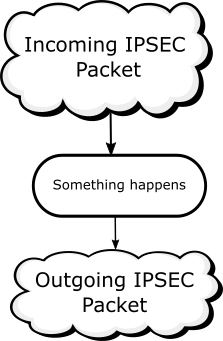
I would gladly accept the nitpick, if only you could explain how it works (though I am afraid that if we include something special for IPSEC; next will be wireguard or BTH or whatever else, making an easy readable flowchart a nightmare to read).
To show how I personally understand how IPSEC works BOTH in Iptables and in Mikrotik, here is a separate (simple) diagram :
With all do respect to the help you have all given me, which is tremendously appreciated, can I have a little bit for anav to respond to my previous post about the firewall rules before we go on about this table thing?
I think not This is the point. The repeated lookup is only done for locally originated packets. For packets that are not locally originated only a single lookup happens.
Yep.
Everything you say makes sense.
The normal IP level encapsulations, such as GRE, Wireguard, OpenVPN (in ip mode), etc. fit nicely: the underlay packet is routed normally to/from “router’s local process” side. The overlay package is ingested and injected through the (virtual) interface of the tunnel.
L2 encapsulations, such as EoIP, L2TP, OpenVPN (ethernet mode), ZeroTier are handled similarly, but additionally bridging is involved.
IPSec (policy based) is special and nasty. That’s why it’s usually not incorporated into these diagrams. I would suggest that we avoid it as well. (BTW this is why there’s the ongoing universal request for VTI support )
@xsentinel: I know that I’ve hijacked your thread. Apologies, and I really hope @anav is paying attention and will answer your questions.
 By this I refer to the two drop rules denying cross-network traffic between what I assume to be two internal networks 192.168.88.0/24 and 192.168.2.0/24.


 ) experiment I proposed some time ago.