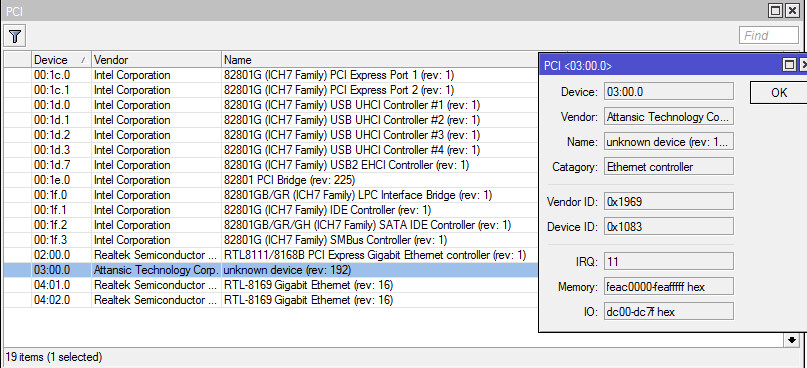
and here is the unknown device:
please, i need it badly, i thought it would be recognized by ROS, but it didn’t and now i’m lack of one interface.
thank you
Noone here can write a driver for ROS.
You can try writing to support@mikrotik.com.
Support is fast. But I dont expect they will support every hardware out there.
RouterOS ONLY uses drivers that are included with the linux kernel. If open source developers have not included those drivers there, RouterOS will not see your device. We can’t do anything about that.
this means i have to wait for new kernel update for mikrotik? it is hard to believe atheros interface is not recognized, as most networking interface especially wireless and switch chip came from atheros.
#1 i had a thought about it, but will have another chance of being not recognized by ROS #2 had thought about it too, but way too expensive
since #3 is asking mikrotik to add the driver is impossible,
so i was thinking #4 which is get myself a RB250GS, BUT, the local store has run out of stock.
not to offend anyone(if someone feel this way), but its sometimes simpler replace NIC.
frankly-speaking(i saw some of on ASUS boards for example)such branded NIC - aren’t well-made, had obsolete drivers(latest was Vista driver. they released Win7 drivers later(which isn’t really good either). and update them “once per 3 years” ~, but thats all. sadly)
so its plently of reasons to put differenty ethernet cards IMHO. if you lack free slots for - try multi-ports card, like 44Ge from Mikrotik Themselves https://www.streakwave.com/itemdesc.asp?ic=RB44Ge or others(bit more expensive) among supoported by ROS(never tested much among things in “compat list”).