Do your wireless clients support fast roaming?
In the Auth type tab do you see ft-wpa2/3-psk?
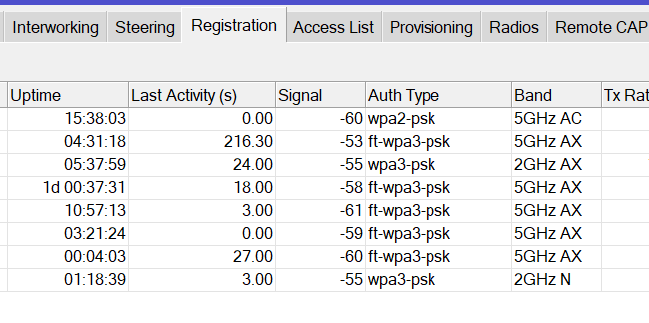
Maybe connect-priority=0/1 option can help you
Do your wireless clients support fast roaming?
In the Auth type tab do you see ft-wpa2/3-psk?
Maybe connect-priority=0/1 option can help you
Just to be sure, this is the only device suffering?
Can you please share all (and complete) configs of all devices? So both CAPsMAN and CAPs?
And don’t forget to remove serial.
connect-priority=0/1 done before

hap ax configuration
/interface bridge
add admin-mac=D4:01:C3:0E:D8:E5 auto-mac=no name=bridge-lan
/interface ethernet
set [ find default-name=ether1 ] name=ether1-lan
set [ find default-name=ether2 ] name=ether2-lan
set [ find default-name=ether3 ] name=ether3-lan
set [ find default-name=ether4 ] name=ether4-lan
set [ find default-name=ether5 ] name=ether5-lan
/interface vlan
add interface=bridge-lan name=bridge-vlan70-cap vlan-id=70
/interface wifi datapath
add bridge=bridge-lan disabled=no name=datapath-bridge-lan
/interface wifi
set [ find default-name=wifi1 ] configuration.manager=capsman .mode=ap datapath=datapath-bridge-lan disabled=no name=wifi1-lan
set [ find default-name=wifi2 ] configuration.manager=capsman .mode=ap datapath=datapath-bridge-lan disabled=no name=wifi2-lan
/interface bridge port
add bridge=bridge-lan interface=ether1-lan
add bridge=bridge-lan interface=ether2-lan
add bridge=bridge-lan interface=ether3-lan
add bridge=bridge-lan interface=ether4-lan
add bridge=bridge-lan interface=ether5-lan
/interface wifi cap
set certificate=CAP-D401C30ED8E5 discovery-interfaces=bridge-vlan70-cap enabled=yes lock-to-caps-man=yes slaves-datapath=datapath-bridge-lan slaves-static=yes
/ip dhcp-client
add interface=bridge-vlan70-cap
/system clock
set time-zone-name=Europe/Rome
Think there are some issues with your config, specifically VLAN related. I prefer to use explicit VLAN’s and try to avoid VLAN 1 where ever I can.
I used this nice topic to let me be inspired:
http://forum.mikrotik.com/t/guide-capsman-configuration-with-management-vlan-routeros-7-14-3/176344/16
Be aware that setting the correct VLAN on a wifi interface is done on datapath (configured on the CAPsMAN). When using, check the last config for the AX devices, called “cAP AX wifi configured via CAPsMAN datapath VLAN”.
i think VLAN it’s ok, because when wifi drops, phone reconnects at the new AP immediately, so RSTP, L2, VLAN for me work.
There’s a native VLAN untagged for LAN for have only one broadcast domain with wifi and all switch ports, and there are 2 VLAN, one for management of the CAPs and one for guests
Why isn’t VLAN filtering enabled on the bridge of the hAP AX?
https://help.mikrotik.com/docs/spaces/ROS/pages/224559120/WiFi#WiFi-CAPusing"wifi-qcom"package:
here isn’t present vlan filtering on wifi-qcom, is present in wifi-qcom-ac
AFAIK, for the VLAN interface (and it’s attached DHCP Client), VLAN filtering should be enabled.
That's not what I understood.
At least not for wifi-qcom (wifi-qcom-ac is something else).
My APs don't have VLAN filtering active either.
It would defeat the purpose of using VLANs on caps mode devices.
Only when you also have a different base VLAN (mgmt VLAN, if you want), you need to add that VLAN itf to bridge and move DHCP client to that VLAN itf.
That's all.
VLAN related wifi-ports are added dynamically via datapath (again: for wifi-qcom devices).
Thanks for the additional information, @holvoetn.
And I fully agree on what you are saying, actually I was trying to say the same. I was referring to this part:
/interface bridge
add admin-mac=D4:01:C3:0E:D8:E5 auto-mac=no name=bridge-lan

/interface vlan
add interface=bridge-lan name=bridge-vlan70-cap vlan-id=70

/ip dhcp-client
add interface=bridge-vlan70-cap
Can you post the CAPsMAN config as well, @nclmrc?
/interface bridge
add admin-mac=78:9A:18:C3:12:2A auto-mac=no name=bridge-lan
/interface bridge port
add bridge=bridge-lan interface=ether2-hap-ax2
add bridge=bridge-lan interface=ether3-cap-ax
add bridge=bridge-lan interface=ether4-lan
add bridge=bridge-lan interface=ether5-lan
add bridge=bridge-lan interface=ether6-lan
add bridge=bridge-lan interface=ether7-lan
add bridge=bridge-lan interface=ether8-lan
add bridge=bridge-lan interface=sfp-sfpplus1-lan
add bridge=bridge-dmz interface=veth1-dmz-debian
/interface vlan
add interface=bridge-lan name=bridge-vlan70-cap vlan-id=70
add interface=bridge-lan name=bridge-vlan200-guest vlan-id=200
/ip address
add address=192.168.10.1/24 interface=bridge-lan network=192.168.10.0
add address=172.16.200.1/24 interface=bridge-vlan200-guest network=172.16.200.0
add address=10.70.10.1/24 interface=bridge-vlan70-cap network=10.70.10.0
/interface wifi datapath
add client-isolation=yes disabled=no name=datapath-guest vlan-id=200
/interface wifi security
add authentication-types=wpa2-psk connect-priority=0/1 disabled=no encryption=ccmp ft=yes ft-over-ds=yes name=sec-lan
add authentication-types=wpa2-psk connect-priority=0/1 disabled=no encryption=ccmp ft=yes ft-over-ds=yes name=sec-guest
/interface wifi steering
add disabled=no name=steering-lan neighbor-group=dynamic-Home-WiFi-9a91126b rrm=yes wnm=yes
add disabled=no name=steering-guest neighbor-group=dynamic-Guest-WiFi-1c2b9b73 rrm=yes wnm=yes
/interface wifi configuration
add country=Italy disabled=no name=cfg-lan security=sec-lan ssid=Home-WiFi steering=steering-lan
add country=Italy datapath=datapath-guest disabled=no name=cfg-guest security=sec-guest ssid=Guest-WiFi steering=steering-guest
/interface wifi
# operated by CAP D4:01:C3:0E:D8:E5%bridge-vlan70-cap, traffic processing on CAP
add channel.frequency=5180 .width=20/40/80mhz configuration=cfg-lan configuration.mode=ap disabled=no name=cap-wifi1-lan radio-mac=D4:01:C3:0E:D8:EA
# operated by CAP D4:01:C3:0E:D8:E5%bridge-vlan70-cap, traffic processing on CAP
add channel.frequency=2412 .width=20/40mhz-Ce configuration=cfg-lan configuration.mode=ap disabled=no name=cap-wifi2-lan radio-mac=D4:01:C3:0E:D8:EB
# operated by CAP D4:01:C3:53:89:A8%bridge-vlan70-cap, traffic processing on CAP
add channel.frequency=5180 .width=20/40/80mhz configuration=cfg-lan configuration.mode=ap disabled=no name=cap-wifi3-lan radio-mac=D4:01:C3:53:89:AA
# operated by CAP D4:01:C3:53:89:A8%bridge-vlan70-cap, traffic processing on CAP
add channel.frequency=2452 .width=20/40mhz-Ce configuration=cfg-lan configuration.mode=ap disabled=no name=cap-wifi4-lan radio-mac=D4:01:C3:53:89:AB
# operated by CAP D4:01:C3:0E:D8:E5%bridge-vlan70-cap, traffic processing on CAP
add configuration=cfg-guest configuration.mode=ap disabled=no mac-address=D6:01:C3:0E:D8:EA master-interface=cap-wifi1-lan name=cap-wifi1-guest
# operated by CAP D4:01:C3:0E:D8:E5%bridge-vlan70-cap, traffic processing on CAP
add configuration=cfg-guest configuration.mode=ap disabled=no mac-address=D6:01:C3:0E:D8:EB master-interface=cap-wifi2-lan name=cap-wifi2-guest
# operated by CAP D4:01:C3:53:89:A8%bridge-vlan70-cap, traffic processing on CAP
add configuration=cfg-guest configuration.mode=ap disabled=no mac-address=D6:01:C3:53:89:AA master-interface=cap-wifi3-lan name=cap-wifi3-guest
# operated by CAP D4:01:C3:53:89:A8%bridge-vlan70-cap, traffic processing on CAP
add configuration=cfg-guest configuration.mode=ap disabled=no mac-address=D6:01:C3:53:89:AB master-interface=cap-wifi4-lan name=cap-wifi4-guest
/interface wifi capsman
set ca-certificate=WiFi-CAPsMAN-CA-789A18C31229 certificate=WiFi-CAPsMAN-789A18C31229 enabled=yes interfaces=bridge-vlan70-cap package-path="" require-peer-certificate=yes upgrade-policy=\
    suggest-same-version
/interface wifi provisioning
add action=create-enabled disabled=no master-configuration=cfg-lan slave-configurations=cfg-guest supported-bands=5ghz-ax
add action=create-enabled disabled=no master-configuration=cfg-lan slave-configurations=cfg-guest supported-bands=2ghz-ax
other phone roaming, it’s oneplus problem

It’s a bit odd, different behaviour. You might even want to consider using the 7.18beta release for testing purposes.
Also, on your CAPsMAN VLAN filtering is missing on the bridge. If you want to know more about VLAN and MikroTik, have a look at this topic:
http://forum.mikrotik.com/t/using-routeros-to-vlan-your-network/126489/1
i installed 7.18 beta, with oneplus same problem.
there are many report online, It seems like a problem related to an Android update
however on a fritzbox mesh network, oneplus roams correctly
i know vlan filtering, i use it when i configure switch port with different untagged vlan.
in these simple cases where's only one native vlan, i prefer use hybrid configuration, native and trunk at the same time.
EDIT DELETE