This was suppose to be my first post in new forum. However it was put into “awaiting approval” for some reason - no attachments, maybe links, dunno…
And with forum upgrade outage, I got hours of time back…
So made some smaller updated the RouterOS LSP VSCode/NeoVim extensions above with the new found time, see CHANGES for recent updates to the RouterOS LSP
And for fun added a “companion” extension – TikBook for RouterOS – that provides a VSCode Notebook interface to RouterOS script. This was actually pretty straigtforward & nifty. The TikBook extensions uses the LSP but provides a “notebook format” to allow mixing Markdown and RouterOS into one .rsc file - that works as both as valid RouterOS script but visualized/edited as notebook in VSCode. It even lets you run code in “cells” (or entire notebook) via the REST API with a :execute, if credentials are provided in Settings.
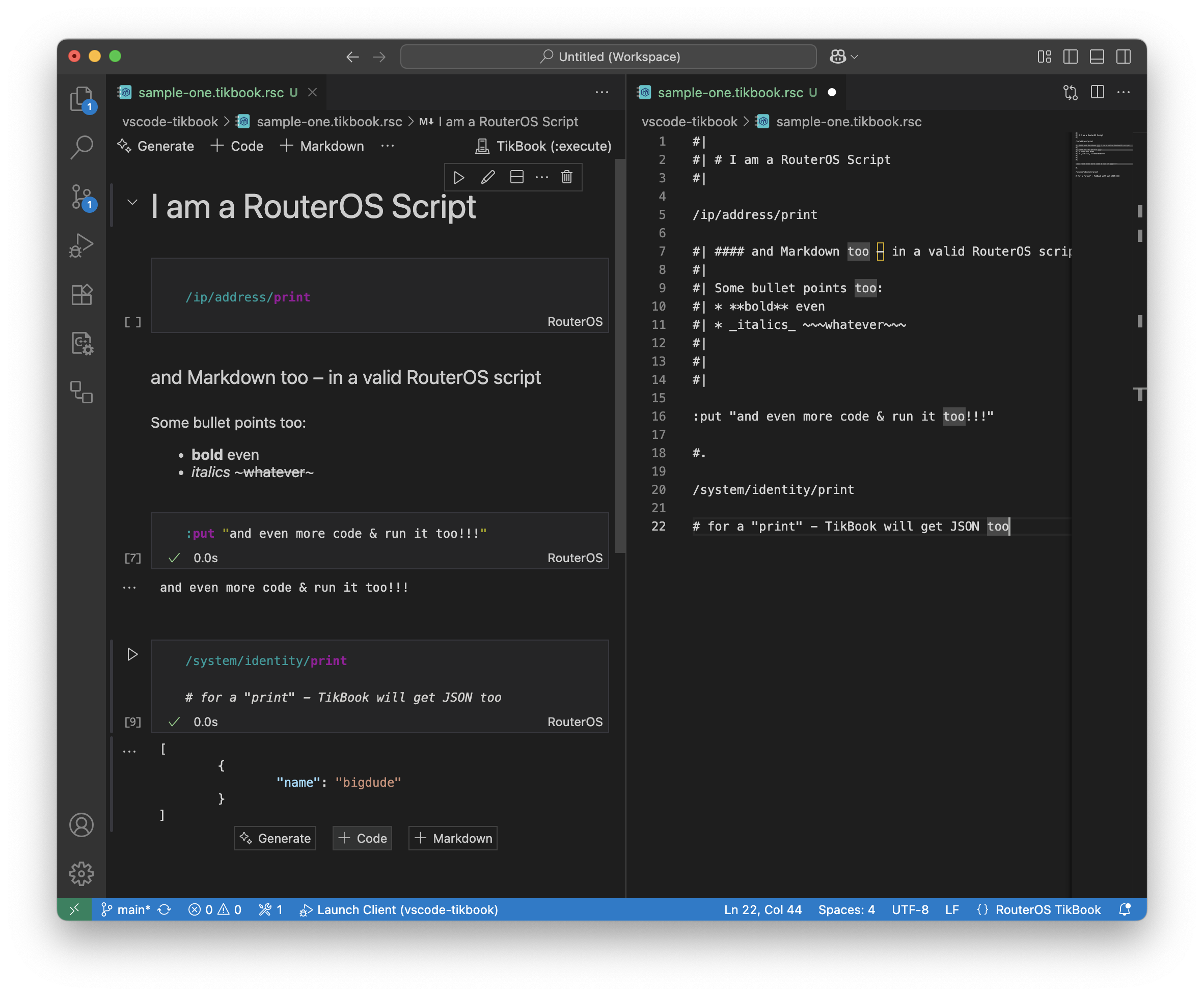
Both the RouterOS LSP and Notebook VSCode Extensions are now installable directly from VSCode (search TIKOCI in extensions) and also via Microsoft’s VSCode Extension Marketplace.