I am counting the hosts trying to compromise my network, in the last one hour i counted 15500 unique hosts attacking 768 IP’s, every hour the count is incrementing by, maybe, 400-500 hosts atm.
The attacks started yesterday 15:00 GMT
Regards, John
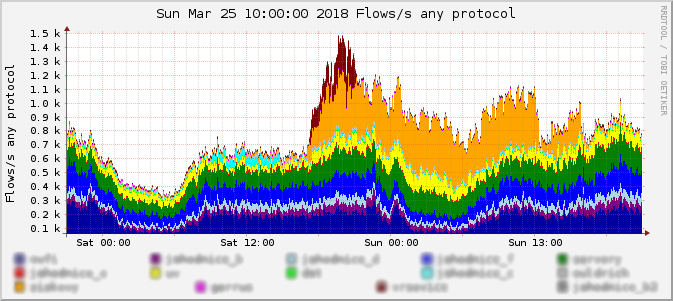
I am counting the hosts trying to compromise my network, in the last one hour i counted 15500 unique hosts attacking 768 IP’s, every hour the count is incrementing by, maybe, 400-500 hosts atm.
The attacks started yesterday 15:00 GMT
Regards, John
If the worm is targeting winbox ports something is seriously broken, even with admin access to winbox you shouldn’t be able to get arbitrary code execution. At this point I’m wondering if any Mikrotik service is safe!
Just pointing out the obvious:
What’s new in 6.38.5 (2017-Mar-09 11:32):
!) www - fixed http server vulnerability;)
Above mentioned devices were running older software. The vulnerability exploited open WWW port on the RouterOS devices.
@normis
Yeah we were aware of the bugfix release, we just had some devices haven’t had the license to upgrade to 6.x. Being a software developer myself I know it’s not Mikrotiks fault - updates were available and should have been deployed by admins. But for those people who have been infected nonetheless this thread might be helpful.
Do you know if updating already infected devices will solve the problem or do we need to flash the devices?
@all
some devices haven’t had the license to upgrade to 6.x
Just note that license upgrade is free of charge, if the device doesn’t allow you to upgrade by upload+reboot, we will give you a free license upgrade.
Do you know if updating already infected devices will solve the problem
YES, RouterOS has been hardened multiple times since that version, it will not only double check every file, it will also remove all unknown files.
wow thats great - i think i had some old information there.
keep your great work up! thx a lot
Do you know if updating already infected devices will solve the problem
YES, RouterOS has been hardened multiple times since that version, it will not only double check every file, it will also remove all unknown files.
thats very good news! thank you very much
2 normis: thanks for our quick reaction (I have 6.39.3 at the about 500 devices) and I can sleep well now. Just old bug with new wave.
Would it be possible for MT staff to create a pinned thread about this. With info about what attack vector was used, from what version of ROS are you safe and how to mitigate if you are effected.
I know you can read all here, if HTTP vulnerability is confirmed to be used, but it would be great to have everything in one post for all to read.
We will do that once we have more confirmation that upgrade to v6.38.5 or above does indeed fix this. Please report your results.
Great. Personally not affected on any device but I’m on 6.41.3 on every device but I still follow this to know what the attack vector was.
I did a trace on the /16 network and captured the IP addresses connecting to port 8291 counting the number of attempts from each.
After removing the top ones (that obviously are scanning servers that are always on the hunt to find and classify systems like this)
I have over 345.000 unique IP addresses of possibly infected routers. Connecting random addresses from this list on the HTTP
port indeed shows RouterOS in some cases, in other cases an inoperative webserver (accepts the connection but does not reply
to a GET / HTTP/1.0)
I had several devices effected by this, it seemed like they were all version 6.35 to 6.37.5 ish and only devices that were accessible from the internet. I upgraded to the latest current version of 6.41.3 and it took care of the problem. As someone else had mentioned the devices all had an entry in the log file about a file being downloaded from/to the device.
I am just happy that an upgrade fixed the issue without having to go through the nightmare that I had with UBNT devices when they had the worm problem.
MT is there any definite word on how these devices were vulnerable? Was it for sure through the web interface? Also is it known if this gave them access to device configs, passwords etc?
Upgrade to v6.38.5 or above should fix the issue and clean your system. To be 100% safe, upgrade to Current v6.41.3, as there are more double-checks included.
It seems the system scans for winbox port 8291 to quickly identify MikroTik devices (since this is a unique port), then checks if port 80 is available, then uses the vulnerability that was fixed in 6.38.5 to copy itself into that system and starts the same process again.
To be absolutely sure about the above, we would love to see remote access or RIF files from affected devices. Also the file it tries to fetch.
Does it require valid username and password to do that, or is it sufficient to have access to the webserver?
I think you mean 8291 
If it’s a botnet using ChimayRed, as suggested earlier in the thread, then it’s exploiting a security vulnerability — it doesn’t need valid credentials to gain access, just an open HTTP server 
Yes. Webfig specifically. Hotspot NOT affected.
I finally got my hands on an infected device, spent some time with it, and can confirm that this appears to be Hajime, as maznu mentioned earlier.
I haven’t been able to catch the infection happening live yet, but I am now pretty confident that this is exploiting the old web server vuln that was already patched before 6.39. I can confirm all infected devices I’ve found so far had port 80 open on them.  (All infected routers were customers, and thankfully not our network core, which were properly protected. Our customers can use whatever router they want, and we offer to sell MikroTiks to them if they want to buy a router from us, but as mentioned earlier we don’t actively maintain them. So many of them run with various configs that I’m sure are unsafe, and the software is not going to get updated unless the customer does it. We have resisted “managed router service” until now but this may no longer be tenable.)
Also, I was wrong about the 6.37.4 device earlier not showing symptoms after a reboot. I just didn’t wait long enough.
In case anyone is curious:
Through the vulnerable web server, commands are issued to download a file called “.telnetd” to /flash/bin. Of course, it is not actually a Telnet daemon.  When executed, “.telnetd” creates a named pipe at /flash/bin/fifo and a directory at /flash/bin/.p and then connects to the Hajime P2P network to grab the latest version of the loader (.telnetd) and the .i and atk modules which it puts in the .p directory. At that point it starts its outward attacks.
A startup script is also placed at /flash/etc/rc.d/run.d/S99telnetd which causes /flash/bin/.telnetd to launch at boot every time, so once the device is infected it will remain infected until you take steps to remove it. Interestingly, the Hajime loader does not create this script; it must be that whatever external agent exploited the vulnerability on your router put it there along with the Hajime loader binary.
I can confirm that upgrading to 6.40.6 removes the /flash/etc/rc.d directory tree, which of course deletes the startup script and thus renders the Hajime binaries in /flash/bin inert. So an infected router can in fact be “cured” just by updating it.
– Nathan
EDIT: I forgot to mention that some devices don’t respond well to Hajime. I ran into a 450G that I think was running 6.19 when it got infected, and the Hajime loader actually causes it to reboot itself when it is started! So because of the startup script, the 450G was stuck in a boot loop.
Excellent work! Many thanks for this, Nathan!
I think it is a bit imprudent to run the webserver under a user-id that has write access to the filesystem. No Linux system admin would do that; all wellknown Linux distributions run the webserver under a user like “wwwrun”, “httpd” or so, which has no write permissions on the persistent filesystem.
Even when the server has a vulnerability, it would be more difficult to exploit it when you cannot write files and any code you execute does not run as root.
Action routines that need root privilege could be implemented as a setuid or sudo program that is easier to guard against abuse.