That is of course the way to do it.
It may be helpful to pack another copy of the sticker, still on its backing, with each device.
That way those that are afraid of losing access to the sticker could put those on a device documentation page in a binder.
Or maybe have some QR code with the relevant information (device type, serial number, MAC address, password) so that one could scan it and put it in the asset tracking system.
One copy is on the device, another password is on a sticker on the quick guide paper, third copy is in the distributor database - if you call them, they could get it. And like I said, if all else fails, Netinstall will remove it.
What’s that second copy ? Never seen it. Not on AC3, not on AX3, not on AX2.
As a matter of fact, just happen to have AX Lite lying here next to me on my desk with the box it came in.
The quick guide paper says there is “no default password” ?!?!
But I know there is. I had to get it from the sticker. That same sticker which has plenty of space to make the font larger.
Oddly enough: the quick guide on the product page DOES mention that on some models there is a password on the label.
Not on the leaflet which was in the box.
BTW 2 steps before the section I highlighted is already a first problem. You can’t connect to the wireless network without a password.
So somewhere there is a leak in that documentation quality assurance process …
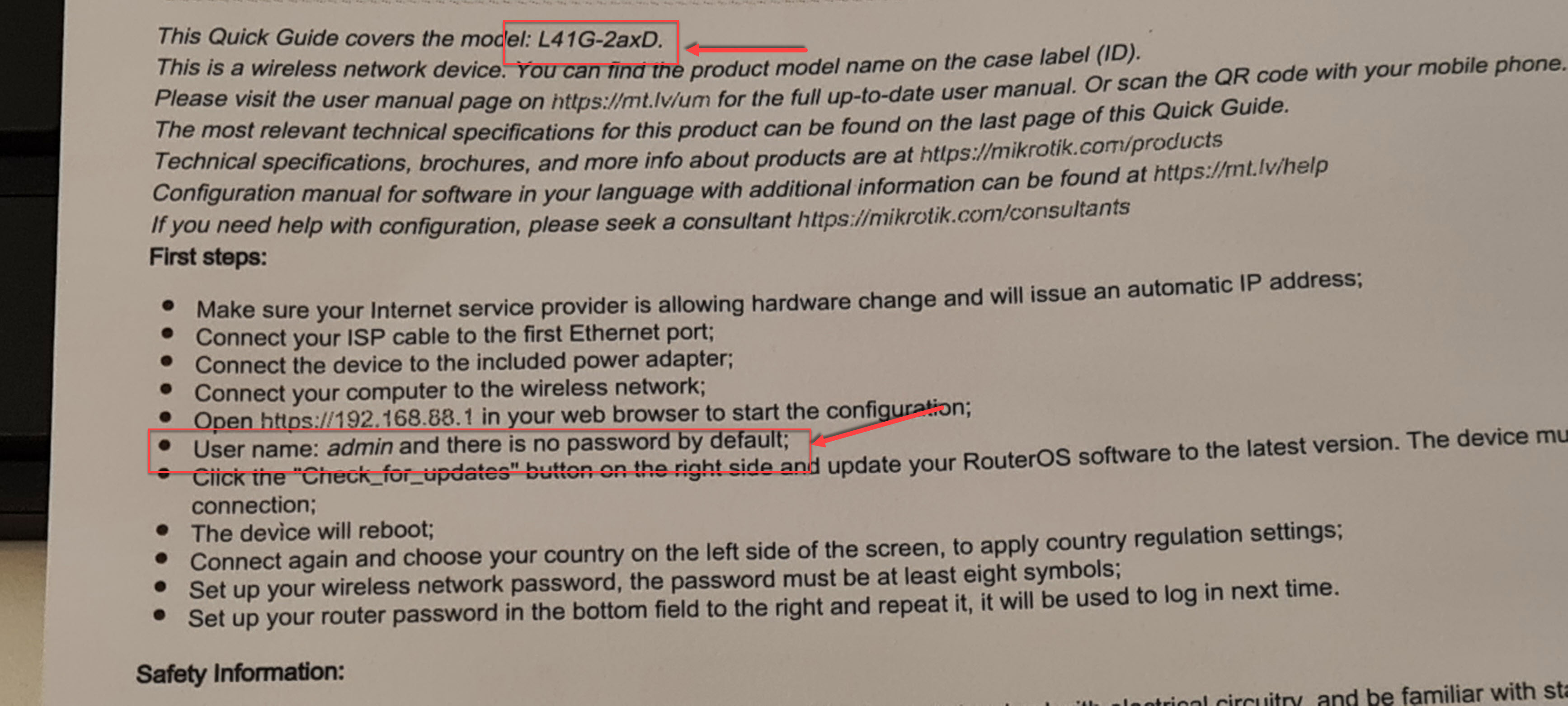
Yeah documentation is a lacking/not updated, in few places. e.g. it should be clear what models this applies too – or if it’s going to be all new routers…that also be good to know so folk can prepare… e.g. I was caught off guard since I thought it was just the EU models, not the US model that had default passwords…
But do agree the admin/(no password) needed to be fixed. While UX/docs aren’t great, MT does seem to pick the least invasive way to do this. In my case, we use a branding package, so same netinstall, or just a few steps to use a “sticker password” to login to copy package+reset. And since variables in the default/netinstall script, you can still replace the defconf and not break the scheme, which was my initial concern.
It’s folks that use SSH/etc where this is going to be annoying… But @mrz suggestion to put into cAP mode to might allow that model to still work… dunno
Why waste paper?
Write a link / qr code directly on the box where the site to visit for the guide is written…
In this way, any errors in the guide can already be resolved even for devices that are already distributed and not selled.
I think the reason why people worry about the sticker is that it may end up in a physically inaccessible place e.g. on a roof, in some equipment room, etc.
Also those people do not consider themselves able to archive the password in some asset tracking system, a general password store app, etc.
That is why I suggested putting an extra sticker in the package so they will be able to stick it in some notebook.
Apparently there already is a sticker on the “quick start leaflet” but I do not know if it can easily be peeled off and put somewhere else, and also not if these leaflets are still so ridiculously small that you immediately lose them…
Ok, right, but…
- Create one account to mikrotik.com, regster own device, access back to the account if you lost the default password, and read it again.
- Register TikApp on Google and add the pasword directly to google keychain
- etc.
Small pieces of paper are usually nauseating copywright FCC crap that goes direct into garbage, Dont put important sticker on crap paper, put it on the router like a pull tab, router will not work unless you pull this tab from the crack LOL.
Well, that be a possible feature at any point...since they have the passwords 
With @pe1chl here... it the small details that got missed in this change...
The 2nd set of stickers is a good idea – the RB9xx etc used to do that actually.
That’s bad… but that’s the user’s problem, not mine and not yours.
And in your opinion, after that, where the user go at break balls?
I don’t think you work with the public…
When MikroTik routers get a bad reputation “because they are so insecure” and then nobody sells them or they become forbidden by law, it becomes our problem as well.
Could be but I have never seen them on those devices I had in my hands yet requiring the sticker password.
AC3, AX Lite, AX2, AX3
Never seen it.
And I unfold all papers in the box.
Password Manager. Although the hAP ac3 I recently received still had the old default blank password, if I receive anything new that has the “new” unique password, that will immediately go into my password manager. Yea, I’m an individual, not trying to deploy large numbers of devices.
OK, as soon as I powered the hAP up, I used the NetInstall procedure to put an amateur radio network called AREDN into it…
Oh, but I also use a password manager since that new mechanism came into place.
But I can imagine for someone having to handle multiple devices a day, some typos will happen.
Unless they netinstall as first action…
if you are using a password manager, you should create new user and set password with password manager, then log into new user using password stored in password manager, and from the new username, delete the admin username. If you do that you shouldn't get locked out because of typo.
Edit: instead of deleting admin, rextended recommends changing admin user to norights user and changing the password to a random one. See Best practices for securing MikroTik router in small business setup? - #2 by rextended
Chiming in here, I added this to the newsletter post but I felt it needed included here.
Like several others here, we do automated deployment of devices, the process is we plug in 20 routers at a time into our bench PoE switch on ether1, then we load up our in-house deployment tool, and plug in a 2nd cable into ether 2-4 (this is for hAP routers btw), the deployment tool tries every 15 seconds to connect to 192.168.88.1 with admin and a blank password, once connected it then checks the OS version, upgrading or downgrading as necessary from the factory software to have it running v6.49.7, then when that’s complete it automatically loads the branding package dpk with the rest of our deployment config and reboots. After it’s gone through all 20 routers, it then monitors and alerts the technician when they all are completed. After that they are boxed and labeled.
This onboarding process also automatically records the device serial number, MAC address, and installation date for later reference. We typically program and ship a case of 20 routers in a little over 30 minutes from start to finish if someone is quick about getting them unboxed and labeled / re-boxed. We don’t even pull the routers fully out of the plastic bag to try to avoid getting fingerprints on the soft touch black plastic cases.
Commercial users like myself require an automatable process to onboard and program routers, Your biggest customers do NOT have time to read the stickers on the routers to log into them, we’ve invested a huge amount in MikroTik, and based on what our distributor tells me I’m one of the largest purchasers of various hAP models of router in North America. It would be tragic to throw it away because we can no longer onboard new devices.
IF there was a way to trigger netinstall without logging into the device first, that might be an option, however that would still be far slower process then we are using right now, and time costs money. Our deployment tool (which uses the API to connect to the router, is web based, and is being opened from a web browser of a smart TV mounted on the wall) does not need to go through the slow reformatting process every time, nor does it even load a new OS version if the device shipped from the factory with the correct OS version (which is about 50% of the time).
We currently do not have any computer at all in the building involved in the setup and deployment of routers, it’s all ran from that webserver configured to access the API on new devices. We don’t have trained technical people programming these routers, they are only trained on plugging in a cat 5 cable, waiting for a beep, wait ~20 seconds watching the screen for the instruction that it’s time to move the cable to the next router, and then when done box and label the routers. Tomorrow we have 80 various routers scheduled to get programmed and shipped, and it’s expected to take a total of 2.5 hours. I challenge ANYONE here to netinstall an OS and branding package on 80 routers, label the boxes and repack them, in under 3 hours. Most of these solutions being proposed above couldn’t do 80 routers in a whole day.
I’m not against making changes to the deployment process, but they must be ones that are automatable, they cannot rely on someone having to read the small label or anything like that. We have built business processes around this workflow and invested lots of time and money into developing them, while some may sanctimoniously think this is no big deal and you can “just” do XXX instead, what those arguments fail to give any thought to is that XXX process takes a LOT more time and effort and training.
As for the labels themselves, I can’t tell you the number of times I’ve had people report to me that the serial number on a device label is no longer readable after being deployed to end users for a couple of years. We track and issue all the devices by serial number so we have a lot of experience with this occurring.
In theory this was what the old flashfig tool was supposed to do, but I had never once gotten it to actually work, and recent versions of netinstall don’t even include it, so I think it’s been depreciated and discontinued.
@Normis, if you have these passwords stored in files somewhere, one acceptable solution would be to create an API to allow the default password to be looked up by authorized & vetted companies that do automated deployments, this would need to be searchable by MAC address. For example our deployment software could authenticate to your API, I pass you a MAC address and you reply with the default password. For additional security you could even limit a device password to only being accessed once this way without some additional verification step. This would allow a vendor like myself to auto program devices while still shipping the devices with a unique default password.
@BrianHiggins
I agree totally. it’s really gotten difficult and overly complicated to deploy mikrotiks as of past few years.
3x issues (in order):
1- default passwords (and no way to wipe that PW) - we can’t be expected to retain these passwords for each device (or have to reach out to XYZ to get it, at 3am when equipment may be hard to reach - unless that is an automated 24/7 type of system, or better yet see solition to #3)
2- The default configuration overly locked-down (ie no way for legitimate admins to get into RB in a remote/remote-hands situation) (i know some will disagree with me on this one and their concerns may be valid) -My suggestion is that there be a compromise and for example holding the reset button for 30 or even 60 seconds fully wipes default config (ie same as /sys reset no-defaults=yes , if you include that the long press also wipes the factory password, then you have a solution to ALL 3x OF THESE!! :) )
3- remove / exclusion of serial ports - (and lack of clear documentation on this) - ie Last week was working on an RB5009, rumors (not docs) state that you can attach a USB serial adapter and thus get OOB access like before (could not get this to work and i use serial frequently) - thus am forced to wipe/default wipe, and deal with issues #1 and #2 above ( loop)
I feel several of these are an overreaction to bad press mikrotik has received over the past few years (In my opinion unfair PR against mikrotik re; security). I know in some cases legislation is involved, but only applies to default/fresh out of box experience for consumers.
I hope mikrotik changes one or more of these going forward.
thanks
You are not to be taken seriously when you claim that a router should be accessible for admins from the internet side by default.
Or, not understanding a long press is how you get PXE boot mode (for netinstall). And that Mikrotik is not going to reverse course on the passwords.
To me it seems @jo2jo’s problem could be solve with a branding package with a replaced default config (with his preferred no/limited config) – that be 7 second button press to trigger. And if you control the default config…well… there should be less of need for serial.
Now on #3 (serial support)… I’m not sure of the serial support via USB on RouterBOOT on RB5009… USB serial is always a PITA. But it’s fair to say Mikroitk has no docs some “known working” USB-to-serial chipset. Now Mikrotik does sell some USB serial-to-WiFi things – never used them myself, since I use my own branding with a default-configuration… so reset to defaults get me something I know thus never used serial in 10 years to mikrotik.