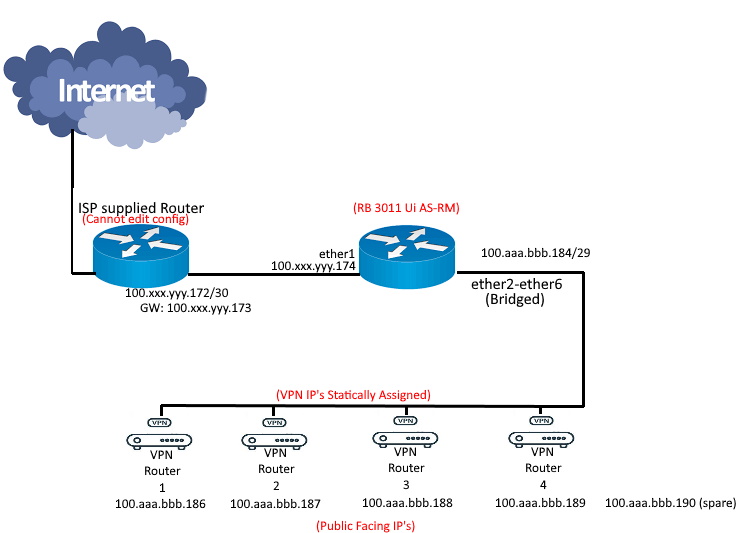
I received my configuration from my service provider for fiber.
They have supplied me a block of /29 IP addresses, of which is natted/routed behind the point to point /30 address. They have supplied a router with the /30 IP config, which contains 1 ethernet output. This router is not configurable by the end user. I have a clean Mikrotik RB 3011 to use for the /29 block. As I am not too familiar with Mikrotik, I am asking for any assistance to be able to set up this device to be able to use the /29 IP addresses. The devices that need to connect to the Mikrotik will mainly be VPN’s, VOIP and NVR devices. Each device will need a its own public facing static IP address .
The most straight forward way would be to configure RB’s “LAN” bridge with one of 100.aaa.bbb.184/29 addresses and disable (if by default configured) SRC-NAT. This way has a drawback of loosing 3 addresses (one is used as network address, another as broadcast address and yet another one for router’s “LAN” address).
If the loss of addresses bothers you, then you could use them for 1:1 NAT, this way you could use all of them. The “target devices” would use private IP addresses, but router would perform 1:1 NAT … and there’s still the PtP client address which can be used as if the routed block didn’t exist.
There’s another possibility (implied by topic title): if there’s another router which should handle the subnet of devices with routed IP addresses … in this case a simple static route with address of the other router used as gateway …
Thank you so much for your reply. As I mentioned in my post, I am still very new to Mikrotik. I have tried applying the advice you gave, but with little success.
If possible, I would appreciate as detailed as possible advice to get me going. Due to the current Coronavirus situation, I have been tossed into the deep end, so to speak, as our service provider has a limited support staff, and is in a major backlog servicing customers.
I have tried to simplify my requirement by means of a diagram. I am looking at the simplest method to achieve this.
I am unable to change any settings on the ISP supplied router, this is locked. All I have is the Mikrotik RB 3011 Ui AS-RM, which is in factory default mode.
Thank you again.
OK, I have set up the RB as explained in your posts.
It shows Internet connection on the 4 VPN IP’s and the spare. (100.aaa.bbb.86 - 90).
I do not get a response back when I ping those IP’s from outside source.