If you have LogAction not type=memory but type=remote and you send MikroTik logs to remote SYSLOG server then it’s case for his storage etc.
If you send it to The Dude, the same.
If you say Syslog as MikroTik logs then it’s not problem, you have this Lines=100 as default but I always change it to 1000 or more.
RMB on WinBox bar and you can add a memory monitoring etc.
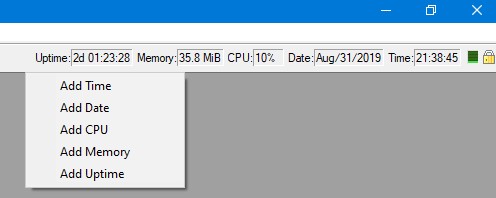
If you say you have duplication in this two sections that measn you not finish my howto and the default >>topics=info type=memory<< still have not exclude rule the “!system”. Look at screenshot again.
.
.
About executing the script every 1 second, I think that is better too
Perfect
.
.
I have problems with the startup of the script using on “Start Time” as “startup” when my routerboard boot up. Then, I think that this can solve my problem. Simply I set a new Scheduler with “Start Date” = 01/Jan/2019, “Start Time”= 00:00:00, “Interval”= 00:00:01 and “On event”=(The name of the script)
The only thing now is how can I do to that this can works when my routerboard boots up. I not know if this part is already done or not.
This is common. Script is running as other user, *sys who haven’t possibility to create global variable and few other limitation.
You can add this:
"start-time=startup on-event"=(delay 20s; /system script run "The name of the script")
. The script itself must have this enable to other user’s like *sys can executed it. This one:

This way you wait until MikroTik stop booting process. At least minimum 10s ← important. Next you run your script who start at proper user and will be works after every boot. I use this method to send e-mail with subject=([/system identity get name]." RePowerOn !") - very usefull notification on power loose in branches.
.
.
I tested your > "> Red Release Candidate Code> " > and works well. It’s > insanely optimized > for me.
2 beers, 6h and very big happiness at the end that I can do it :). You welcome. All knowledge are written here as Step by Step to know function tricks.
.
.
Thanks a lot for your support and the tips with Notepad++.
Regards.

You welcome. Select proper post as solution.