Happens with IPv6 set to NOTRACK. It’s not tracking causing this.
So it is ND (also indicated by the name of the tool).
You will not be affected when you block the incoming traffic on your internet interface so it is not routed towards the interface where ND is happening.
ND is like ARP. It is used to find the hardware address corresponding to the IPv6 address. Transit routers to not use it. (but they could use tracking)
No, you’re doing exactly the same thing MikroTik support did — that is, not reading the addresses that are being targetted. Despite using a tool for ND crashing, it is not ND which is causing the problem — it’s just an easy to find tool which will send ICMPv6 packets to lots of different destination addresses.
MikroTik Support eventually read my emails properly, after a week of back-and-forth, and acknowledged this problem:
I can confirm the problem, in one case forwarding of ipv6 traffic eats all the memory. There is also another case when kernel is crashing, but also can be related to low memory.
We will look into this problem.
To refer you back to my post, and why ND is not to blame (despite using an “ND exhaustion tool”):
RaspberryPi ---- hAP ac2 ---- hEX
If I run this on the Raspberry Pi:
XXXREDACTEDXXX 2a01:9e02:0:666::/64
Then the hAPac2 crashes.
The question I had for MikroTik was: why is the hAP ac2 crashing? The target subnet is connected to the hEX. The hEX is doing ND, the hAP ac2 is not doing ND. Yes, the hEX crashes (it should not — the IPv6 neighbor table should not grow without bound!). But the hAP ac2 also crashes, and for a different reason to ND exhaustion. Guess what? CCRs used for transit also crash. That means a customer of an ISP running MikroTik routers as their BGP edge can use the ND exhaustion tool (targeting a subnet “out on the Internet”) and crash their own ISP’s MikroTiks.
While we are on the topic of security and forgive me if this has been addressed before.
Someone hacks the router as it happened in the resent past or perhaps they find another hole in the future. Why is it that if we forget the username and/or password there is no way to see it or export it? This is good, and is very secure and that is the way it should be.
This takes me to the real question of this post. If I have VPN enabled and someone access the router, export the configuration, they can see the /ppp secret information and ipsec-secret.
For example:
/ppp secret
add name=myusername password=mypassword profile=VPN
Is there are reason why this has to be this way? If there is a better way please let me know. Thank you!
Not “someone access the router”. When “some user” logs in to the router they cannot see this info. They have to be an administrator to see it.
The reason why this data is stored in plaintext is that it has to be available in plaintext for the protocols it is used for (IPsec, xCHAPx).
So you cannot store a hash value of those values.
I have never seen increasing memory usage due to IPv6 forwarding. But apparently your use case or configuration is different.
@pe1chl thank you for your response.
This is an out-of-the-box configuration, plus IPv6, NOTRACK, and some static routes.
MikroTik confirmed to me back in March that they have reproduced this issue. I’m just hoping that they treat it as what it is — a remote, unauthenticated denial-of-service — and fix it soon.
Sooo, a long time later… I haven’t received any notification of Release 6.43.3 and Release 6.43.4.
Does that mailing list even work???
Interesting.. I found myself unsubscribed from everything, including security info
My usual routine is to check log files every morning and today I got some intrusion attempts. Winbox is not at the default port and is protected but still.

This tells me that you should close it 100% from outside and use VPN.
Complete closure does not prevent attackers from trying though …
Actually it is closed by the book, every possible measure taken. Cannot be 100% sure off course. This IP is known circulating in honeypots and its in every possible scam database, however this bot specifically works as a winbox scanner. By the way, the default port is changed also. Something to think about for those who think they secured their winbox.
I have a CCR1036-12G-4S router that I finally got to the location to update from version 6.40.3. I’ll guess that I’ve been lucky that it may have not been hacked with the exception of these lines:
/ip firewall layer7-protocol
add name=WB regexp=“/\.\./\.\.?/”
/ip firewall filter
add action=tarpit chain=input comment=WB protocol=tcp src-address-list=BANIP
/ip firewall mangle
add action=add-src-to-address-list address-list=BANIP address-list-timeout=none-dynamic chain=input comment=WB dst-port=8291 layer7-protocol=WB protocol=tcp
/system package update
set channel=development
Should I worry about this? Was it a good Samaritan from Mikrotik that did this? Or am I wrong about this? As I search this forum all I find is lines with the comment=WB. I vaguely remember reading that someone was doing this, but can’t recall the details – thanks.
Here you se why you should upgrade.
This is our company firewall last 24 hour. 65000 hits on port 8291, mostly from Iran (50 different IP in Iran)
And its on top of our list of port tried to enter.
.
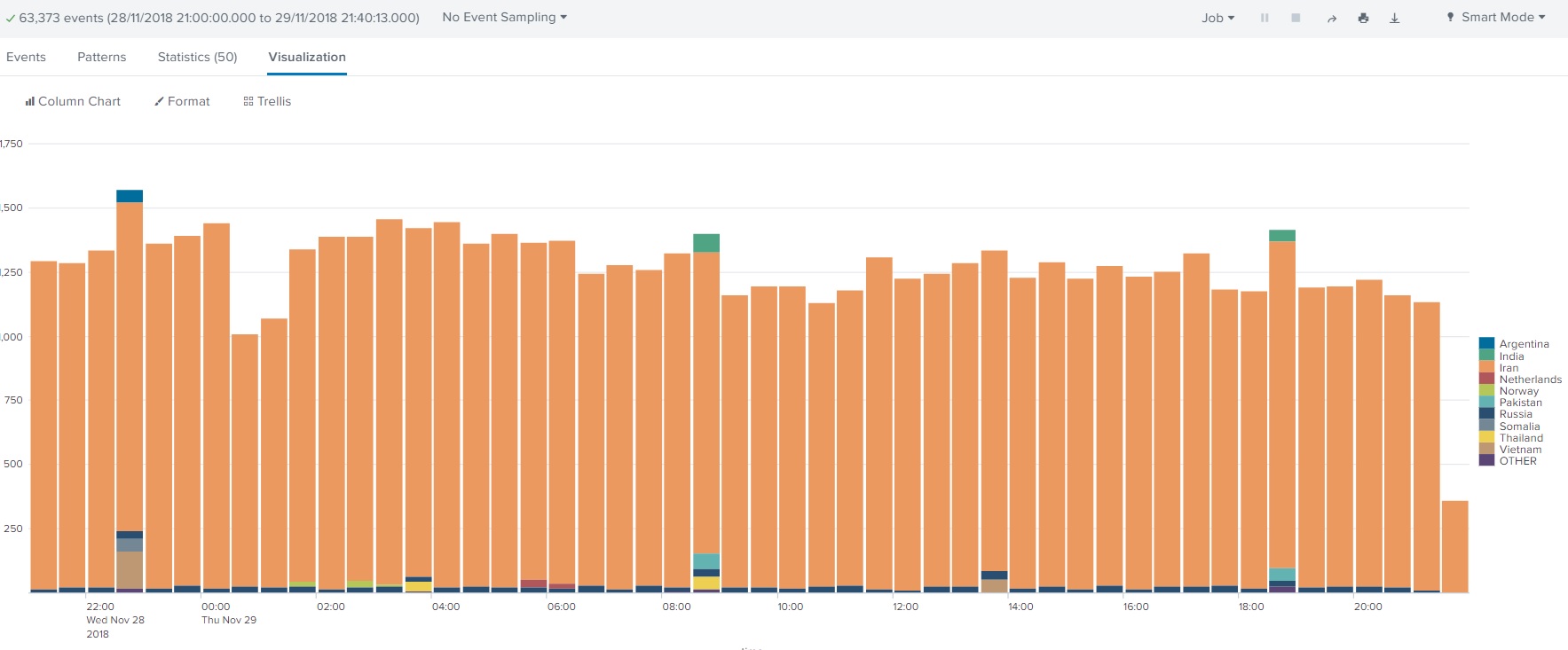
Yes it is
I don’t know what the old link was, but it went down after a while. I have changed to:
https://cdn.mt.lv/web-assets/supportsec/rss.xml
(I feel like that was about half a year ago)
which is still the RSS-Link provided on:
https://mikrotik.com/supportsec
which now is also down, then it went up for a short time, providing me with a new CVE, that I missed because the Link was down.
(CVE-2024-54772)
which btw is NOT listed in the 6.49.18 Patchnotes I got via: https://mikrotik.com/download.rss
so - where can I get a reliable RSS-Feed of Security Notices, that won’t stop working after some time?
No idea if it was changed by now, but here the link on that page is: https://cdn.mikrotik.com/web-assets/supportsec/rss.xml