Hello, Rex! No, these modems of mine don’t send SMS via API… They are sent from the WEB interface without any problems…
Apparently they need to be flashed to E3372-320
Sorry, I can’t help here, except this,
https://forum.mikrotik.com/viewtopic.php?p=982500#p982173
I do not have that poduct…
No, my firmware is the original factory firmware. I bought it that way and it updated itself.
Your help is always welcome. That script is very useful.
delSMS had a few errors. New version:
:global delSMS do={
  :local lteIP "192.168.8.1"

  :global tokenParser

  # get SessionID and Token via LTE modem API
  :local urlSesTokInfo "http://$lteIP/api/webserver/SesTokInfo"
  :local api [/tool fetch $urlSesTokInfo output=user as-value]
  :local apiData  ($api->"data")

  # parse SessionID and Token from API session data
  :local apiSessionID [($tokenParser->"getTag") source=$apiData tag="SesInfo"]
  :local apiToken [($tokenParser->"getTag") source=$apiData tag="TokInfo"]

  # header and data config
  :local apiHead "Content-Type:text/xml,Cookie: $apiSessionID,__RequestVerificationToken:$apiToken"
  :local delData "<?xml version=\"1.0\" encoding=\"UTF-8\"?><request><Index>$index</Index></request>"

  # delete SMS via LTE modem API with fetch
  :return [/tool fetch http-method=post http-header-field=$apiHead url="http://$lteIP/api/sms/delete-sms" http-data=$delData output=user as-value]
}
Now it seems to work ok. Tested in terminal deleting one sms:
:put [$delSMS index="40008"]
I use :put so output of /tool/fetch is shown in terminal.
A interesting note:
- Before deleting sms 40008, I had: 40000, 40001, 40002, 40003, 40004, 40005, 40006, 40007, 40008, 40009, 40010 (no holes).
- After deleting it, I had: 40000, 40001, 40002, 40003, 40004, 40005, 40006, 40007, 40009, 40010 (hole between 40007 and 40009, as expected).
- Then modem received 2 more sms, and as result, I now have: 40000, 40001, 40002, 40003, 40004, 40005, 40006, 40007, 40009, 40010, 40008, 40011 (no holes).
SMS were fetched with 1 (ascending order: older first).
Conclusions:
- HiLink reuses holes, so sms index number is not monotonically increasing (new indexes are not always greater than existent ones).
- Sort and comparison of sms by age can’t be done using “Index”, has to be done using “Date”.
You can try this in terminal to test if you can authenticate with HiLink API (assuming modem IP is 192.168.8.1):
[admin@MikroTik] > :put [/tool fetch "http://192.168.8.1/api/webserver/SesTokInfo" output=user as-value]
Output has to be something like these:
data=<?xml version="1.0" encoding="UTF-8"?>938z9a0QgNbIk27xff3LoPNw02XUtxq2xkc0orPIZe
bLSzpEvNUONe7mb4SbLm8Vj9rba5CfNEA0jqVOd7EFn0RBzum6i6lBJofjp1kSsSuPMqPfQCfa6uKDNFifm3Vz<TokInfojcgWVFYc3cR8hvbO2R4byN2QPurVnA7M;downloaded=0;status=finished
Thank you very much for your help @pkt,
we are very close to solve it.
I just tried it like this and I notice something curious, if I insert this code inside a script, it doesn’t work.
{
:global tokenParser
:local xmlSmsList ([$recvSMS]->"data")
:local smsList [($tokenParser->"getTagList") source=$xmlSmsList tag="Message"]

:foreach tagContent in=$smsList do={
  :local index [($tokenParser->"getTag") source=$tagContent tag="Index"]
  [$delSMS index=$index]
}

}
However, if I run it directly from the terminal (between {}) it DOES delete correctly the messages in the inbox.
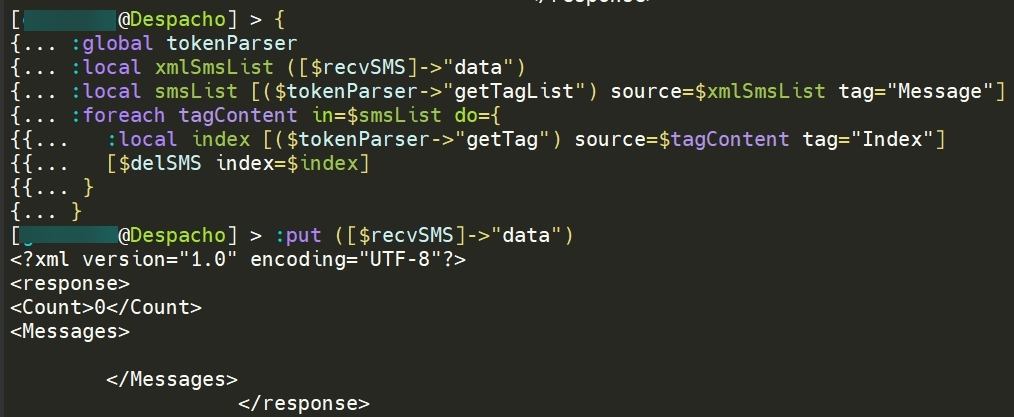
What can happen?
Maybe you have not delSMS in scope.
If it is not defined in the same script or function in which is used, it’s necessary to “import” the symbol declaring it.
You can try to put :global delSMS in a line before the foreach one.
You are right, declaring the global variable “delSMS” is already solved! Thanks!!!
Final and correct script:
:global recvSMS do={
  :local lteIP "192.168.8.1"

  :global tokenParser

  # get SessionID and Token via LTE modem API
  :local urlSesTokInfo "http://$lteIP/api/webserver/SesTokInfo"
  :local api [/tool fetch $urlSesTokInfo output=user as-value]
  :local apiData  ($api->"data")

  # parse SessionID and Token from API session data
  :local apiSessionID [($tokenParser->"getTag") source=$apiData tag="SesInfo"]
  :local apiToken [($tokenParser->"getTag") source=$apiData tag="TokInfo"]

  # header and data config
  :local apiHead "Content-Type:text/xml,Cookie: $apiSessionID,__RequestVerificationToken:$apiToken"
  :local recvData "<?xml version=\"1.0\" encoding=\"UTF-8\"?><request><PageIndex>1</PageIndex><ReadCount>20</ReadCount><BoxType>1</BoxType><SortType>0</SortType><Ascending>0</Ascending><UnreadPreferred>1</UnreadPreferred></request>"

  # recv SMS via LTE modem API with fetch
  :return [/tool fetch http-method=post http-header-field=$apiHead url="http://$lteIP/api/sms/sms-list" http-data=$recvData output=user as-value]
}

:global tokenParser
:global delSMS
:local xmlSmsList ([$recvSMS]->"data")
:local smsList [($tokenParser->"getTagList") source=$xmlSmsList tag="Message"]

:foreach tagContent in=$smsList do={

  :local index ([($tokenParser->"getTag") source=$tagContent tag="Index"])
  :local phone ([($tokenParser->"getTag") source=$tagContent tag="Phone"])
  :local content ([($tokenParser->"getTag") source=$tagContent tag="Content"])
  :local read ([($tokenParser->"getTag") source=$tagContent tag="Smstat"] = 1)

  :if ($content != "") do={
  # :put "$index $read $phone $content"
  /tool e-mail send to=to@mail.com subject="\F0\9F\93\A9 SMS $phone" body="$index $read $phone $content"
  }
}

:foreach tagContent in=$smsList do={
  :local index [($tokenParser->"getTag") source=$tagContent tag="Index"]
  [$delSMS index=$index]
}
BR.
:if ($content != "") do={
  # :put "$index $read $phone $content"
  /tool e-mail send to=to@mail.com subject="\F0\9F\93\A9 SMS $phone" body="$index $read $phone $content"
And it’s better to go to Telegram:
/tool fetch url="https://api.telegram.org/bot$TToken/sendmessage\?chat_id=$TChatId"  \
    http-method=post  http-data="text=\F0\9F\93\A9 SMS $phone%0A$index $read $phone $content" keep-result=no
I use Telegram in most of my scripts, I tried it at the time here and I had errors with the encoding of some SMS characters, so I discarded it.
The 2nd function on my post can be used before sent the string (ASCII-7 and/or CP125x) to telegram (UTF-8):
http://forum.mikrotik.com/t/rextended-fragments-of-snippets/151033/1
Or directly URL encode the string:
http://forum.mikrotik.com/t/rextended-fragments-of-snippets/151033/1
Thanks Rex. I am already testing it.
Which ascii characters are displayed, only from 32 to 126?
Would it be possible to include the character "ñ" or "€" or others that I need in the future?
BR.
1a> MikroTik support only the display of 7-bit characters (as in CP470),
the remaining 8-bit are unsupported and € symbol (And be can insterted only by winbox and webfig because terminal do not support it)
is translated from winbox/webfig on hexadecimal value 0x80 (that is € on CP1252 and others).
Since there is not correspondence from various language on 8-bit characters, codepage is needed and what is, for example € on CP1252 is Ђ on another codepage.
1b> MikroTik do not support UCS-2 alphabet, if the message contain simply one UCS-2 character, all mesage is on UCS-2 format and MikroTik can not read it.
On GSM7 alphabet the only currency symbol supported are £ $ ¥ and the generic ¤
If € is used, can’t be encoded on GSM7, and the character is removed, or message is not sent.
http://forum.mikrotik.com/t/sms-charset-problem/74623/2
2> I do not know if MikroTik add sooner or later the support for the UCS-2 SMS, but actually you can not read or sent that characters.
At least must be implemented a method for read by AT commands the SMS memory and convert the RAW binary data to readable message,
and do the opposite to send the SMS with support for UCS-2
Probably using the API of the Huawei, is possible to send one message with “ñ” or “€” simply converting first the message with ASCIItoCP1252toUTF8.
If your codepage is not CP1252 / Windows 1252, must be done one appropriate function using the ASCIItoCP1252toUTF8 as base.
When an SMS is received on the Huawei modem, through the API we get the data (with :put) and it is fully compatible with the Mikrotik Terminal.
[admin@MikroTik] > sys scr run check-sms
40008 false +34XXXXXXXXX SOLOPTICAL Ofertas hasta 60% dto + REGALO Gafas mod España. CÓDIGO DESCUENTO: UoxTM
In the following example you can see that I forward the SMS received via Email, SMS and Telegram, the characters are perfectly readable in Email and SMS. I have only had some sporadic problem with the text in Telegram, but it has been quite reduced thanks to the function "ASCIItoCP1252toUTF8".
:foreach tagContent in=$smsList do={

  :global tokenParser
  :global sendSMS
  :global ASCIItoCP1252toUTF8
  :local phoneTG ""
  :local contentTG ""
  :local index ([($tokenParser->"getTag") source=$tagContent tag="Index"])
  :local phone ([($tokenParser->"getTag") source=$tagContent tag="Phone"])
  :local content ([($tokenParser->"getTag") source=$tagContent tag="Content"])
  :local read ([($tokenParser->"getTag") source=$tagContent tag="Smstat"] = 1)
  :set phoneTG [$ASCIItoCP1252toUTF8 $phone];  # It is also needed, otherwise remove the "+"34.... original
  :set contentTG [$ASCIItoCP1252toUTF8 $content]

  :if ($content != "") do={

  :put "$index $read $phone $content"

  /tool e-mail send \
  to=mail1@mail.com \
  cc=mail2@mail.com \
  subject="SMS $phone" \
  body="$phone - $content"

  :delay 2s; :execute [$sendSMS lteIP="192.168.8.1" phone="+34XXXXXXXXX" sms=($"phone" . " " . $"content")];

  # --- TG Start ---
  :local MessageText "\F0\9F\93\A9 SMS $phoneTG %0A $contentTG"
  :local SendTelegramMessage [:parse [/system script get MyTGBotSendMessage source]]
  $SendTelegramMessage MessageText=$MessageText
  # --- TG End -----

  }
}
Thanks.
How ñ and Ó on terminal???
What you use SSL? Telenet? Other?
On 7.7 I haven’t find any way to print other characters.
Is a script results??? Hmmm…
I use MobaXterm as an external terminal SSH, it is wonderful and very visual.

I can read SMS, but I can't write those characters.
If you need any information do not hesitate to ask for it.
Hi @pkt,
One last question please, is it possible to delete also the sent SMS? when I enter the web-ui 192.168.8.1, I see that the received SMS are deleted correctly, however the sent SMS are visible. It is not important, just curious.
Edit: I reply to myself:
The key is in the following: 2 of the local variable “recvData”
Type 1 we get the Inbox messages.
Type 2 we get the Outbox messages.
# Script name: recvSMSoutbox (or any)

:global recvSMSoutbox do={
  :local lteIP "192.168.8.1"

  :global tokenParser

  # get SessionID and Token via LTE modem API
  :local urlSesTokInfo "http://$lteIP/api/webserver/SesTokInfo"
  :local api [/tool fetch $urlSesTokInfo output=user as-value]
  :local apiData  ($api->"data")

  # parse SessionID and Token from API session data
  :local apiSessionID [($tokenParser->"getTag") source=$apiData tag="SesInfo"]
  :local apiToken [($tokenParser->"getTag") source=$apiData tag="TokInfo"]

  # header and data config
  :local apiHead "Content-Type:text/xml,Cookie: $apiSessionID,__RequestVerificationToken:$apiToken"
  :local recvData "<?xml version=\"1.0\" encoding=\"UTF-8\"?><request><PageIndex>1</PageIndex><ReadCount>20</ReadCount><BoxType>2</BoxType><SortType>0</SortType><Ascending>0</Ascending><UnreadPreferred>1</UnreadPreferred></request>"

  # recv SMS via LTE modem API with fetch
  :return [/tool fetch http-method=post http-header-field=$apiHead url="http://$lteIP/api/sms/sms-list" http-data=$recvData output=user as-value]
}

:global delSMS do={
  :local lteIP "192.168.8.1"

  :global tokenParser

  # get SessionID and Token via LTE modem API
  :local urlSesTokInfo "http://$lteIP/api/webserver/SesTokInfo"
  :local api [/tool fetch $urlSesTokInfo output=user as-value]
  :local apiData  ($api->"data")

  # parse SessionID and Token from API session data
  :local apiSessionID [($tokenParser->"getTag") source=$apiData tag="SesInfo"]
  :local apiToken [($tokenParser->"getTag") source=$apiData tag="TokInfo"]

  # header and data config
  :local apiHead "Content-Type:text/xml,Cookie: $apiSessionID,__RequestVerificationToken:$apiToken"
  :local delData "<?xml version=\"1.0\" encoding=\"UTF-8\"?><request><Index>$index</Index></request>"

  # delete SMS via LTE modem API with fetch
  :return [/tool fetch http-method=post http-header-field=$apiHead url="http://$lteIP/api/sms/delete-sms" http-data=$delData output=user as-value]
}

:global tokenParser; # The content is posted a few posts above
:global recvSMSoutbox
:global delSMS
:local xmlSmsList ([$recvSMSoutbox]->"data")
:local smsList [($tokenParser->"getTagList") source=$xmlSmsList tag="Message"]

:foreach tagContent in=$smsList do={
  :local index [($tokenParser->"getTag") source=$tagContent tag="Index"]
  [$delSMS index=$index]
}
It works fine.
[admin@MikroTik] > :put ([$recvSMSoutbox]->“data”)
<?xml version="1.0" encoding="UTF-8"?> 0
BR.
I finally reflashed my modem and these functions worked for me. Thanks to the authors for them.
The question arose - is there any stable feature that could be used to understand whether there is an API modem in the WEB or not? So that you could write a short function that would return “true” or “false” for example?