Just upgrading and assuming everything works as before does not sound like a proper upgrade strategy. But that is based on the information you provided.
update check said both installed and latest version were 6.49.19, but update still required. Found the answer here V6.49.19 [long-term] is released! - #17 by EdPa (cosmetic changes only)
For the RB750Gr3 I would say the situation with v7 is not that bad, it basically will work fine especially as a home router. The only thing you should expect is a slightly reduced packet forwarding performance.
When you use that router on a 1Gbps internet connection you will notice dropped performance. When it is 200Mbps there will probably be no difference.
Yeah. It's a fairly well known thing that when they promote a version, it gets new checksums, signatures, etc. so it's considered a new version. This can lead to the sort of confusion that you saw.
I am on a 1gbps line and everything is working fine so I think, at least at this point I should probably stay put with 6.
Yes, especially when you are obsessed with speed test results. Because speeds for sure will drop somewhat.
Postpone your v7 experience for the time you buy a newer device anyway.
Well I don’t know what that means as I have not said anything about speed tests. I was replying to the person that said that if you have a 1gb connection you might notice something.
As for upgrading, after reading a lot of comments here it seems that quite a few seemingly knowledgeable people would say that unless v7 has something that you need you probably should, at least at this point, stay put. Upgrading might introduce some issues. If everything is working fine and you don’t need to upgrade you probably should not. That seems to be good advice.
Right now everything is pretty solid for me. 7 seems to have no advantage that I can see, at least at this point. Of course that could change tomorrow.
I did not say that you did, but I have seen many times on the forum that people upgraded to v7 and then did a speed test and found it was lower. Not something you would notice in practical use, but certainly noticable in speed test. That is why I warned you.
Agreed.  and I appreciate it.
In v7 there are default settings which are different to V6, like PPP has different encryption defaults, in NAT tracking udp stream time outs may cause port jumping with VoIP, DHCP server oddness, etc.
Like just today i have a V7 HEX POE which refused to work with Cisco VoIP phones, but a V6 HEX POE was fine, in V7 the Cisco phone would get an IP address from the HEX during the phones boot up but once the phone had fully booted the lease was deassigned, does not happen in V6 or using any other brand router like TPLink etc.
V6 has oddness with 5GHz like horrible latency randomly but if you drop the station and let it reconnect it’s fine, happens more so on AX, but as AX in V7 only you can’t downgrade to V6, most of the time if i don’t need the power of Mikrotik i just get something like a TPLink router to save the phone calls.
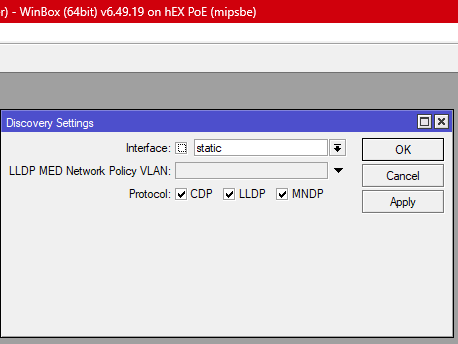
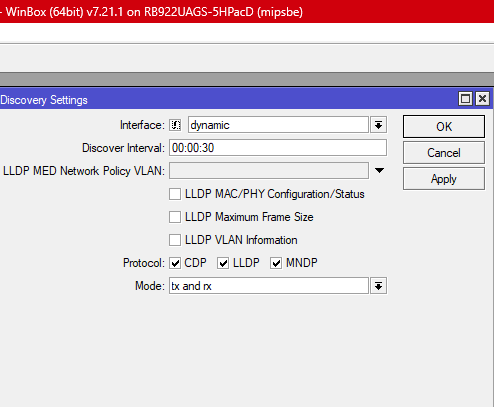
I guess your DHCP issues are caused by DHCP options/option sets and/or LLDP settings (IP Neighbor discovery settings).
I have professional VoIP phones (not Cisco but Mitel) working on MikroTik routers without issue.
Adding you have to be careful of the encoding that's needed. Some things are strings, other are ints.
Sure but in both V6 and V7 DHCP options are blank, so having to make changes from the defaults should not be required just to make a certain brand of phone work from v6 to v7, yealink and poly not an issue, using other brands of routers not an issue, the skill set and time required is not cost effective, the customer just knows “well the phone works if i take it home but not in the office, the only difference is the router/provider” it’s a simple logic that is hard to argue with.
But still it is wrong. Your MikroTik router sends LLDP packets and the phone reacts to that, your Yealink probably ignores them and your TPlink router doesn’t send them.
Cisco stuff is typically not what you give to an employee to connect at home. V7 has LLDP and V6 has not, so yes, upgrading changes things.
Post your /ip/neighbor/export output.
Oh i agree with you, but it’s about what choices the every day joe has working in the field, for example if someone buys a new Mikrotik router is usually V7, a company who buys internet from you may already have Cisco phones, these are two variables one does not have control over but the problem is there and could happen any time as hardware gets replaced or as new customers come onboard, with working from home still popular it’s not uncommon for someone to have an office handset at home to maintain the presence of working in an office ie extension numbers etc for internal calls and call plans from the office PBX.
With most applications and data being cloud based, router setup knowledge is getting weaker, just setup the WAN which is usually simple PPPoE or DHCP client, set wifi ssid and password, that’s it, so when something like LLDP comes along it’s cheaper just to swap hardware and use common logic instead of researching ROS.