Hi all,
thanks for support. I checked my rules and everything is like described in this thread…Maybe my issue is in annother details, which I did not mention!
The RB3011 is the Router but all Sonos Devices are attached to an Cisco SG350x-Switch. I followed this thread: https://support.sonos.com/s/article/2118?language=en_US.
Maybe something wrong with Multicast-Settings on the Switch.
Ideas?
I´ve checked the it now without Cisco-Switch and it is not working very well!
My Sonos Players are in Subnet vlan30 and the Controller are in vlan10. I have cofigured vlan10 and vlan30 directley on MT-Router Ports as an untagged vlan and i have connected a Windows-PC and a Sonos Play 3.
A freshe installed Windows controller on (vlan10: ether3) cannot connect to the Sonos-Network (vlan30: ether2). Windows tells me, that there is no existing Sonos-network. If I put player and controller into the same Subnet (VLAN30) everything works, and controlloer finds the Sonos-network. Once controller is connected to the Sonos-Network, I can move the Controller back into vlan10 and it works also.
Please note:
ether3 = vlan10 = 172.16.10.0/24
ether2 = vlan30 = 172.16.30.0/24
Here is an extract from my Mikrotik-config. Maybe someone can tell me, what is going wrong! I am trying since months, but I cannot find any issues in the configuration
I don’t know if this matters, but your routing PIM section in the previous post… I don’t have anything in my “RP” section of that, and it works fine. If you remove the RP entry completly does it work? I have the two vlans (sonos and control) added to interface tab in PIM and that’s it.
Hi all,
thank you for your reply, but it doesn´t change anything if I remove the RP.
What I noticed is, that the SONOS players use different UDP-Ports for communication if they try to connect to a controller. I saw a lot of upd -FW-drops in a range between 30000-60000.
If I open this range, connection to a controller is possibe. This is very interesting, because I do not find any documents about this “higher” udp-Port communication and I am not sure why this only happens to my system and others can connect to controllers with the standard port configuration.
Can someone please confirm, that he can connect a new Sonos Windows or Android Controller to the SONOS-Net Environment, without additional configuration? I can only do that, if I allow all udp-Ports in my FW rules.
My Windows and Android controllers are on same vlan as sonos players but my Mac controller is on a different vlan and that can connect to players, with the setup I mentioned in my above posts that works, confirming that the original instructions posted on this thread worked with just modifications for my vlan names and numbers being different.
If you reset the controller on your MAC (disconnect from SONOS-Net), and if you then try to register the controller again to your existing SONOS-System. Does this work with the setup above, if your MAC is in a different Subnet than the Players?
My Mac is already in a different subnet than the players, that is what works already. By Sonos-NET do you mean the WiFi network that the players create that you can connect to? Because that is what you are doing then maybe that is the problem. My devices whether they are on same vlan/subnet as players or not, are using regular WiFi connections or Wired Ethernet. No controller device is connected to the Sonos-NET WiFi network that the players create themselves.
My players are all connected to the LAN by Ethernet. The players are in vlan30, the controller in vlan10
FW between vlan10 and vlan30 is setup as above! Everything works, once controller is registered.
BUT:
If you start a fresh installed controller software on a client, the Sonos software asks you “do you want to connet to a new Sonos Sytem, or do you want to connect to an existing Sonos System”. And if you choose “connect to an existings Sonos System” the SW connects to your players and you can see the players the rooms etc.
In my Configuration:
This works only, if controller and player are in the same subnet, it works not, if controller and player are in different subnets with the FW-rules above.. I only wanted to know, if someone can add fresh installed controllers to the existing Sonos System, if players and controllers are in different Subnets.
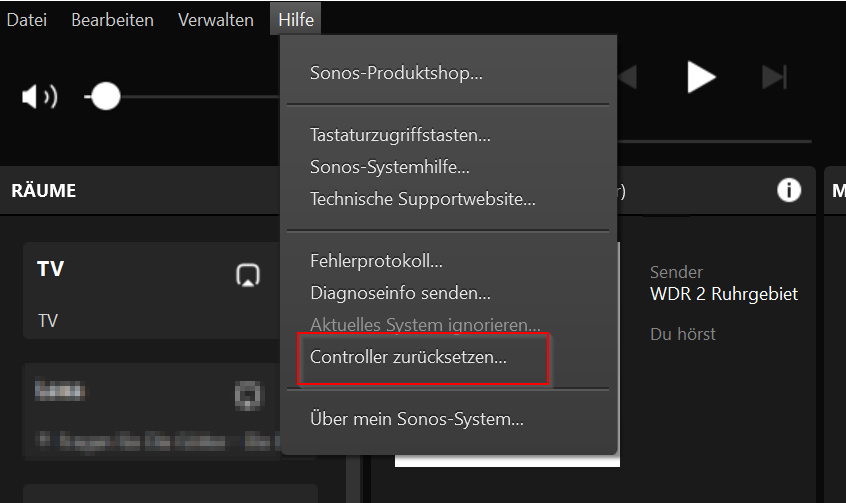
You can test this, if you select “reset controller” in the Sonos-SW under “help.”. (german version: Hilfe->Controller zurücksetzen)
Christian
Ahh okay, I don’t want to mess with actually trying it on the Mac since it’s working BUT I installed a windows 10 VM on my Mac and tried to connect a new install of sonos controller for windows and it would not find the players, just like you say. I am fairly certain that when I did the Mac months ago it did work, so maybe a recent update changed something where it can’t make the initial connection unless on same vlan as players. I am guessing also if it work when you open that large range of UDP ports, that maybe the software is using a randomly open port for connections so there is nothing you can open to predict that except a large range.
Hi ilovepancakes,
thank you so much for this test! I thought I was going crazy! None undestood my issues, but now, I have the certainty that only “operation-mode” will work with the FW-rules above!
BTW:
I also noticed, that you are not able to make Sonos Updates from a controller in a diffrent Subnet! It would be great, if you can test this also (next time when Sonos provides an update) from a controller outside the player network!
I tried an update and it didn’t work, although I tried update from controller on same vlan as players and it still seemed to fail so not sure what is going on.
Anybody have this working still? It seems Sonos controller for Mac/PC updated and broke this from working. I always had to join the controller software while connected to the same VLAN as players, however then switching WiFi networks to different VLAN, the controller still saw and controlled the players.
Now, if I do the same, when I launch the controller while PC/Mac is on another VLAN from the players, it actually sees the players and data and controls them for 2 seconds, then Sonos controller pops open an overlay saying WiFi network has changed and to change back to previous one the players are on. But it shows the players and works for a few seconds before this overlay comes up and then blocks access!! It’s almost like it stills works but Sonos put a block on the controller from working if WiFi network is a different name.
Tested using ethernet instead of WiFi too and same result. So it really seems like the controller still has a connection to players and works across VLAN but Sonos has this overlay that covers up the interface if WiFi name or ethernet network changed.
lol, yeah well I have been using this method to control Sonos from my main PC which is on a management VLAN. Guess Sonos wants to start enforcing the app actually being on same WiFi SSID or same ethernet subnet even if the players are found and displayed. Would be great if there was some way to trick the app into thinking it’s still on the same network.
Hi all,
I have the same issue with the PC Controller on Windows when the PC is in a different VLAN than SONOS Players. I am a little bit frustrated that the Controller App cannot find the System anymore. I do not have the isses from an Android Phone. Does anybody know the differences between Windows App and Android regarding the starting procedure? Both systems are in the same Controller VLAN and Players are all in the SONOS VLAN. Have nearly all Players on Ethernet (cable) and only 2 or 3 in WLAN without SonosNet at different AccessPoints. (cAP AC).
I checked with wireshark on the PC and it seems to be that the Controller App is listening to a Broadcast 255.255.255.255.255 which is send out by the players. And of courde this cannot be routed to the Controller VLAN (or does anybody has an idea how to make this happen?). The Multicast packages 239.255.255.255.250 are passing the Subnet-Borders, I can see it in Wireshark.
I was able to get control working again using latest sonos software controller and firmware versions by opening up UDP ports 32000-65535 from sonos players to my controller PC. A tip on the Sonos forums led me to check out the firewall logs and find out that random UDP ports are used now each time controller launches, so opening this range solved the issue.
I really wonder what these ports are used for though because like I said previously, when they aren’t open, control still works for 2-3 seconds after launching app on PC but then app complains about wifi network changing and it blocks the control screen with it’s popup.
Hi,
thanks for reply. But for me, that cannot be the case. I have no FW-rules between the Subnets and all the traffic is allowed. So for me it is annother issue, why this is not working.
Before the last MT-Update everythink works fine but since 6.46.6 it doesn´t work anymore. Sonos Controller is also up2date.
Update 2023-06-05: Fixed some formatting in the post
I can second this symptom and solution. Found out by watching communication on wireshark on a controller on same subnet as the Sonos Playback devices.
I have my Sonos Playback devices and most controllers on the same VLAN. But I do have a single controller on my Admin VLAN and it became a challenge to make it work as well as the other controllers.
So a total solution for me (Sonos S1 - the old version) is:
Open UDP ports 1900,32000-65535 from all Sonos Playback Devices to Controllers (or their respective interfaces if you prefer)
Open TCP port 3400 from all Sonos Playback Devices to Controllers (or their respective interfaces if you prefer)
Open TCP ports 1400, 1443, 4444 from Controllers to all Sonos Playback Devices (or their respective interfaces if you prefer)
Explanation:
UDP port 1900 is UPnP discovery, the high ports (32000-65535) are the proprietary ones also mentioned by ilovepancakes - actually, I found 50000-65535 to be enough.
TCP port 3400 is among other things used to alert the controller of the player’s presense
TCP port 1400 seems to be control commands to the player
TCP port 4444 is used for updates
TCP port 1443 is not always in use, but some encryption handshake is going on between Controller and Playback device when it’s used. I saw it used in connection with updates (port 4444)
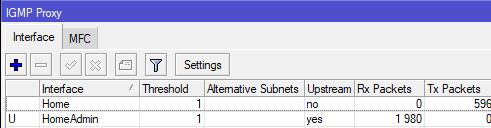
Only thing left in my case was to setup IGMP proxy, to allow the Controllers’ multicast announcement to transfer from it’s VLAN to the VLAN that Sonos is on. IGMP proxy is enough for this, as long as you do not have Controllers on multiple VLANs, because the Controller interface needs to be upstream, and there can be only one upstream. I understand that PIM SM is another way you can solve this problem, but I haven’t tried that yet.
Short setup recap:
VLAN called Home has the Sonos Playback Devices
VLAN called HomeAdmin has the Controller I wanted to connect.
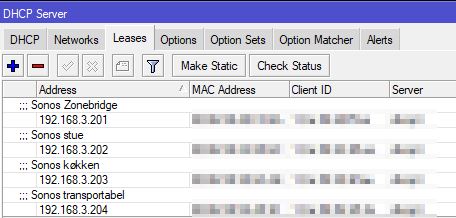
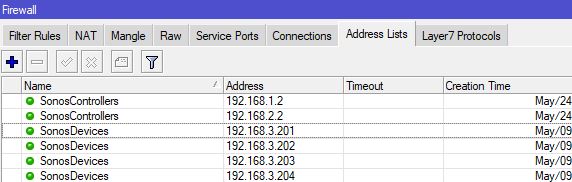
Controller and Sonos devices have statically assigned IP adresses, so I can make address lists (makes it possible to keep a rule fixed, while adding new devices - just update the address list).
Below, you will find Winbox screenshots of the relevant parts.
Static leases:
Address lists (sorry for the confusion, I forgot to remove the controller’s old IP from the list - shame on me. There should have been only 1 IP as per my explanation):
Filter rules:
IGMP Proxy:
I hope this helps someone. Took me a while to figure out.
I will post a full config, when I’m finished. My firewall isn’t ready for scrutiny yet