First, like I already wrote in the other thread(s), the tunnel workaround with MACVLAN is only really needed when you need to communicate between one side being a router's service running in main, and the other in some other VRF(s). In your test setup, the communication is between two real VRFs (not main) so normally, the usual route leaking mechanism as documented by MikroTik can be use without the dummy bridge and the extra MACVLAN.
However, WireGuard is special with regards to the source address selection, you should read this post from @lurker888 RouterOS blatantly ignores pref-src. Can this really be a bug? - #15 by lurker888 as well as the discussion in that thread for more details. The solution to work-around this involves several NAT rules as you can read from here RouterOS blatantly ignores pref-src. Can this really be a bug? - #72 by lurker888 as well as the rest of that thread.
But wait! You knew all that because you were the one who started that thread! 
Having said that, if you still want to use / abuse the MACVLAN "tunnel" solution then what follow is a "solution" to be integrated with that MACVLAN stuff.
First I will start from the easiest, that requires almost no modification to the configuration with MACVLAN, but with a big constraint. The constraint is that your WG client don't need to use that specific 192.0.2.222 WG endpoint address, and has the ability to specify the endpoint address as a private (non-public) IP address, in short, the constraint is that the WG clients are in the network managed by your router, and not coming from the outside internet for example.
I just did a test configuration and nothing much to be done for it to work. In fact, starting from the test configuration of this post: Accessing router-hosted services (DNS, HTTP, etc) from a VRF - #9 by CGGXANNX a single additional SRCNAT rule was required. And I only linked to that post for the definition of the VRFs, the MACVLANs, and the addresses. The NAT or mangle rules from that post is not required (they are needed for accessing services in main only).
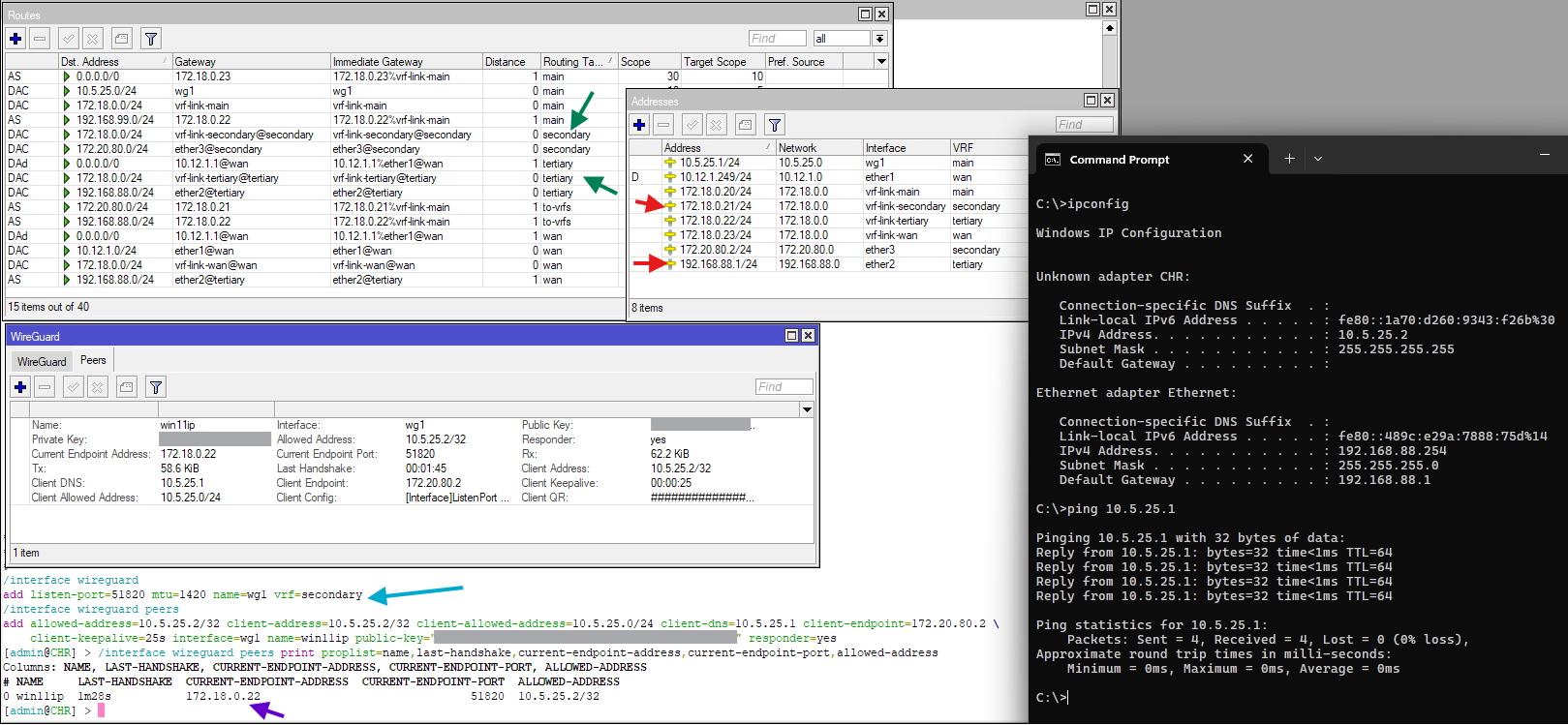
From the screenshot you can see that the Windows VM which has 192.168.88.254 as address is in the VRF tertiary. The WireGuard is set up to listen in the secondary interface. You can see that there aren't even any VRF route leaking between the two VRFs required. No routes from secondary to tertiary and vice versa.
WG client on Windows is working, and Windows is able to ping the address of the router inside WG (10.5.25.1).
Now if we apply that, starting from your configuration:
This #3 route above is not needed at all.
Same with this #4 route. It can be removed.
As for this SRCNAT rule at #5:
It's the only additional thing that is needed (as I wrote above), however the SRCNAT rule should be like this instead:
/ip firewall nat
add action=masquerade chain=srcnat dst-address=172.18.1.20 dst-port=51820 \
    protocol=udp out-interface=xvrf-main2
This is the only additional thing needed (and it replaces your #5)!
Now is the very important part: For the devices in vrf-main (those connected to the interfaces vlan3, vrrp3, etc... When they specify the remote endpoint of the WG server, they should use 172.18.1.20:51820, not 192.0.2.222:51820! And of course, it's preferable that you turn on the "Responder" checkbox in the setting of the peers of the wg-mobile interface.
That was the big constraint. The devices use the internal address inside the MACVLAN "network" as endpoint address. If the router acts as default gateway for those clients, then this work fine.
The reason why this work is:
-
The incoming UDP packet that tries to establish the handshake has destination
172.18.1.20:51820, it arrive at the router in thexvrf-mainVRF. In this VRF, the best route for destination172.18.1.0/24is the connected route specifyingxvrf-main2as outgoing interface. -
The packet, before going out through this interface, is handled by SRCNAT (the
masqueraderule above), so its source address is changed to172.18.1.21, the address attached toxvrf-main2. -
It goes into the dummy bridges and come out at the side of the
xvrf-asinterface, because this interface has172.18.1.20as assigned address. This interface is also invrf-as, so it's accepted and handled by WireGuard. -
WireGuard will create the response packet, if you read the other thread, you'll know that this packet at the beginning has the destination address
172.18.1.21, but the source address is not yet defined. -
Luckily for us, in
vrf-asthe best route for destination172.18.1.21is the connected route withxvrf-asspecified as outgoing gateway. There is no ambiguity. Also, if this route is used and the packet has no source address yet, then there is only one best address to be used as source, which is172.18.1.20attached toxvrf-as. -
As a result, the response packet will have source
172.18.1.20:51820and destination address172.18.1.21and it will be put into the dummy bridge. -
The packet will then arrive at the interface
xvrf-main2, because this interface as172.18.1.21assigned. Here connection tracking will be able to find the matching pair172.18.1.20:51820and172.18.1.21:xxxxpreviously marked as SRCNAT-ed. It will be able to undo the NAT-ing and restore the original address and port of the WG client in place of172.18.1.21:xxxx. The packet will be routed back to the client.
So this pretty straightforward. We don't even need any VRF route leaking, because the routing between VRF is through the tunnel.
The reason we needed the SRCNAT masquerade rule is because it helps selecting the correct route for the answer packet at the vrf-as side. If you don't like that SRCNAT rule, you can remove it, however, in the routing table of vrf-as you should assign routes for destination address ranges of the WG client (the addresses in xvrf-main) with gateway=172.18.1.21@vrf-as, so that the response packet can be sent through the MACVLAN tunnel.
In the next post I will outline the few modifications needed, so that 192.0.2.222:51820 can be used to specify the endpoint address in the WG client, instead of 172.18.1.20:51820.