Ha ha ah, wow, thank you for the screenshot with the Packet Sniffer. That bothered me so I decided to removed all the unnecessary stuffs from the Frankenstein config, and reduced it to this, that "works":
# 2026-08-04 17:32:27 by RouterOS 7.23.3
# system id = *******
#
/interface bridge
add name=vrf-link protocol-mode=none
/interface ethernet
set [ find default-name=ether1 ] disable-running-check=no
set [ find default-name=ether2 ] disable-running-check=no
set [ find default-name=ether3 ] disable-running-check=no
/interface macvlan
add interface=vrf-link mac-address=76:CE:75:BF:FD:3F name=vrf-link-main
add interface=vrf-link mac-address=0E:31:55:68:24:DD name=vrf-link-secondary
add interface=vrf-link mac-address=EA:00:F2:A9:1E:6A name=vrf-link-tertiary
/ip pool
add name=dhcp_pool0 ranges=192.168.88.20-192.168.88.254
/ip dhcp-server
add address-pool=dhcp_pool0 interface=ether2 name=dhcp1
/ip vrf
add interfaces=ether2,vrf-link-tertiary name=tertiary
add interfaces=ether3,vrf-link-secondary name=secondary
/interface wireguard
add listen-port=51820 mtu=1420 name=wg1 vrf=secondary
/interface wireguard peers
add allowed-address=10.5.25.2/32 client-address=10.5.25.2/32 \
    client-allowed-address=10.5.25.0/24 client-dns=10.5.25.1 client-endpoint=\
    172.20.80.2 client-keepalive=25s client-listen-port=13131 interface=wg1 \
    name=win11ip public-key="**************" responder=yes
/ip address
add address=10.5.25.1/24 interface=wg1 network=10.5.25.0
add address=192.168.88.1/24 interface=ether2 network=192.168.88.0
add address=172.20.80.2/24 interface=ether3 network=172.20.80.0
add address=172.18.0.20/24 interface=vrf-link-main network=172.18.0.0
add address=172.18.0.22/24 interface=vrf-link-tertiary network=172.18.0.0
add address=172.20.80.2 interface=vrf-link-secondary network=172.20.80.2
/ip dhcp-server network
add address=192.168.88.0/24 dns-server=192.168.88.1 gateway=192.168.88.1
/ip firewall nat
add action=masquerade chain=srcnat dst-address=172.20.80.2 dst-port=51820 \
    out-interface=vrf-link-tertiary protocol=udp
/ip route
add dst-address=172.18.0.0/24 gateway=vrf-link-secondary@secondary \
    routing-table=secondary
add dst-address=172.20.80.2/32 gateway=vrf-link-tertiary@tertiary \
    routing-table=tertiary
add dst-address=192.168.88.0/24 gateway=172.18.0.22@main routing-table=main
Let's look at the export in details: Gone are the WAN stuffs, as well as the PPPoE stuffs, and all the DSTNAT and manging that make the router's services in main accessible. What left are:
-
On
ether2LAN192.168.88.1/24with DHCP server intertiaryVRF. -
A
secondaryVRF where WireGuardwg1is listening, as well asether3with main IP address172.20.80.2/24(my PC at172.20.80.1is connected to this). -
Subnet inside tunnel is
10.5.25.1/24and is inmain. Remote peer has10.5.25.2. -
Win11 with WG client connected to
ether2getting address192.168.88.254via DHCP (is intertiaryVRF). WG client is listening on port13131. -
Win11 WG client connects to endpoint address
172.20.80.2which is part of thesecondaryVRF on the CHR.
Now for the MACVLAN tunnel part:
-
Dummy bridge
vrf-linkwith 3 MACVLANvrf-main,vrf-secondary,vrf-tertiary, with address assignment:/ip address add address=172.18.0.20/24 interface=vrf-link-main network=172.18.0.0 add address=172.18.0.22/24 interface=vrf-link-tertiary network=172.18.0.0 add address=172.20.80.2 interface=vrf-link-secondary network=172.20.80.2With
vrf-link-secondarygetting a/32address assignment being the same as the address onether3,172.20.80.2. -
Because
vrf-link-secondaryonly automatically gets a dynamic/32route from the address assignment, we also manually add the route to172.18.0.0/24with the MACVLAN interface as gateway. The purpose is so that when we have the a return address172.18.0.22it's directed to the MACVLAN tunnel, toward the other MACVLAN on VRFtertiary:/ip route add dst-address=172.18.0.0/24 gateway=vrf-link-secondary@secondary \ routing-table=secondary -
And the route in
tertiarythat tells that destination172.20.80.2/32is directly connected tovrf-link-tertiary:/ip route add dst-address=172.20.80.2/32 gateway=vrf-link-tertiary@tertiary \ routing-table=tertiary -
And we have the SRCNAT rule that changes the source address of the WG packets going out of
vrf-link-tertiaryto172.18.0.22:/ip firewall nat add action=masquerade chain=srcnat dst-address=172.20.80.2 dst-port=51820 \ out-interface=vrf-link-tertiary protocol=udp
All that is already known from the previous post, and logically that should be all what needed for the WG tunnel to work too.
However, that's not the case, without this extra route in the main table the tunnel doesn't work!!!
/ip route
add dst-address=192.168.88.0/24 gateway=172.18.0.22@main routing-table=main
If that route is present and enabled everything works, if that route is disabled, the handshake hangs and never completes!
Now let's look at the original config in the older post that also worked. Actually this route in main to reach 192.168.88.0/24 also existed there, just not explicit, but as combination of these two routes:
which directs the packets (because 192.168.88.x is satisfied by 0.0.0.0/0 ) to the gateway 172.18.0.23, which is the address on vrf-link-wan of VRF wan. The packets will be received on that interface, and in VRF wan we have this route:
that knows where to put the packets for destination 192.168.88.0/24.
So the response packets being sent to 192.168.88.254 were pushed through vrf-link-main and vrf-link-wan as a result, and you saw them your the sniffer screenshot.
In the new reduced configuration that detour route has been replaced by:
/ip route
add dst-address=192.168.88.0/24 gateway=172.18.0.22@main routing-table=main
But the fact is still the same: we need to provide a route in main that is able to reach 192.168.88.0/24, otherwise the handshake will not work  .
Indeed, when I look at the connection table when the tunnel between 192.168.88.254:13131 and 172.20.80.2:51820 is established and working, I see this:
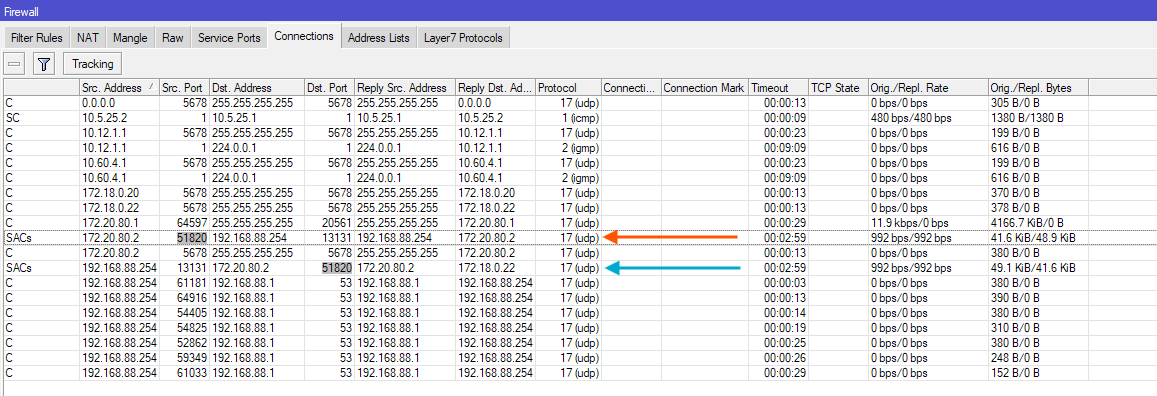
We have the blue expected connection entry, with correct NAT information (Reply Dst. Address 172.18.0.22 from masquerade). And we would think that when the packets go out of the tunnel on the vrf-link-secondary side, another conntrack entry would have been created between 172.18.0.22 and 172.20.80.2. But we don't see that.
Instead there is a conntrack entry as pointed by the orange arrow, that has source 172.20.80.2:51820 (ok, understandable if this is catching the return traffic when the WG side of the router response), but instead of the expected destination address 172.18.0.22 (because that was what WG see incoming, 172.18.0.22 is also listed in the Current Client Enpoint field), we have the original source address 192.168.88.254:13131 as destination!!!
And what is even more strange, is that this conntrack entry has a SRCNAT applied to the 172.20.80.2:51820 source:
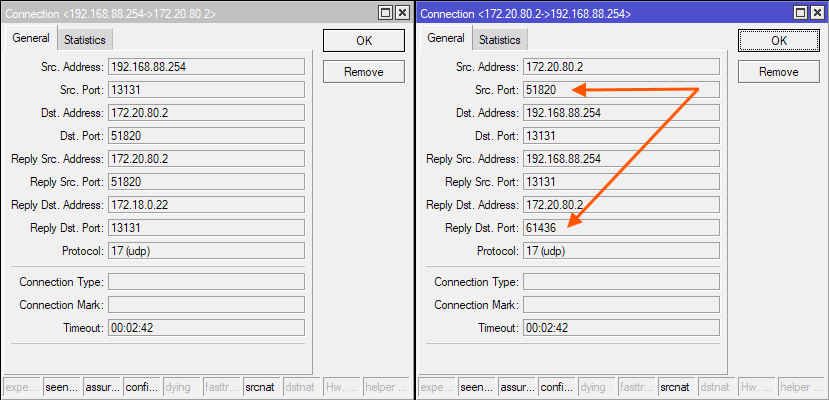
But the configuration only has a single SRCNAT rule that should solely act on the 192.168.88.254:13131 source!
/ip firewall nat
add action=masquerade chain=srcnat dst-address=172.20.80.2 dst-port=51820 \
    out-interface=vrf-link-tertiary protocol=udp
So how did this connection that absolutely requires the route in main come out of existence??? I have no idea how to explain this at all. You've been correct all the time with this take:
