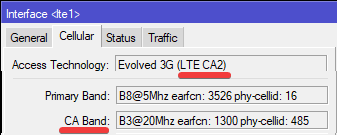
after reboot or at+reset or atcell=2.3… or atcell=0 i always retrieve CA but not long, some time i loose CA after 30mn or 7h, don’t understand why. I loose much bandwidh like 20 or 30 Mb/s (with CA i have near 70mb/s).
I do many many many testing and on my fw:22 I see that
Reboot/ usb power-reset / at+reset → those tree fix the ca-band - means always after one of them, the ca-band can works.
But if I do:
from 1-3 times disable&enable lte1 interface then ca-band do spoil/crash means not be assigned to current connection anymore.
from second time or more the CellLock then ca-band do spoil/crash means not be assigned to current connection anymore.
from second time or more the Disable CellLock (at*cell=0) then ca-band do spoil/crash means not be assigned to current connection anymore.
This give summary:
The Fast reconnect via celllock enable/disable is possible but it disable ca-band pernament from sencond use. Only first at*cell set a setting with ca-band - all next are without ca-band.
To setup CellLock or disable celllock or do re-enable lte1 I must always do additional reboot / usb power-reset / at+reset to reach ca-band again.
Ca-Band can be flapping etc. but when signal are better then it’s have got longer connectivity. One ISP disconnect me ca-band but it’s because not generate traffic and after I add some dummy bandwith-test every 10m with limited qos then ca-band is provided constancy. This depend from your ISP policy.
You can monitor this by doing every 1s this command, with enable lte logging and specific print like:
interface lte at-chat 0 input="at+eemginfo\?"
log print follow-only where message~"EEMLTEINTER:|EEMLTEINTRA:"
Play with them, description in google.
.
There is 30 to 40 clients who is connected (with QOS at 3mb/s down and 2 up => i have near 30mb/s on upload but CA is don’t use with upload…) then loose 20 or 30Mb/s is much and clients feel it.
unfortanly even at+reset is a bit too long 1mn30s it’s too much if i have to do action script every 5mn to execute at+reset
In your place when you work like ISP… then the 2xLTE will be better with MultiWAN policy. Of course $… you can write a script who will be check ca-band and do changes on QoS policy base on PCQ.
I haven’t any faster way to do re-connection then at*cell who disable ca-band but do a fast re-connection.
I try many AT Commnand’s about LTE topic from many at command papers… .
If I have some new fresh info then I write it here.
.
Packet’s with us Beer accepted on MUM in Prague.
Is there any way to check if CA is actually being used on the device? (i have a cat 6 version but i see no improvements over and above the previous model).
Of course, you must have computer or mobile phone and some time.
First is read post on what you answer.
Second is to read a https://wiki.mikrotik.com/wiki/Manual:Interface/LTE
When information in documentation are not work for you then you should search assistant like forum/irc/etc.
CA-BAND works but it depend from your ISP.
At R11e-LTE6 with CellLock remember to do at+reset who bring you ca-band again if your ISP give you it.
Read this topic.
Write more specific question because “i see no improvements” it’s opinion, not question.
P.S. I is always from BIG letter.
You search stg like this:
Only you say about this at this forum. At other channel like IRC/FB no one say about difference.
Yes, I remember that you write that the same settings / band etc. and differ results of ping response.
Please be sure that eNB and CellID are the same on both device when you doing test ping or do CellLock to be sure.
Next please be sure that FW of MODEM are latest.
r11-lte6 → v20
r11-lte → MikroTik_CP_2.160.000_v013
r11-lte-4g → v9
r11-lte-us → v16.02.183961
sxt lte 3-7 → v???
and finally do supout.rif and send both to support@mikrotik.com - I am not a MTK programmer or designer and please ask a vendor itself.
At LTE6 the primary band is for signal and ping response that way I use CellLock on B3 and worse B8 speedtest/ping and that way I always have got good speed. Remember that 2CA is two-directional but primary-band give you all main parameters..
I just buy it in Friday and wait for delivery LHGR+R11e-LTE6 and RBM11G and pigtails m50 antenna etc..
I have got currently SXTR+R11e-LTE6 and SXT LTE 3-7.
As you can see - both modem-s are the same: R11e-LTE6 on sxtr and lhgr and I have NOT any r11e-LTE itself to compare ping response.
You can do it and ask vendor. Please send e-mail to support@mikrotik.com and ask them about this. Maybe they give you a sure to do warranty rma or give you a newest modem firmware like me (v22).
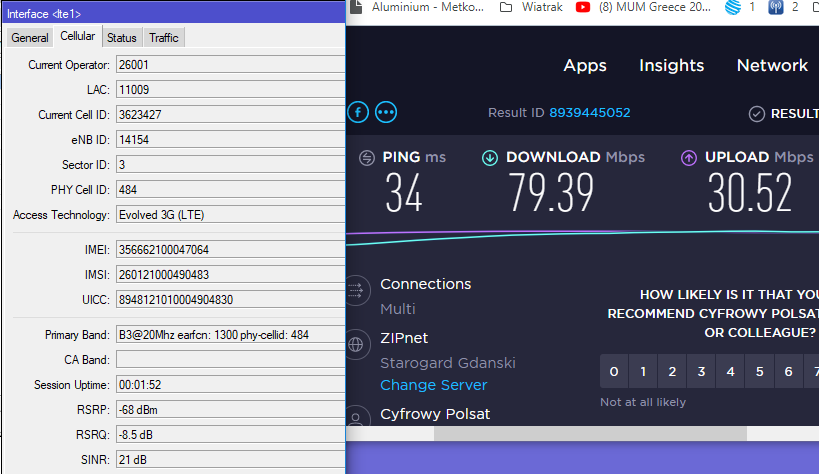
When I go to with my sxtr+lte6 to my BTS and from car, after 23:00, 600m from eNB who have antenna at ~75m) I receive that parameters:
and I do similar test very neat to other one bts. All ping response at B8/B3 are 30-40ms.
I plan today go with the same test but with other SIM ISP who have additional Band like B3/1/7 and I can test the bonding on sxtr to check if is possible to cross the FE.
Your test answers my question. You don’t loose speed ping with your lte6. I don’t think there is a difference between SXT lte6 and LHT lte6, so it’s probably the relationship between my LHG LTE6 and my antenna relay that makes me lose a bit ping speed
I have SXTR LTE on roof, and Rb750gr3 in house, want to go over 100mbps between them with 2 interfaces.
I make bonding eth1 and eth2 on no default configuration,on both routers, assign ip adress on bonding interface SXTR 192.168.88.1 and Rb750gr3 192.168.88.2
All ok, ping work, Rb750gr3 see SXTR LTE,
but on winbox cant see SXTR LTE and reach that router for further configuration?? Must again go to roof and reset SXTR LTE configuration, please provide workig script example bonding, dhcp,nat for SXTR. Thanks
.
I thinks this just work. I always enable RoMon and be sure that mac-telnet works on all interface.
If your RB works with “interface list” then you should add the ether1,ether2,bonding1 into “LAN”.
WinBox > Tools > Mac Server > Mac WinBox Server > all > OK.
I cannot currently reset my sxtr into no-default to share configuration but I do that testing with bonding in past.
My near bts is to slow and my ISP give me 80/30Mb on distance 600m - then the FE is not limitation…
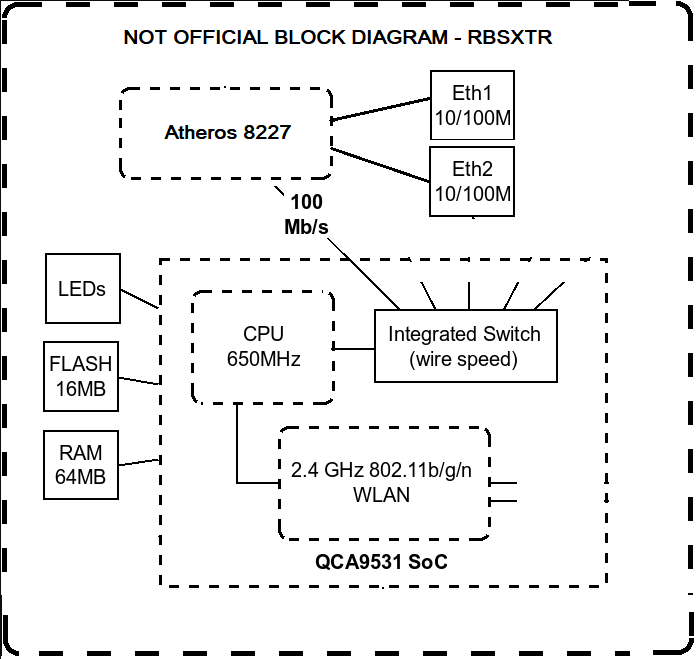
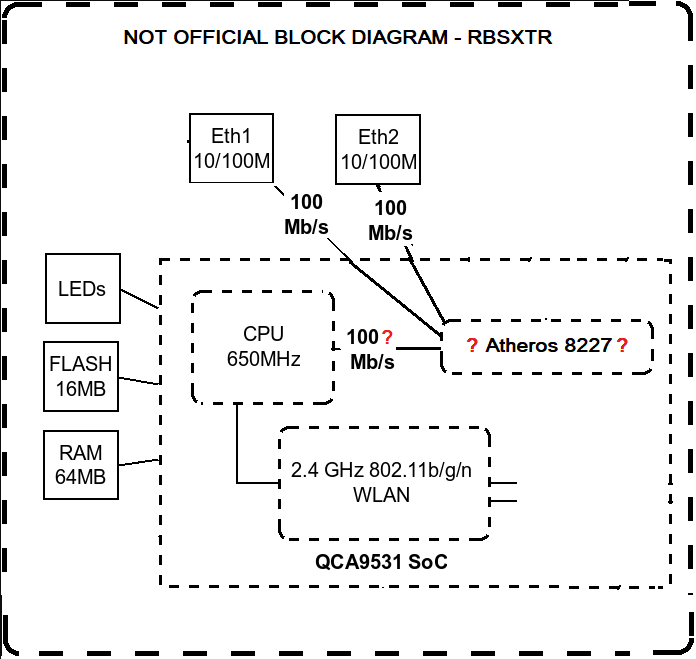
Please share your results because I not do next test in short time range with other ISP and other eNB to proof limitation of 100Mb… currently I must think that SXTR has one of both Block Diagram (base on other QCA9531 block diagram)
Option one
Option two
.
I hope you can reach more then 120Mbps-190Mbps in DL by 2CA of 2x@20Mhz band’s. Good Luck and give feedback.
PS. I will have some free time in 1.03.2020 and you can write me to my Telegram.
I read again carefully this thread and post from user SiB have all i need! Thanks SiB!
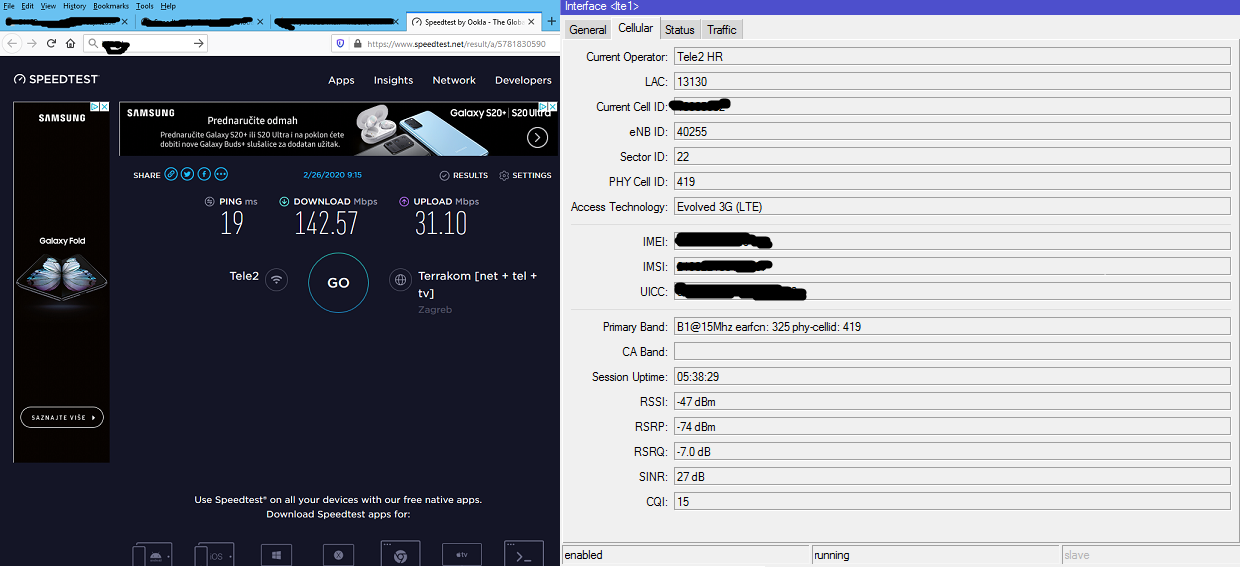
I have managed bonding and setup SXTR LTE over RoMon, MAC connection from Rb750gr3, all work perfect now 197Mbps is max ethernet speed but my isp provider do 150 Mbps, still better than 97Mbps, thanks again!!
I understand that you do a Bandwitch test between MT<>MT to receive/transit/both the 197Mbps.
.
but my isp provider do 150 Mbps, still better than 97Mbps, thanks again!!
First person who hit >100Mbps. THANK YOU. I must do again my tests with other BTS and ISP who can have @20+@15Mhz at B3/B1/B7.
Please provide the screenshot of speedtest.net/run and WinBox > LTE > interface lte1 > Cellular tab with parameters you receive. If you want to be incognito you can send it ty my Telegram (signature).
 Beer accepted on MUM in Prague.