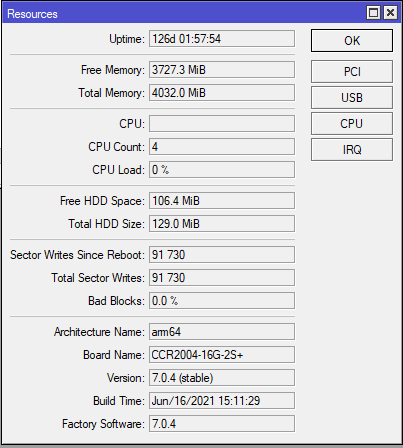
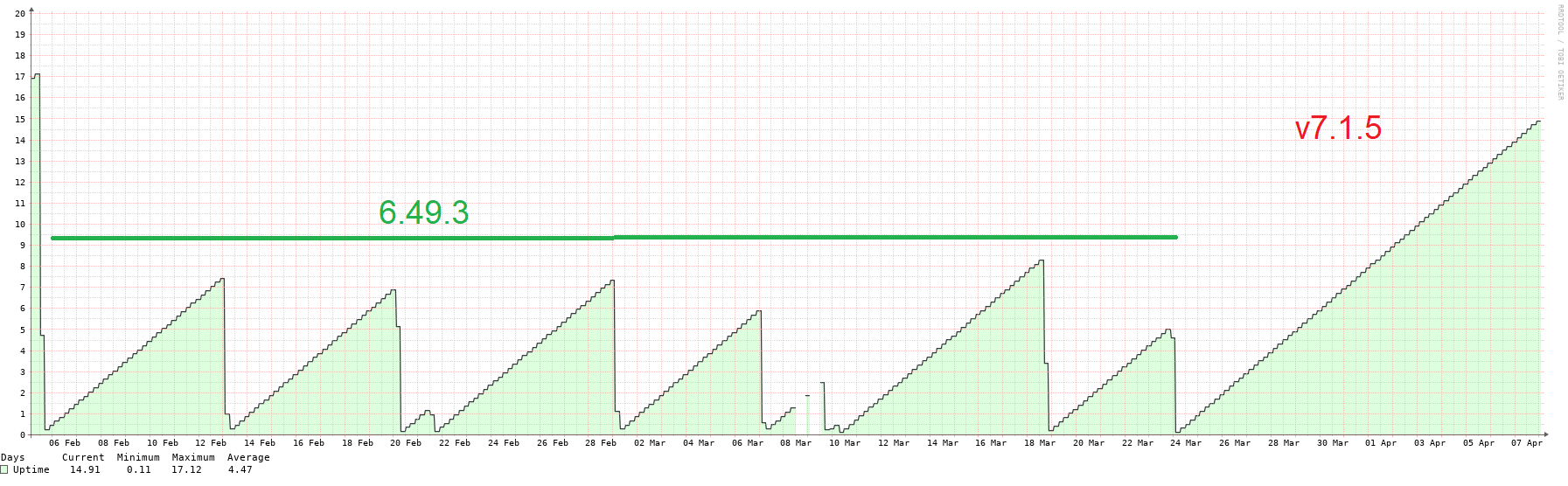
for version 6.49.1 (stable)
sergejs b. indicates the following
There are two potential fixes for the particular problem.
Soft fix to modify queues,
/queue type set ethernet-default pfifo-limit=300
/queue interface set [find where queue!=no-queue] queue=ethernet-default
There are few important fixes in v7 regarding that matter, we can provide you with 7.3beta packages, if you have an option to use beta packages on your device.
Those soft fixes about que related changes fixes nothing. You still get reboots.
And yes, 7.3beta15 fixes this reboot issues permanently and it will soon get on stable 7 series, they are not sure about including it in v6.
I am on 38days uptime.
It looks like RouterOS 7.2 RC5 that came out today includes the CCR2004 fixes. I’ve not had a chance to update our CCR2004s just yet to see if it helps
I am with 49 days uptime with v7.3beta15.
So, this fixes my issue permanently.
Those changes are added to latest rc which is v7.2rc7 and will be added to stable v7.2 release soon.
But support is not sure when these fixes will be added to v6 branch.
So guys, try latest rc.
Thank you very much for everyone, who helped us with the provided information, feedback and for the patience.
It took us unusual effort to nail this one, and hopefully biggest part of mysterious reboots should be fix with this commit,
What’s new in 7.2 (2022-Mar-31 12:11):
*) ccr2004 - improved system stability on CCR2004-12S+2XS;
P.S.
As v7.x is a little different than v6, currently fix backporting might take unreasonable amount of time, and it should not be expected at v6 at the particular moment.
Ah yes “long term support”.
So correct me if I am wrong. We’re left to choose if we want to keep rebooting our production routers every week, or upgrade to a beta quality release with missing/incomplete features and no upgrade path from 6 that doesn’t end into to a broken configuration?
So far (admittedly before 7.2, we haven’t been trying that yet) we haven’t had a single 6 > 7 upgrade that did not need manual adjustments to work as intended. Mainly in the router filters/bgp area
OSPF has plenty of instabilities compared to 6.x (or it has in a network with mixed 6.x, 7.x devices)
BGP had dozen of issues we ran into, missing features too, sometimes it even just doesn’t advertise prefixes unless you manually flap the peer
We had a number of instances where a learned route was withdrawn and not shown in the UX/CLI but was clearly still in the kernel routing table and kept active until we flapped the relevant interfaces. This happens in 6.x very occasionally, but started to happen regularily in in the upgraded 7.x boxes
connecting to a 7.2 crashes older winbox (all of them, if you have 32 windows open)
not to mention, configurations are incompatible, so we need to migrate our internal provisioning tools
We have 500+ mikrotik devices in the internal network plus some 3500 as CPEs, can’t just click a button and hope for the best.
Could you specify such setup, where adjustment is required? So we can fix it shortly. (based on my experience filter converting works on 99.99% even with 7.1).
2)3) Once again OSPF is rock solid at 7.2. Regarding BGP/OSPF, make sure you are not redistributing full feed later by OSPF.
We didn’t notice reported things in the reports. It would be nice to get more information (support@mikrotik.com).
Winbox has been dramatically improved, newest version required for it.
Yes, I can confirm it.
Running 54 days and no reboot. ( With private built of v7.3rc15 which contains same fix as v7.2 contains. )
Before, only 15 days was max for me.
We have two new CCR2004-1G-12S+2XS, coming from different batches (one came with ROS6 and the other with ROS7).
We run a BGP connection with 2 providers but with multiple connections (main / backup).
We are seeing a memory leak, the routers are eating around 80MB of memory each day.
The issue is that because of this, when the memory usage reaches around 2GB the routers get stuck and must be rebooted.
There is nothing else configured, only the BGP and some drop rules in the Firewall. We also tried with SNMP enabled / disabled, makes no difference.
This happens on ROS 7.2 as well as on the 7.3.1. Downgrading to ROS 6 isn’t an option since one of them came with 7.
For now we’re rebooting every 2 weeks, during the night, to avoid downtime… but this isn’t a long term solution.
Already registered, from incomprehensibility.
I have two CCR2004-1G-12S+2XS.
One was recently installed.
Both work in “cluster”, 100vlans are up on the interfaces. About 100 vrrp int. DHCP in 30 vlans, and ospf.
And here is one of them, which was taken not so long ago over the past 2 weeks, has already rebooted 1 time with the watchdog log.
After the first case, I decided to disable watchdog. Now, 4 days later, it’s stuck again. But already without a reboot, because. apparently watchdog - still worth turning on.
At the same time, the router that is in stand-by status is rebooted, the traffic on it goes up to 300 meters.
And on the main gigabit and rare peaks up to 3 gigabit. The firmware on the first is 7.3.1, on the second it has already been updated to 7.4
And also an incomprehensible story with SFP +:
There is Cisco Nexus3500 C3548P-10G and Mikrotik CCR2004-1G-12S+2XS.
There are SFP+ modules (10G) mikrotik, fang hang, ubiquiti.
I’m trying to raise a link between two pieces of iron between them, and it does not rise.
Tried a couple of different sfp modules. Mess around with negotion. Change patch cords.
Thus for example between Nexus - and other cisco the link rises without problems. Mikrotik to Mikrotik - no problem either.
Signal levels on both sides are shown as normal. (All within one rack)
And as a workaround, I temporarily solved the problem like this:
I took CCR2004-1G-12S+2XS.
I connected one sfp module to it. I connected the second sfp module to the neighboring interface, raised the link between them without any problems.
After one of these sfp modules I quickly switch to nexus, connect optics and everything starts up. Everything is working. Until the link falls, or any piece of hardware is rebooted.
This raises the question of what is wrong and how to live with it.