Unless know you really need mDNS, devices like Chromecast and Apple TV use other discovery protocols (like DIAL and SSDP) that work with PIM-SM and, guess what, this feature has always been in ROS in the Routing menu and it’s simple to set up! Try PIM-SM first before going down the container and AVAHI rabbit hole.
UpRunTech,
The title and introduction really describes what this project does. SSDP and mDNS/Bonjour/ZeroConf mostly use a TTL of 1 and most of them only like to accept source IPs from their own network. That is not possible with PIM-SM. Next to that, this solution has advanced filtering solutions which are described in the start post, you will likely need, otherwise why would you segment your network in the first place. Most use-cases, less traffic + more security are covered by this solution, whereas non of them are covered by mikrotik routing as it does not have layer 7 inspection for session recognition.
This solution is not targeted as a Multicast routing replacement, because it isn’t. Or a dumb avahi repeater because its better. It a solution for service specific devices supporting SSDP, mDNS/Bonjour/ZeroConf on different networks with state-full sessions and L7 protocol security all in one container, one binary.
Add veth1-reflector as tagged port to the vlans you want to use.
Change the bridge to your bridge and vlan-ids to the vlans you want to use.
Please note, these commands open an editor, to save the changes press ctrl+o to exit the editor. Interfaces are comma separated, so if you want to add multiple interfaces, add a comma between them.
/interface/bridge/vlan/edit [/interface/bridge/vlan/find bridge=bridge1 vlan-ids=100] tagged
/interface/bridge/vlan/edit [/interface/bridge/vlan/find bridge=bridge1 vlan-ids=101] tagged
/interface/bridge/vlan/edit [/interface/bridge/vlan/find bridge=bridge1 vlan-ids=103] tagged
when you have a switch chip device like RB450GX4, is the above setting still applicable or should it be done differently ?
From manual: > https://help.mikrotik.com/docs/display/ROS/Bridging+and+Switching#BridgingandSwitching-BridgeVLANFiltering
Currently, CRS3xx, CRS5xx series switches, CCR2116, CCR2216 routers and RTL8367, 88E6393X, 88E6191X, 88E6190, MT7621 and MT7531 switch chips (since RouterOS v7) are capable of using bridge VLAN filtering and hardware offloading at the same time, other devices will not be able to use the benefits of a built-in switch chip when bridge VLAN filtering is enabled. Other devices should be configured according to the method described in the Basic VLAN switching guide. If an improper configuration method is used, your device can cause throughput issues in your network."
while the above setup works with different vlans setup on the router, was wondering how to get it to work when router has wireguard enabled and me as road-warrior would like to use homekit (with an iphone) when connecting via wireguard from outside home.
have noticed that applehomekit has quirky behavior especially when you roam from wifi to cellular and back to same wifi (with vpn like protonvpn always enabled/on). it does not work correctly when you roam and come back to same wifi (on IOS)
fabulous work, was able to get this working well on my RB5009 and Google devices! only issue I ran into was the script at the end of the guide to have the container rebuilt and restarted - it didn’t work at all and I’m not sure why. I was able to get it run manually. any suggestions would be appreciated!
Thanks
the container works great; airplay, airprint and sonos are fine.
But in the log I find from timt to time a info message (no warning nor error). All in the high ports 46272, 52158, 59148. What does this mean? Is there anything to do to avoid this?
time=2024-04-04T15:22:38Z level=info msg=No matching SSDP session found with SSDP request/advertisement src port 46272.
Thanks very much for this. I’ve got it working fine. Are there any changes in the configuration needed for IPv6? Does it make sense in packet sniffer to see veth traffic to WAN interfaces/outside of the network?
I had to reinstall for other reasons and now I’m getting errors. Any help would be appreciated!
importing remote image: ghcr.io/nberlee/bonjour-reflector, tag: main
/terminal (*5 = /container add comment=bonjour-reflector interface=veth1-reflector logging=yes mounts=reflector-config remote-image=ghcr.io/nberlee/bonjour-reflector:main root-dir=containers/reflector start-on-boot=yes)
unexpected response from container registry: Idle timeout - connecting
was unable to import, container f900fb58-ec6f-4f9c-84d1-a389450cabd9
I think you need
/container config set registry-url=https://ghcr.io tmpdir=tmpfs/pull
Help! 
Still can’t get it to load the container…
I run the script with the following:
:local tag “ghcr.io/nberlee/bonjour-reflector:main”;
:local interface “veth1-reflector”;
:local containerLogging “yes”;
:local mount “reflector-config”;
:local rootdir “containers/”;
/container config set registry-url=https://ghcr.io tmpdir=mdns/pull (I have tried tmpfs/pull as well - no luck - I have plenty of memory to store files on the router itself without needing a USB stick)
/container mounts add dst=/config name=reflector-config src=“” (the config.toml file is in the router’s root directory)
/container/add remote-image=ghcr.io/nberlee/bonjour-reflector:main int=veth1-reflector root-dir=containers/ mounts=reflector-config logging=yes start-on-boot=“yes” comment=“bonjour-reflector”
LOG MESSAGES BELOW:
importing remote image: ghcr.io/nberlee/bonjour-reflector, tag: main
item added by winbox-3.40/tcp-msg(winbox):pfturner@172.23.221.134/script:recreate-reflector-container (*6 = /container add comment=bonjour-reflector interface=veth1-reflector logging=yes mounts=reflector-config remote-image=ghcr.io/nberlee/bonjour-reflector:main root-dir=containers/ (I don’t know why the *6 is there? Are previous attempts retained?)
unexpected response from container registry: Idle timeout - connecting
was unable to import, container 2e48af3b-5e9b-4e8e-8962-f3951d2ccdde
below is a full working version of script. change interface,mount,rootdir,mytempdir variables to suit your env and it will work.
also my mount details: reflector_config is /sd1-part1/container/reflector_config mapped to /config.
Note: i believe root directory has to be named “reflector” for it to work.
:local tag "ghcr.io/nberlee/bonjour-reflector:main";
:local myregistryurl "https://ghcr.io"
:local reflectorcomment "bonjour-reflector";
:local interface "veth1-reflector";
:local containerLogging "yes";
:local mount "reflector_config";
:local rootdir "sd1-part1/container/reflector";
:local mytempdir "sd1-part1/container/pull";
:local startonboot "yes";
#:local mydns "1.1.1.3"

#pinghost for internet connectivity check
:local pinghost "ghcr.io";

# check if container is already running and remove stopped containers
foreach container in=[/container/find comment=$reflectorcomment] do={
:local status [/container/get $container status];
if ($status != "running") do={
   :log warning "reflector was in stopped status. removing it"
    /container/remove $container;
}
if ($status = "running") do={
    :log warning "reflector already running.nothing to do"
    :error "container already running";
}
}

# test if we have internet connectivity
:local continue true;
:while ($continue) do={
do {
    /ping address=$pinghost count=1;
    :set continue false;
} on-error={
    delay 1s;
}
}

/container/config/set registry-url=$myregistryurl  tmpdir=$mytempdir
:local reflector [/container/add remote-image=$tag int=$interface root-dir=$rootdir mounts=$mount logging=$containerLogging start-on-boot=$startonboot comment=$reflectorcomment];
:while ([/container/get $reflector status] != "stopped") do={ :delay 1s; }
/container/start $reflector;
:log warning "reflector was added back and started"
Hi, I’m new here, and pretty new to setting up vlans on mikrotik devices, but I do have a working home network on a hAP ax^3. It’s a very simple setup, its just the router with 1 bridge and 3 vlans. Now i need to get my apple homekit device into homeassistant, specifically an Aqara presence sensor and a few chromecast devices.
I have run through this guide and I think I have everything configured correctly. But things just don’t feel right (i can see and cast to the google devices, just not the aqara sensor via homekit). As I see lots of tx in the packet sniffer, but only a few rx very rarely, I want to look into the verbose logs as described in the troubleshooting section of the guide. I have added “/bonjour-reflector -verbose” to the Cmd in the container settings, but I’m unsure where the logs go? Can someone point me in the right direction please?
Can someone point me in the right direction please?
They should be in the mikrotik Log. You should see at least one line during startup about the CPU. Something like Leaving GOMAXPROCS=8: CPU quota undefined even in -verbose is not configured.
If you do not see this line, please ensure that Logging checkbox is ticked in the container configuration. And System → Logging has:
topic=container action=memory
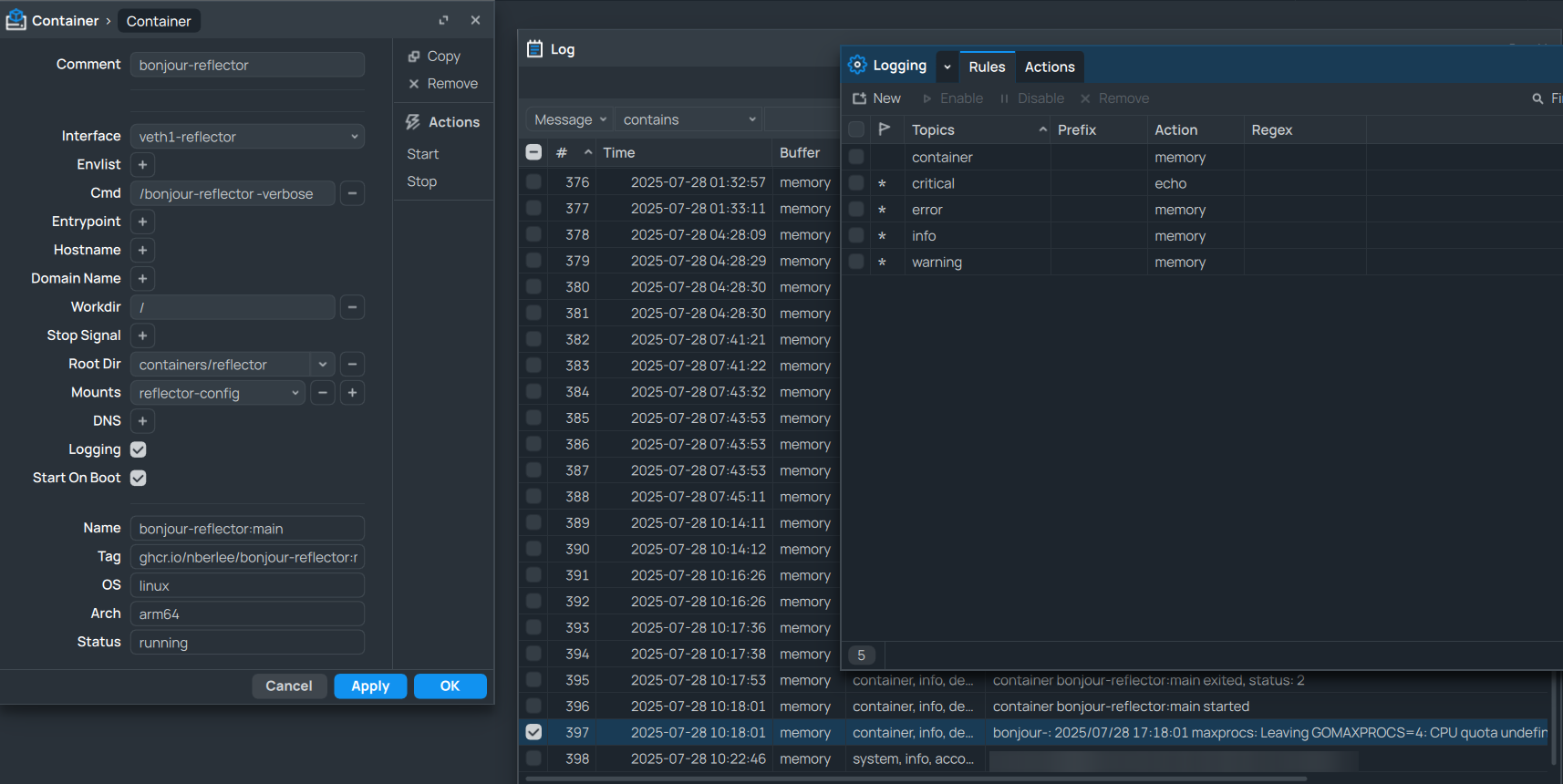
Hey folks. First off - thanks so much for this. I one we got mDNS reflectors fairly recently but this gives the level of control that I’ve been looking for and adds support for things like SSDP.
After setting it up, I can AirPlay/cast to my tv, connect to my sound bar and control my Apple TV from my phone again so most stuff works great.
However, has anyone got any experience of LG ThinQ client? Even though I can AirPlay to my LG tv from my phone, the LG ThinQ app still thinks my TV is offline. I can see traffic from my phone to ports 5353 and 1900 going through the veth interface but still no connection.
If anyone has any ideas that would be much appreciated.
First of all thanks for the great work! I was able to configure and run the container. I cannot however make my LG TV work. I cannot even see it in the list of available devices (works fine in the same VLAN of course). It uses SSDP. I have confirmed with packet sniffer that packets are flying both ways. I can see the SSDP packet from my phone in VLAN 101 begin reflected to VLAN 103. After that TV should attempt to send a unicast packet directly to my phone, but that does not happen (I have allowed all forwarding in FW for the duration of this test).
I am getting a lot of these (not sure if it’s relevant):
Got a packet that is not a SSDP query, response or advertisement
Any ideas what might be wrong? I’m on RouterOS 7.20.4.
This is my config (TV is in VLAN 103, client is in VLAN 101):
net_interface = "veth-mdns"

[devices]

    [devices."B0:37:95:C5:60:BE"]
    description = "TV"
    origin_pool = 103
    shared_pools = [101, 105]

    [devices."08:3A:88:D3:D4:48"]
    description = "Sony Soundbar"
    origin_pool = 103
    shared_pools = [101, 105]

    [devices."48:B0:2D:B1:DE:62"]
    description = "NVidia Shield"
    origin_pool = 103
    shared_pools = [101, 105]

[vlan]

    [vlan.101]
    ip_source = "10.1.1.99"

    [vlan.103]
    ip_source = "10.1.3.99"

    [vlan.105]
    ip_source = "10.1.5.99"
It should not be firewall, right? Discovery process should be fully proxied through the reflector. Or is it? 
I have figured it out. My TV was rejecting requests from other subnets. Srcnat helped and now everything works.