Your current version is easy to analyze. Work just after rsrp|rssi goes to wrong value. Current script works perfect OR change SIM-Slot in madness frequency ?
We can add some latency and average but without your feedback I don’t know if I can help with something or not.
Maybe script should monitor time of last change a sim-slot to not change to often.
Detail about script, The main section is long but this is fast to edit and you not must change this idea into function. My changes not change a current functionality
# Check if LTE is connected
if ($isConnected=true) do={
    :local Info [/interface lte info [find name="lte1"] once as-value]
    :local isRsrp ($Info->"rsrp")
    :local isRssi ($Info->"rssi")
    :log info message="$Info"
    # Check which SIM slot is used
    :if ($simSlot="up") do={
        # If "up" (UNICOM) slot, check Rsrp or Rssi
        :if ($isRsrp<-105 | $isRssi<-110) do={
            :log info message="Rsrp less than -105dBm, switching to SIM DOWN (CM)"
            :system routerboard modem set sim-slot=down
        }
    } else={
        # Else "down" (CM) slot, check Rsrp or Rssi
        :if (!$isRsrp<-101 | $isRssi<-110) do={
            :log info message="Rsrp less than -101dBm, switching to SIM UP (UNICOM)"
            :system routerboard modem set sim-slot=up
        }
    }
} else={
    :log info message="LTE interface did not connect to network, wait for next scheduler"
    :if ($simSlot="down") do={
        :log info message="DOWN slot No sim Switch simslot to Sim UP"
        :system routerboard modem set sim-slot=up
       } else={
        :log info message="UP slot No sim Switch simslot to Sim DOWN"
        :system routerboard modem set sim-slot=down
       }
}
FINAL SCRIPT: My version is :
  # Change the LTE Slot when the RSRP or RSSI is to too bad.
  if ($isConnected=true) do={
    :local isRsrp ([/interface lte info [find name="lte1"] once as-value]->"rsrp")
    :local isRssi ([/interface lte info [find name="lte1"] once as-value]->"rssi")
    :if ($isRsrp<-105 | $isRssi<-110) do={
      :log info "LTE modem is switch to other sim slot."
      :if ([/system routerboard modem get sim-slot]="up") do={/system routerboard modem set sim-slot=down} else={/system routerboard modem set sim-slot=up};
    }
  }
} else={
  :log info ("LTE modem did not appear in ".$LteInitTime."s, trying power-reset")
  /system routerboard usb power-reset duration=5s
}
Why you resign from /system routerboard usb power-reset duration=5s and do just change sim-slot ?
Maybe this part should be like… if (“up” no connect in 60s) then (switch to “down”) and if (still not connection) then re-power. This “way of working” must use a Function, FailCounters, FailRePowerCounters. Just my thinking about do safe situation and be sure just RB have a own LTE_WatchDog checking internet in loop.
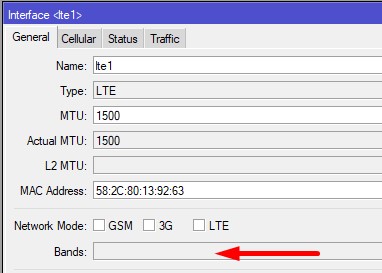
Please put result of:
put [/interface lte get lte1 band]
or maybe this info is at WinBox > Interfaces > LTE > lte1 > General or Status tab.
Cell-Monitor exist to search band/cell@BTS but maybe you know how to check current used band without at-chat ?
About GPS. We can use two script who will be cooperate by global variable. Fist we must check how to grab a speed value. Then we can write about merging scripts.
I just guessing a cli command, please check and search a correct syntax:
put [/system gps monitor once as-value];
put ([/system gps monitor once as-value]->"speed");
When we have speed then simple script can do history adding value into array of last 10 cycles and do something what be trigger for change (or not) sim-slot operation. Or just disable/enable script from upper post’s.
Similar case with controlling a 5x LEDs at “LtAP KIT LTE” is at finish stage. Please look at ReleaseCandidate script/code based on function who short a code from 70 lines to 20. What exactly is your hardware
put [system routerboard get model ]
?
.
By the way,do you know APRS? I have a idea , send the /system/GPS info to the APRS network
I think this is case on other Post at forum. This is just grab gps values and upload it to other devices like RasberyPi etc. who will propagate your coordinate etc. Just mutch other stuff not related into LTE topic..