First, your firewall filter table is empty, thus VERY insecure. You should have something similar to MikroTik default firewall rules to protect your router (search this forum, this post has the 7.18's rules, for instance, that you can use).
Then probably abandon the idea of directly managing the router by using the WinBox port from the internet. That's also very insecure. Consider setting up a VPN, such as WireGuard, and manage the router by first establishing a WireGuard tunnel to it.
IF you still insist on connecting directly with WinBox from the internet (again, very dangerous, shouldn't do!) via both WAN, you'll need these steps:
-
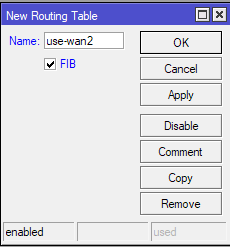
First create a new routing table, with FIB turned on:
/routing table add disabled=no fib name=use-wan2 -
Then modify the DHCP client instance associated with
ether4and set the following:/ip dhcp-client set [find interface=ether4] default-route-tables=main:2,use-wan2:1 default-route-distance=2 -
Next add the mangle rules to ensure that responses to incoming connections via WAN2 (
ether4) also leave the router via WAN2:/ip firewall mangle add action=mark-connection chain=input in-interface=ether4 \ connection-state=new connection-mark=no-mark new-connection-mark=USE_WAN2 add action=mark-routing chain=output connection-mark=USE_WAN2 \ new-routing-mark=use-wan2 passthrough=no -
If you have applied the defconf firewall, then you'll need to add exception to open the WinBox port on the
inputchain.

Again: this is not recommended. The recommended way is to setup WireGuard. But with two WANs, it will be pretty complicated due to the nature of WG. You'll need the workaround from this thread: RouterOS blatantly ignores pref-src. Can this really be a bug? - #72 by lurker888.