Imagine an attacker is sending small flood of 10mbps, they are TCP packets with spoofed IPs, so your address list is filling up at a rate of 10k+ unique addresses per second which increases memory and CPU usage. Without the rule, the packets would be dropped with no additional overhead.
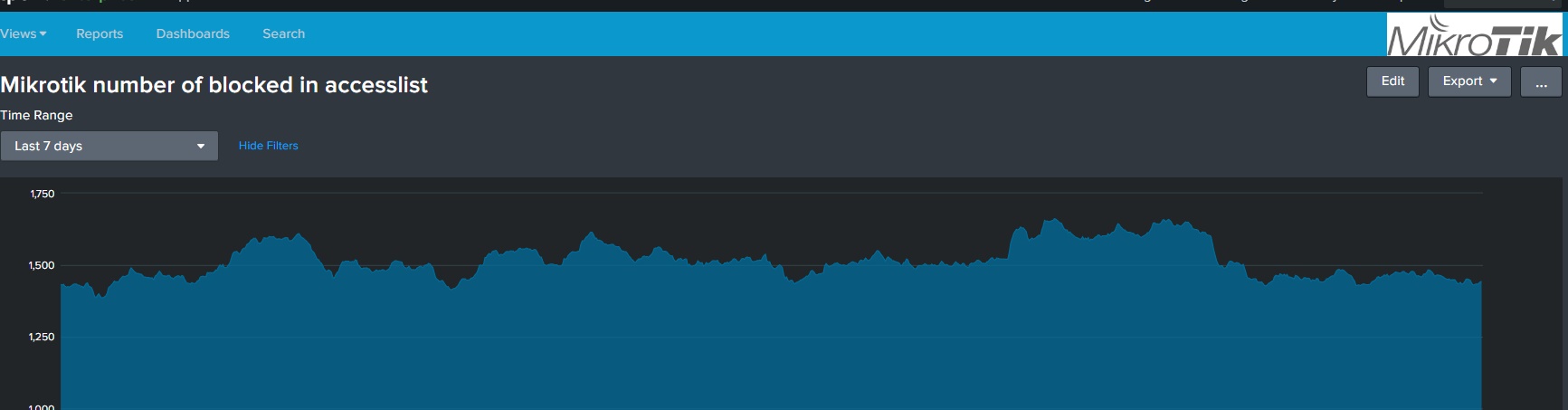
Could have been done, but in 6 month this has never happens. My access list do have around 1500 IP on average, some days up to 2500 but goes down.
Here is the last week, stabel on 1500 IP. (using Splunk to measure it)
.
Yeah, I have 2,700 collected over about three days, so about 900 attempts per day.
Great
I have another question now :
I put the rule you told me as number 0
/ip firewall filter add action=accept chain=input comment="accept established,related,untracked" connection-state=established,related,untracked
can you explain to me what it does in simple (like the great example of the door? 
also I have “Drop” rules in the end
add action=add-src-to-address-list address-list=Port_Scan address-list-timeout=2d chain=input comment="Block all other connections" in-interface=pppoe-out1
add action=drop chain=input comment="Block all other connections" in-interface=pppoe-out1
add action=add-src-to-address-list address-list=Port_Scan address-list-timeout=2d chain=forward comment="Block all other connections" in-interface=pppoe-out1
add action=drop chain=forward comment="Block all other connections" in-interface=pppoe-out1
which someone in th post told it’s a good idea to put
but when I look at the address list
I see that
google (8.8.8. is block?
My DNS server is block
and the ntp client is not in sync
why it is?
Thanks ,
Better to post this new question as a new thread.
And with export of complete /ip configuration. It’s really hard to comment particular FW rules without knowing the whole picture.
Regarding the accept established,related,untracked rule: when a packet arrives at input interface and router determines proper chain to deal with it, it needs to check FW rules to determine action for that packet. If general rule is to drop everything (not allowed by previous rules), FW rules have to be carefully crafted.
Example: DNS request, sent by router to google DNS server … when DNS client on RB sends out packet, firewall checks rules for chain=output. Normally there are none so initial packet is free to leave router. Connection tracking engine makes a note of new connection. Then a reply packet artives at input interface, router determines (with a help from connection tracking engine) that it’s a reply packet and it should enter chain=input. If there was no rule allowing google DNS server to talk to your RB (possibly limited set of src-port), then FW would drop this packet when executing last rule (drop all). The rule we’re discussing, however, allows this packet as it is part of (now) established connection. As vast majority of packets belong to established connectikns it’s good to place this rule on very top of FW rule list. It is virtually impossible to construct decent FW rule list on edge firewall/router that allows outgoing connections but limits incoming connections without using this kind of rule.
And the same rule for chain=forward (for traffic that only flows through RB).
Story with “related” is similar, but for a few particular L7 protocols. FTP being prime example as it uses two distinct ports on server, one for control and one for data where data connection is initiated by FTP server and without app helper run by firewall (inspecting control flow) firewall would not allow data connection (actually already NAT even without firewall wouldn’t pass it) … and data connection is related to the already established control connection.
The same story goes with “untracked”. I don’t remember any protocol that can’t be tracked (perhaps some of forum gurus can provide an example), but connection tracking engine can be configured not to track certain traffic.