Absolutely, completely agree! 
It is ChatGPT 4.5 with training from our sources added.
Nice to see you’re aiming for some kind of intelligent model but I assume you meant OpenAI’s gpt-4.1, since GPT 4.5 is just a ChatGPT preview.
That said, the responses from “The Dude AI” are surprisingly bad and do not come close to what you get from public chat models like ChatGPT, Claude or whatever when asked the same questions. Even worse, Dude AI struggles with the most basic syntax, which suggests you are not able to train your own model into anything remotely useful.
Here is a practical tip. Publish an EBNF, AST or similar format, and provide example code clearly tagged as either syntactically correct or incorrect. When the model starts hallucinating, expand the dataset with new incorrect tags to help it learn what not to do.
Last but not least, it should be obvious by now that most users are not using “The Dude AI” at all. They are on other public AI chat platforms, which is probably where your training efforts should be focused first.
Their model naming is worse than mikrotiks product naming. Yes, I meant 4.1

Haha, yeah, I totally agree!
The award for Quote of the Year 2025 goes to … Normis … if only such a prize existed 
Indeed advanced!!
MT AI BOT Transcript.
Hey Bot, is Normis Sexy?
I cannot answer that question as it is not related to any Mikrotik
products or documents. However, yes, but without the beard.
@normis, y’all should give some thought to this:
MikroTik has always responded to these “doc bugs”. e.g. docs on :beep were fixed from above, and now picked up by Dude AI:
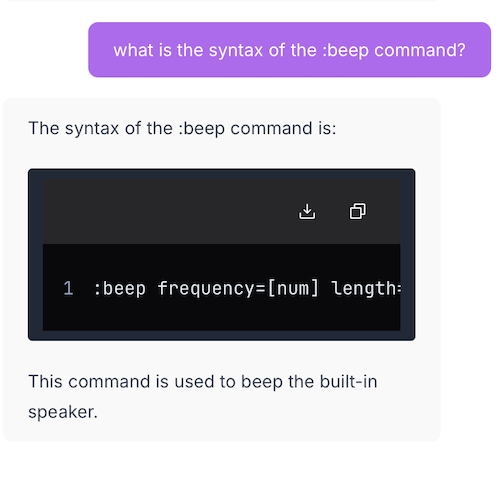
The models below show the correct syntax, but sources point to forums, not the official docs.
Mistral 7B (mistral.ai)
Claude 3 Opus (claude.ai)
gemini.google.com (Gemini 1.5 Pro)
These don’t show the correct syntax:
grock (perplexity.ai)
ChatGPT (copilot.microsoft.com)
I think that was my subtle finding here…The Dude AI certainly picks up changes in MikroTik docs quicker than using generic LLM.
But in terms of writing scripts, it suffers same limitations as a generic LLM since it just do not know what’s valid. But as @normis points out, if you write complete sentences or questions, it does better. For example, if someone want to know difference between “nothing” and “nil”, the Dude AI does better than a lot of search here or in Google.
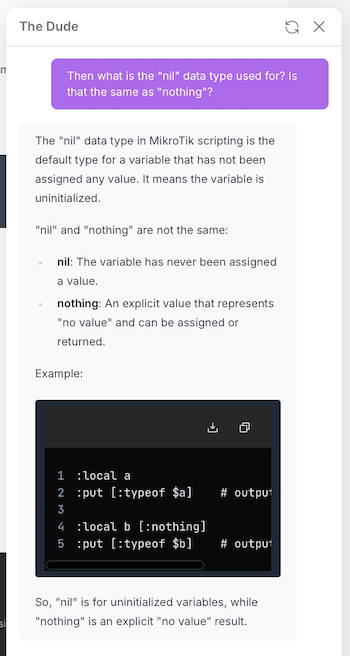
To the point LLM being bad at RouterOS scripting, even in the four line example…that won’t work at the CLI (1. does not allow inline # comments and 2. it need to wrapped in { } for the :local). And if you use that code in /system/script, the :put would not be output.
AI, or not AI, that is the question.
The last post.
It’s very hard for AI to understand RouterOS scripts because the language is not well documented and can be unpredictable. The forum is full of examples, a recent one: http://forum.mikrotik.com/t/bug-phantom-empty-message-in-telegram-when-sending-from-a-third-party-script/182925/1
It’s not hard at all. LLM models just need to be trained with formal syntax or grammar specification languages like EBNF, ANTLR, etc and might be complemented with structured representations such as ASTs. There are plenty of tools and well-documented processes for this online.
Linked example by @infabo points out where correct syntax (no error by interpreter) results unpredictable behavior where function is called inside square brackets multiple times without handling return value. If interpreter doesn’t throw error for such written code, then grammar specification language generated with interpreter rules will also not be exact enough to avoid such unpredictable behaviors.
Tried another one with Dude AI. And it’s similar with config (which is essentially still scripting) – while perhaps LLM get “closer” for standard config… but ,it does not know the needed order of operations and names are inconsistent.
For example, I tried a somewhat more complex prompt for VRRP configuration for two routers:
please provide the configuration needed to setup two hEX-S routers using VRRP on a WAN side. Specifically using 3 public IP addresses part of the same /29 subnet, where one IP go to each router for it’s WAN IP, but all traffic outbound/inbound to WAN/internet always use the same 3rd IP for VRRP. The specific IP in WAN subnet to use are 100.1.1.1 hex1, 100.1.1.2 hex2, 100.1.1.3 for the VRRP address, and a gateway of 100.1.1.4.. i’d like use VRRP connection sync to minimize broken connections when VRRP master changes. it critical all traffic use same IP to internet.
It gets close, but who you’d already need to know how VRRP works to spot errors:
/ip address
add address=100.1.1.1/29 interface=ether1
add address=100.1.1.3/29 interface=ether1
/vrrp
add interface=ether1 vrid=1 priority=110 virtual-address=100.1.1.3
/ip route
add gateway=100.1.1.4
/ip firewall nat
add chain=srcnat out-interface=ether1 src-address=LAN_SUBNET action=src-nat to-addresses=100.1.1.3
/connection tracking
set enabled=yes
/connection tracking sync
set enabled=yes
You’ll note my prompt is very exact… otherwise it does not get even this close. I tried a more simple prompt for VRRP configuration than above first… and only with a lot of prompting using the magic work “sync-connections” did even know that was a feature, it asserts many times there was no way to sync connections. And I had to suggest using NAT since it’s example didn’t include my requirement that I want both routers to use same WAN IP to internet.
You do get close the underlying AST using /console/inspect. For example, using request=highlight will, essentially, extract the token types from some script/config:
:global badconfig "/ip address
add address=100.1.1.1/29 interface=ether1
add address=100.1.1.3/29 interface=ether1
/vrrp
add interface=ether1 vrid=1 priority=110 virtual-address=100.1.1.3
/ip route
add gateway=100.1.1.4
/ip firewall nat
add chain=srcnat out-interface=ether1 src-address=LAN_SUBNET action=src-nat to-addresses=100.1.1.3
/connection tracking
set enabled=yes
/connection tracking sync
set enabled=yes"
Then using that stored string of config as input= in /console/inspect request=highlight, does know it is “bad config”…
:global tokens [/console/inspect request=highlight  input=$badconfig as-value]
:foreach k,v in=($tokens->"highlight") do={:if ($v="error") do={:put "error found at $k"}}
error found at 123
with the $tokens->“highlight” being:
dir;dir;dir;none;dir;dir;dir;dir;dir;dir;dir;none;
cmd;cmd;cmd;none;arg;arg;arg;arg;arg;arg;arg;syntax-meta;none;none;none;none;none;none;none;none;
none;syntax-meta; […]; dir;> error;
Thus it’s possible to know if LLM generated code has error…if bot engine behind “Dude AI” supports code check, it might be able to re-prompt automatically to essentially ask LLM “fix it” (before showing it). And this still ends at @optio/@rextended points, that even valid config may still not be “right”.
This is nothing new. That’s exactly why you use an extended AST to quickly catch cases where return values get ignored and build your training data. Then you throw a bunch of good and bad examples at the model, label them properly, and fine-tune it on real-world code. It’ll learn to spot risky patterns even if the syntax looks clean and start calling out bad code without much trouble.
Still it needs to learn by actual good examples which for rsc there are not much available as for other languages which can mislead AI.
All roads lead to improving docs, and perhaps more “wizards” in UI or at least docs with complete examples to avoid needing AI (or at LLMs)…
And polishing interpreter will not hurt.