Using RouterOS to VLAN your network

MSTP is a highly complex protocol with a lot of traps if you do not fully understand it. Id say, avoid it if you can! RSTP is good and fast w/o the complexity of MSTP.
Only if you have to do stuff like: all even VLANs go clockwise and all uneven VLANs go counterclockwise, dont touch MSTP.

In gerneral, I disable STP on my Bridges, because it can create unwanted side-effects and I dont want unnecessary BPDUs. I enable it only on Bridges and Ports where I want it - not everywhere. The next discussion is, STP-BPDUs are sometimes dropped, if you have an unmanged switch in between (like in an office w/o sufficient ports). So STP can sometimes not work properly and misses storms behind such ports. There are better ways nowadays to detects loops in such real world scenarions like STP.

In regard of redundancy, I tend to use LAGs over STP, because you dont waste 50% of your bandwith. Only in scenarios where you have only one path and need a redundancy (link a ring-topology), I use RSTP on the 2 backbone-ports. I advise you, use (R)STP wisely and not in general everywhere. And forget MSTP, it will induce a lot complexity and a lot implemtations are buggy as hell.

I haven’t had any problems with MSTP.


call me crazy but i have perceived in mikrotik MSTP works better than RSTP even without using MSTP additional functions

I am setting up a Hex S for my home & office (SOHO) environment, using the RouterSwitchAP as a guide. As I work through this, I have two questions related to the commands following the comment “# L3 switching so Bridge must be a tagged member”:


#######################################
#
# -- Access Ports --
#
#######################################

# ingress behavior
/interface bridge port

# Blue VLAN
add bridge=BR1 interface=ether2 pvid=10
add bridge=BR1 interface=ether3 pvid=10
add bridge=BR1 interface=wlan1  pvid=10

# Green VLAN
add bridge=BR1 interface=ether4 pvid=20
add bridge=BR1 interface=wlan2  pvid=20

# BASE_VLAN
add bridge=BR1 interface=wlan3 pvid=99

# egress behavior, handled automatically

# L3 switching so Bridge must be a tagged member
/interface bridge vlan
set bridge=BR1 tagged=BR1 [find vlan-ids=10]
set bridge=BR1 tagged=BR1 [find vlan-ids=20]
set bridge=BR1 tagged=BR1 [find vlan-ids=99]

Question 1: Are these commands (i.e., to set the bridge itself as a tagged member) only needed when setting up Access Ports? So for example, we would not need those commands for any vlan-ids that are only used on Trunk Ports and not on any Access Ports? Or are these commands required to enable Inter-VLAN L3 switching (routing) on the RouterSwitchAP device, regardless of whether the VLANs were used for an Access Port, a Trunk Port, or a Hybrid Port. In which case, should this be its own section? For example:


#######################################
#
# -- L3 Inter-VLAN switching ---
#
######################################## 

# L3 switching so Bridge must be a tagged member of any switched (routed) VLANs
/interface bridge vlan
set bridge=BR1 tagged=BR1 [find vlan-ids=10]
set bridge=BR1 tagged=BR1 [find vlan-ids=20]
set bridge=BR1 tagged=BR1 [find vlan-ids=99]

Question 2: Does this command actually do anything, and how can I tell? For simplicity, I am initially testing adding a single Access Port to the Bridge (“Green on ether4”), and then looking at what changed after each step (via /export). When I enter the following commands on the CLI, I am able to see the Bridge Port that was added. But I don’t see anything related to the Bridge VLAN, even when I looking at the output of /export verbose).


# ingress behavior
/interface bridge port add bridge=BR1 interface=ether4 pvid=20
/interface bridge vlan set bridge=BR1 tagged=BR1 [find vlan-ids=20]
/export compact
/export verbose file config.txt

Update to my Question 2… (regarding RouterSwitchAP.rsc)

After some trial and error: it looks like the “add bridge” command is what works, and the “set bridge” version does nothing.

/interface bridge vlan
set bridge=BR1 tagged=BR1 [find vlan-ids=20]    # <<< does not seem to do anything
add bridge=BR1 tagged=BR1 vlan-ids=20    # <<< this works!

So now I am also confused about the difference between these two options. Also, why do some examples only use “set bridge” (RouterSwitchAP.rsc), some examples only use “add bridge” (Router.rsc), and others use a combination of both (AccessPoint.rsc). My suspicion is that only the “add” actually works, which is why AccessPoint.rsc uses it for BASE_VLAN, since otherwise the rule won’t actually be added to the profile. In which case, should all files be updated to only use “add bridge”?

The examples walk you through a process of adding things and then changing them. I did this to keep every line as short as I could. It is very possible to do it all on one line. The add syntax at times is adding a VLAN construct (in MikroTik’s world). Then later setting things on that construct. Note that my syntax choices don’t mirror what you’ll see in an export statement because I felt those were too verbose to learn and keep everything concise and short.

The examples are for high level learning. There is not a clear separation of concerns with RoS syntax, so it can be confusing to see some items showing up in multiple places in unexpected ways. With RoS syntax, you’re not really working with objects with properties (like with JSON) so the way things get modified is different.

An unfortunate limitation of RoS is that when the system receives a VLAN created by an add statement (I wish add would perform a set automatically) you must use a set later, and worse need to find it. Would be nice if it simply did the right and obvious thing. Because of my desire to show Access vs Trunk ports, you’ll see add show up in odd places. Again, working with RoS syntax and trying to maintain separation of concerns causes this.

But if you don’t want to fight what RoS does natively, take note how the exports look. Maybe I’ll update the examples to match exports someday.

@pcunite I wanted to say Thank you!!! I am new to mikrotik and even had no idea what a VLAN was before reading your post.
I was able to set up my router, AP, VLAN thanks to your thorough article. I learned a lot !!

very, VERY(!!!), helpful!

Thank you very much

Hi All:

I am trying to understand the logic of how DHCP is being assigned in the example using the ROUTER.RSC file in this post.

I have applied this entire file to a Hex Lite with 6 total ports. I removed ether 6,7, and sfp1 from any rule that contained it.

so, in basic form I see this:
add bridge=BR1 interface=ether2,3,4,5

Below as written in the file:
add bridge=BR1 tagged=BR1,ether2,ether3,ether4,ether5 vlan-ids=10
add bridge=BR1 tagged=BR1,ether2,ether3,ether4,ether5 vlan-ids=20
add bridge=BR1 tagged=BR1,ether2,ether3,ether4,ether5 vlan-ids=30
add bridge=BR1 tagged=BR1,ether2,ether3,ether4,ether5 vlan-ids=99

Then we add DHCP:

Blue VLAN interface creation, IP assignment, and DHCP service

/interface vlan add interface=BR1 name=BLUE_VLAN vlan-id=10
/ip address add interface=BLUE_VLAN address=10.0.10.1/24
/ip pool add name=BLUE_POOL ranges=10.0.10.2-10.0.10.254
/ip dhcp-server add address-pool=BLUE_POOL interface=BLUE_VLAN name=BLUE_DHCP disabled=no
/ip dhcp-server network add address=10.0.10.0/24 dns-server=192.168.0.1 gateway=10.0.10.1

Green VLAN interface creation, IP assignment, and DHCP service

/interface vlan add interface=BR1 name=GREEN_VLAN vlan-id=20
/ip address add interface=GREEN_VLAN address=10.0.20.1/24
/ip pool add name=GREEN_POOL ranges=10.0.20.2-10.0.20.254
/ip dhcp-server add address-pool=GREEN_POOL interface=GREEN_VLAN name=GREEN_DHCP disabled=no
/ip dhcp-server network add address=10.0.20.0/24 dns-server=192.168.0.1 gateway=10.0.20.1

Red VLAN interface creation, IP assignment, and DHCP service

/interface vlan add interface=BR1 name=RED_VLAN vlan-id=30
/ip address add interface=RED_VLAN address=10.0.30.1/24
/ip pool add name=RED_POOL ranges=10.0.30.2-10.0.30.254
/ip dhcp-server add address-pool=RED_POOL interface=RED_VLAN name=RED_DHCP disabled=no
/ip dhcp-server network add address=10.0.30.0/24 dns-server=192.168.0.1 gateway=10.0.30.1

Then some interface lists...

/interface list add name=WAN
/interface list add name=VLAN
/interface list add name=BASE

/interface list member
add interface=ether1 list=WAN
add interface=BASE_VLAN list=VLAN
add interface=BLUE_VLAN list=VLAN
add interface=GREEN_VLAN list=VLAN
add interface=RED_VLAN list=VLAN
add interface=BASE_VLAN list=BASE

Then Vlan security...

Only allow packets with tags over the Trunk Ports

/interface bridge port
set bridge=BR1 ingress-filtering=yes frame-types=admit-only-vlan-tagged [find interface=ether2]
set bridge=BR1 ingress-filtering=yes frame-types=admit-only-vlan-tagged [find interface=ether3]
set bridge=BR1 ingress-filtering=yes frame-types=admit-only-vlan-tagged [find interface=ether4]
set bridge=BR1 ingress-filtering=yes frame-types=admit-only-vlan-tagged [find interface=ether5]

Now my question....

If I plug my pc into ether2, what DHCP address am I going to get? Nowhere was DHCP assigned to a specific interface.
The way I see how the VLANS were set up in the above rules, DHCP is assigned to each specific VLAN. But each VLAN Blue, Green, and Red are assigned to 1 Bridge interface, BR1.
Bridge BR1 has tagged all ether interfaces with all VLAN id's 10,20,30,99. So, each interface is a member of each VLAN.
What this says to me is: DHCP for each VLAN (as written above) is being answered on all ether interfaces 2,3,4,5.

What am I missing here? I know not all rules are in this post, but I think the important ones for my question are here.

Please help, I am trying to learn how this works, and I am failing to see the light.

Thanks

Glenn

The answer is in the picture in post #2 above.

For router config in this context, all ports are considered trunk ports.
It is not meant to have a PC plugged in directly.

OH sheesh… that makes more sense. So, now I read that when I set certain switch ports to VLAN 10, the router rules for “Blue DHCP” will reply to my PC through those assigned switch ports since “Blue DHCP” is assigned to VLAN 10 .
I was completely in small network mode at this point and was not thinking of this needing to be set up across switches for it to work as written, while trying to learn how to make it work… :slight_smile:

Thank you for the insight, and thank you for responding so quickly.

Glenn

No problem, I also banged my head a couple of times against the wall before it all fell into place :laughing:

And I hope you mean “bridge ports” ?

I have a question about a snippet in the sample router file. Doesn’t the below allow access to all ports on the default route address? Like if my VLAN is 10.0.22.0/24 and the VLAN IP is 10.0.22.1, then won’t this allow access to all ports on 10.0.22.1? I would prefer to specify only the ports I want clients on the VLAN to have access to.

##################
# INPUT CHAIN
##################
add chain=input action=accept connection-state=established,related comment="Allow Estab & Related"

# Allow VLANs to access router services like DNS, Winbox. Naturally, you SHOULD make it more granular.
add chain=input action=accept in-interface-list=VLAN comment="Allow VLAN"

Fuddle duddle please dilute a firewall thread with firewall questions, not a vlan thread…

To answer your question its best only to allow the admin full access to the config and the input chain.
All other users ( LAN list or VLAN list) should normally have access only to needed services from the router, typically only DNS and sometimes also NTP.

I have great issues and big puzzles regarding this issue.
My setup was working up until the moment I’ve aquired two managed industry-grade switches - Brocade ICX6610 and Zyxel XS3700.
They are running on default settings (apart their IP address in main subnet ) and they should act as unmanaged switches. Yet, main MT router cannot pass DHCP IP addresses to wi-fi clients that are connecting to VLAN based network on APs that are connected via those switches. As soon as I take out these switches out of network, everything is working fine. I’m aware that my setup has many flaws (I did all by trial and error, not exactly network expert).
If you have time, please take a look at my thread:
http://forum.mikrotik.com/t/dhcp-not-passing-ip-addresses-to-guest-wifi-clients-when-managed-switch-is-in-middle/163975/1

Thank you in advance

Thank you for these explanations.
I had to set up many vlans and for many routers, so I’ve converted your explanations into a small python script with a descriptor json file.
Hope this can be usefull to someone.
https://github.com/devHomeye/Mikrotik
Feel free to comment / improve.
regards,

Replying to my comment made last year. The add command now works as expected. So, I’ve updated the examples.

Hi all,
thanks pcunite for this explanation first of all.
I have one related question, maybe someone did or could give me a hint how I can achieve this.
I customized VLAN as described in the first post for Router + AP logic.
Router has 5 ether ports and I need actually couple of more.
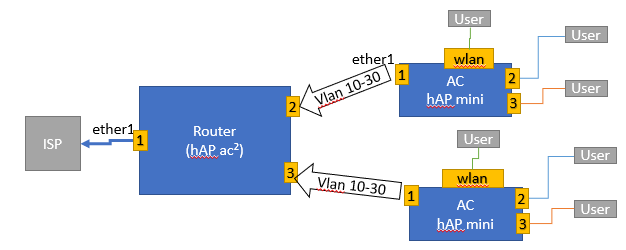
as-is.png
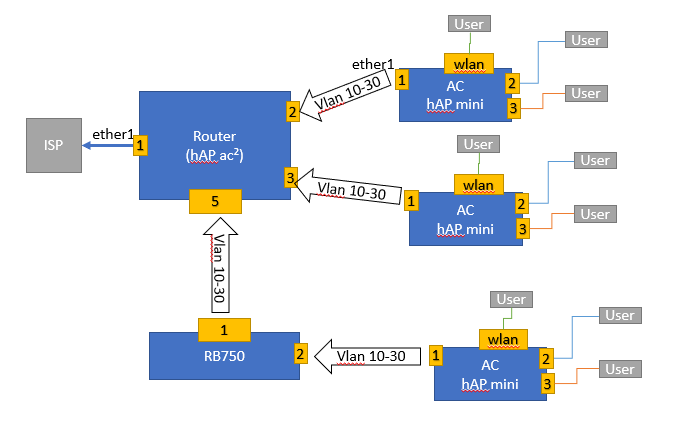
I have additionally one router which I would like to connect more devices to the main router, for example to get 5 AC connected to the router 1 directly and 4 behind a switch. I just show on the screenshot less AC point to have more clear.
to-be.png
I tried it several times with Bridge and with Switch function, but up to now no success.
So perfect would be something like https://wiki.mikrotik.com/wiki/Manual:Switch_Chip_Features#VLAN_Example_2_(Trunk_and_Hybrid_Ports) but i see it is not supported by RB750 board.
Any hints how I can achieve this?

UPD: [SOLVED] At the end it worked with this example. I am not sure why it did not worked before, I did similar settings.
https://help.mikrotik.com/docs/display/ROS/Bridging+and+Switching#BridgingandSwitching-VLANExample-TrunkandHybridPorts

@pcunite thanks for this, It has given me a way better understanding of Vlans, :slight_smile:

Am I right to think that this will not work with a CSS3xx switch running switchOS?

Would I need a separate Lan interface for each Vlan trunk to the switch?

cheers M

Correct. This configuration series is only for RouterOS based MikroTik products. I’ve not ever used SwOS, but will be soon because I’m deploying the CSS610-8P-2S+IN for a client soon. I can’t say yet how SwOS should be configured. This may help but is not my endorsement.

Thanks I’ll take a look