you should have a look at the status of the interface - not the settings to see the real connection speed !!!
settings are set to auto negotiation - the speed setting there is for nothing..
as you write that you have a 1 Gbit IF then you might also have gbit connection !!
is there some sort of bug on this release?
i’ve just updated to v5.6 yesterday, and now i got CPU resource load 100%. it’s been hours like this


Uploaded with ImageShack.us
somebody help please before the router crash for overheating
Seriously, what kind of help are you expecting with this post? 
Unless you do some proper support request with a supout file, I barely see what anwser you can get (except “gather with some colleagues to blow on your router to cool it down” or a mere “try to downgrade”?).
also look into the Tool Profile to see what is using that CPU.
this kind of help i’m talking about 
under Tool Profile, it’s “management” taking mostly 65% of the CPU load

i closed all active winbox already, nothing’s changed. is there anything else i could check on?
thanks before
reboot? Or power cycle? That sometimes helps. If issue comes back, downgrade reboot, power cycle, and upgrade again…
Winbox is not “management”. What configuration you have on that router?
a lot. but nothing is changed on configuration.
i’ll do this in the morning


it seems like this problem is solved just by rebooting the system. but isn’t it better if we can find out what exactly caused it? because it is impossible to do a reboot every time it happens.
btw, this never happen on the older version.
winet - do you use user-manager? and have you send all this info to support@mikrotik.com?
i use user-manager for hotspot. i didn’t send it because i didn’t know that i have to and no body told me to i’ll send it next time it occurs
I suspect it is the graphing tool causing high CPU Usage. After reboot, graphs are deleted and it starts
all over again, after a couple of days it will cause the CPU to go again 100%. I have disabled graphs
on my RB411 a week ago, and since then had no problems with CPU
I just report that all remaining basestations and CPE:s where successfully upgraded from 4.17 to 5.6 without any problems.
We did use The Dude for upgrading all, one by one, logged in via winbox till connection lost messages arrived. In general the upgrade took 3 minutes per device.
The reconfiguring of all wireless interfaces where successful so now we can switch between nstreme and nv2 in all our network.
all SXT in network.
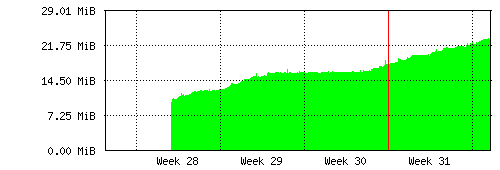
then can not connect to the SXT. Memory is full. SXT then disconnects OSPF etc..
SXT use since version 5.0 and make it completly all versions up to v5.6. RB711 and others RB do not.
and configurations are completely identical on both routers?
Have you sent this to support?
configuration differences. But everywhere OSPF and where not, no problem.
I did not send support.
please create one after reset and one when some amount of RAM still left. That would be helpful to track down the problem.
I’ve returned from my holiday now and started to discover what’s wrong. I was not able to connect to SXT with 5.6, so I reset settings (using button) and SXT started to respond again (with default settings, of course). Then I tried to restore configuration - I lost SXT again.
So I tried to reset, downgrade to 5.5, restore configuration - everything is all right. Upgrade to 5.6 - lost. There is obviously something wrong with my configuration and 5.6. I am using bridge - ethernet and wireless are bridged together. Maybe there is something wrong with that in 5.6? I’m not sure and perhaps I will contact support.
please make the support output file from v5.5 with your config, so we could check it. Also maybe make admin user without password and send us the backup file maybe we could try to reproduce it.