If you configure “Local forwarding” in CAP then you HAVE TO remove WiFi interfaces from bridge you are dynamically assigning them to.
As you see on pictures all WLAN interfaces are “D” = dynamically added.
You also have to not assign them to any bridge on CAPSMAN as the traffic is already sent to local bridge so assigning WIFI interface in CAPSMAN sends the second packet to bridge on CAPSMAN and then you have two same packets in the LAN.
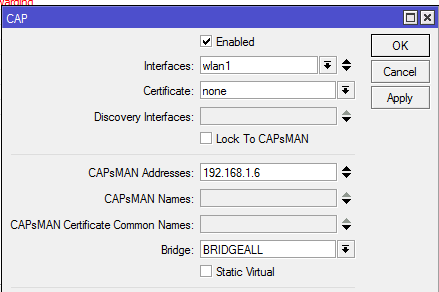
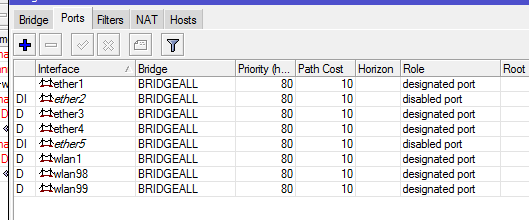
BartoszP, thank you. but i have found out today that capsman is not the cause of the problem.
we have all wlans and virtualAPs as dynamic bridge ports on capsman and all caps.
i have two CRS-326 connected through ether2-3.
on both i reset config and disable all interfaces except for ether1-3, then create a bonding on ether2-3 and a bridge.
bonding1
- ether2
- ether3
bridge1
- bonding1
- ether1
this starts throwing “bridge port received packet with own address as source address” error on the one with the root bridge.
when i remove the bonding from the bridge on either side, it stops.
we are using bondings on different models too (RB2011,CRS125,CCR1036) and they are working fine, only CRS-326 have these symptoms.
I’m using all ports on my RB2011 as a switch with vlans (tagged and untagged) and am getting HW offloading and not seeing any duplicate packets. I posted my config in this thread: http://forum.mikrotik.com/t/6-41-and-vlans-what-is-the-proper-an-most-performant-way-to-do-that-now/115100/2
[/quote]
My 6.41 configuration (before I downgraded) looked fairly similar to yours, and was (almost) what the upgrade gave me when migrating 6.40.5 → 6.41 (had to make a few tweaks for things which weren’t well converted). If I get a chance to try again, I’ll see if I can reproduce the problem on 6.41 again.
One thing I tried (but could not do), was to create a bridge for each switch chip (with auto hardware off-load), and then create a bridge to join those hardware groups and the SFP interface. This didn’t work, since the Mikrotik software won’t allow adding the “child” bridges (e.g. HW offload to the switch chip CPU ports) into the “parent” bridge). I’m not sure I prefer the new method of configuring switches / bridges. As a HW guy, I’m quite happy with being aware of the underlying hardware configuration with the switch chips etc.. (although the “master port” terminology not that helpful - since really it is the switch cpu port interface being bridged by the software).
First thing which happened after upgrade to 6.41 from 6.40.5 was all the time SFP connection drop. I have to go to the router unplug it and plug it again. Running on :
RB962UIGS 5HACT2HNT HAP AC
During 4h after upgrade it happened twice till now. On 6.40.5 it was running rock solid on SFP.
Simple queues do not work, or the way in which they are written has changed.
Changed compared to what?
Hi, Chupaka, compared to the previous version 6.40.5.
I also have problems with PPPoE Client, every time the ISP changes ip I have to use the backup file, because the only reboot leaves the connection active but not working.
All I have to do is to downgrade to 6.40.5.
I have upgraded a CRS125, wAP AC and RB751U all to 6.41 on the same network.
All devices upgraded OK and are working but only two devices showed the new 6.41 Routerboard F/W. The RB751U interestingly shows a blank where you would expect to see the new F/W (6.41). Is this a limtitation of the older hardware or a bug I wonder ?
(Tried rebooting the RB751U and no change either under Winbox or CLI).
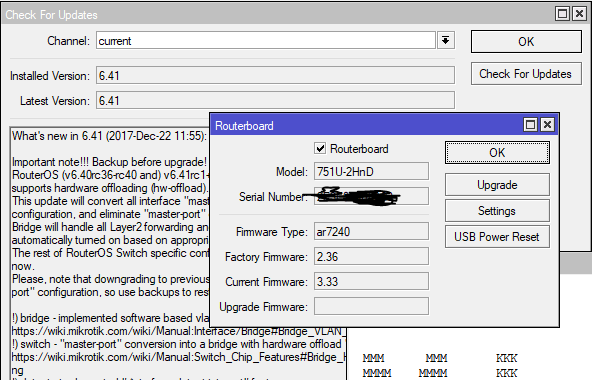
It was reported earlier in this topic and already fixed in 6.42rc.
Limited troughput between RB951G & RB751u2HnD,
I use cat5e cable and as seen in the pict it’s 100Mbps FD link,


I tried to connect my laptop to RB951(connected to ONT-UFB) then did BW speed test and the result is same
http://pic.nperf.com/r/224638898-QnI4M7V4.png
eventhough when I tried direct connect from ONT-UFB to my laptop the result is
http://pic.nperf.com/r/224477017-k6qrDvc7.png
any comment? what should I do/
It seems that the CPU usage rate of RB751u2HnD is 100%, but are you using functions such as FW?
If that is the case, I think that it is better to use the profile etc. to see which function is used.
tried again

Previously there were 2 possible ways to implement VLAN functionality:
- Via the switch chip VLAN functionality which was 100% hardware (switch > vlan)
- Via the CPU functionality which was 100% software (create multiple bridges for each VLAN (untagged ports), and one bridge for tagged ports)
Solution 1 was not very useful if device have 2 separate switch chips.
What changed now with hardware offload?
Just want to say good job on the HW offload functions. I managed to get this onto my “old” RB750 which sits on my desk at work and the offload makes a huge difference from 1 interface to another so hopefully this amazing performance increase scales up to far larger switches. CPU usage was also down from 98% to 2-3% whilst running tests.
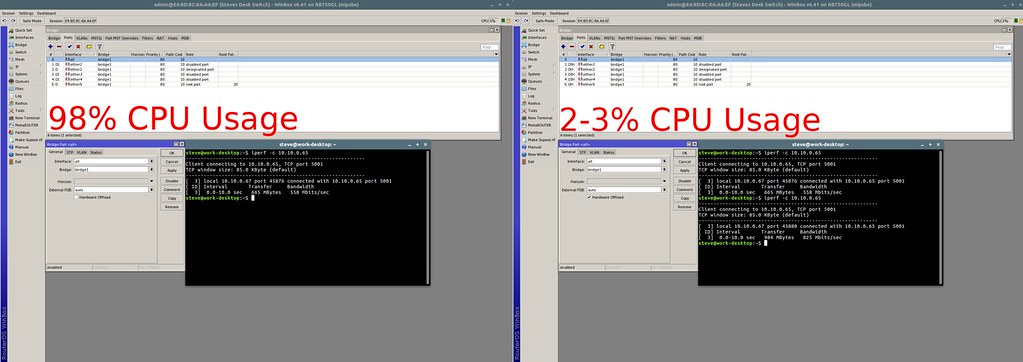
hwoffloadtest by Steve Carter, on Flickr
Yes, sometimes good features simply needs to be forced upon you,
This functionality was there for 7+ years, simply instead of bridge you needed to use “master-port” option in interface settings.
Even though I believe this is good for most of the users, I do not understand well why I should loose the straightforward way of organising switches and bridges as I want. But I am also preparing to give a try…
The reason it was done (I think) is to allow standards like RSTP and IGMP snooping to work in both bridge and switch.
And it should also make things a little bit clearer.
However, I agree that everything that was previously done (and allowed) in switch configuration should be migrated to bridge in such a way that the original switch menu can be completely deleted.
As it is now, it is confusing. I have VLAN configuration on my switches and it has to be migrated to bridge without losing hardware acceleration. As of now this does not work, so switch config remains necessary.
It is a clean, easy to use implementation of something that was although working, clunky. The option to “add all” to bridge is also brilliant, a real step forwards in user friendliness.
How can I use this to set up a site to site vpn tunnel with dynamic ip in one end?
I can’t seem to set DNS-name as SA-address in ipsec->policy.
You cannot set a dns name as sa-dst-address in a manually configured IPsec policy. The feature can be used with mode-config peers, i.e. the “vpn clients” which generate policy dynamically based on the information received from the peer. It is possible to associate an address pool of more than a single address to a user name, so when this user establishes an IPsec connection, it gets the whole subnet via mode-config, and it generates the policy dynamically, based on this subnet. In this case, the generated policy sets the current IP address of the peer as sa-dst-address.