me too 
distance is for ACK calculation and installation ist foot frequency selection…
make sense ,but need more info
Hello,
I have a problem with wireless.
I getting internet from ISP Access Point [ROS: 6.27]. This link is 7 year old.
My station is RB433 and after upgrade from 6.43.7 to 6.43.8 link is drop down.
After troubleshooting i see diffence in Wireless tab.
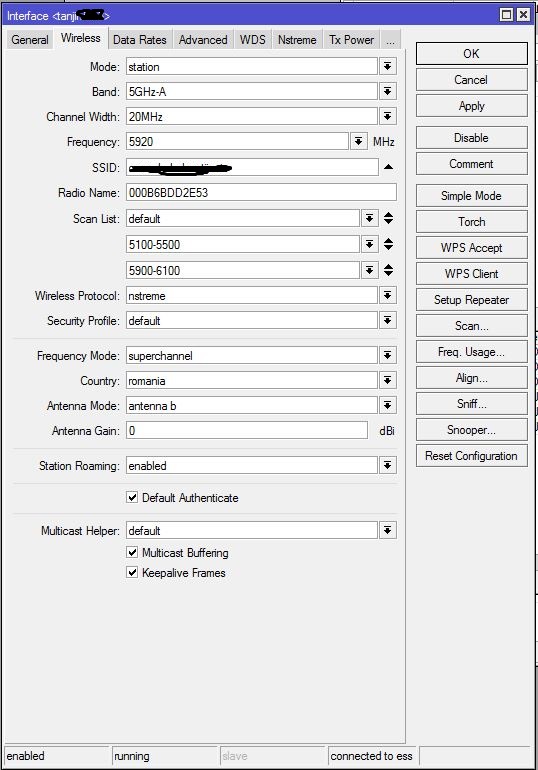
On old conf, Frequency is 5920, Frequence Mode is superchannel, Conutry romania.
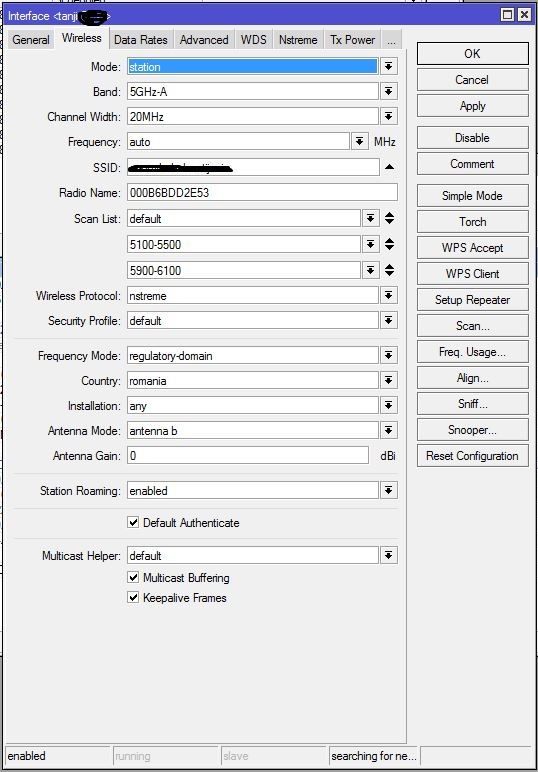
On new conf, Frequency is auto, Frequence Mode is regulary-domain, Conutry romania.
I cannot change back Frequency to 5920.
Can anyone help me? (I downgrade to 6.43.7 and push backup and this is work, but I won’t use old ROS)
Before upgrade:
After upgrade:
Just set Country to no_country_set and use superchannel
That is it! Ty
That is true
Distance adjusts ack settings.
Installation decides which frequencies and powers you can use, based on regulations.
Just set Country to no_country_set and use superchannel
That is it! Ty >
Careful, this can bring you trouble, depending on which country you are in.
As it was always possible, check specifics in menu “/interface wireless info county-info germany” or other country.
[normis@rb4011] > interface wireless info country-info germany
  ranges: 2402-2482/b,g,gn20,gn40(20dBm)
          2417-2457/g-turbo(20dBm)
          5170-5250/a,an20,an40,ac20,ac40,ac80,ac160,ac80+80(23dBm)/passive
          5250-5330/a,an20,an40,ac20,ac40,ac80,ac160,ac80+80(20dBm)/dfs,passive
          5490-5710/a,an20,an40,ac20,ac40,ac80,ac160,ac80+80(27dBm)/dfs,passive
          5190-5310/a-turbo(20dBm)/dfs
          5180-5300/a-turbo(20dBm)/dfs
          5520-5680/a-turbo(27dBm)/dfs,passive
          5510-5670/a-turbo(27dBm)/dfs,passive
          902-927/b,g,g-turbo,gn20,gn40(30dBm)
sindudas - We are sorry for any inconvenience caused. We will fix this problem in upcoming RouterOS releases.
ErfanDL - You can change value by using “/interface wireless set installation=any/indoor/outdoor”.
honzam - What kind of information about DFS are you looking for?
kez - Sometimes router that was using “ac” did tend to reboot due to a Watchdog timer. This problem is now resolved. This does not mean that all “Watchdog reboots” are fixed in RouterOS. Usually such reboot happens on overloaded router.
ErfanDL, nichky, amt, mistry7 - This setting (installation) makes your router to take into account parts from “/interface wireless info country-info ” that specify usage in indoors or outdoors.
awacenter - What do you see when you run “/system logging export” command?
hapi - Please send supout.rif file from your router to support@mikrotik.com. Name from which version you did upgrade your router.
mikelaurense - Does interface actually gets disabled? Or it becomes inacessible? If it disabled, then someone has done that manually. Please provide supout.rif file tp support@mikrotik.com. Make sure that file is generated while interface is “disabled”.
Redmor - Yes, but that is the whole point of country settings. You can still change settings in order to do so. Country settings are made in order to comply to regulatory domain.
sff - Have you contacted support@mikrotik.com regarding this matter. We have fixed suh bug in RouterOS already, however, your problem might be little bit different.
hapi - Please provide supout file from your router that would be generated while router is inaccessible either over another interface or over serial console. We will see why you can not access router at some point. I do not see any reason why you should jump tp consclusions right away and announce this as a “bug”.
anav - Yes - "http://forum.mikrotik.com/t/6-43-8-update-alert-read-before-update/126150/1
ognjen - In Europe (country selected) you can not use any other settings besides regulatory domain.
I think that “normis” post was missing “indoor/outdoor” setting in country information simply because example country does not have such limits.
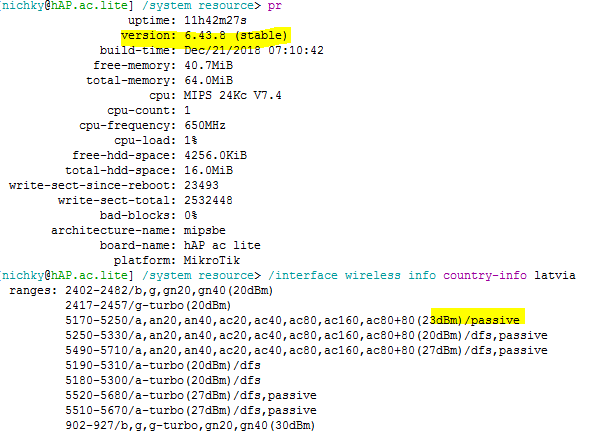
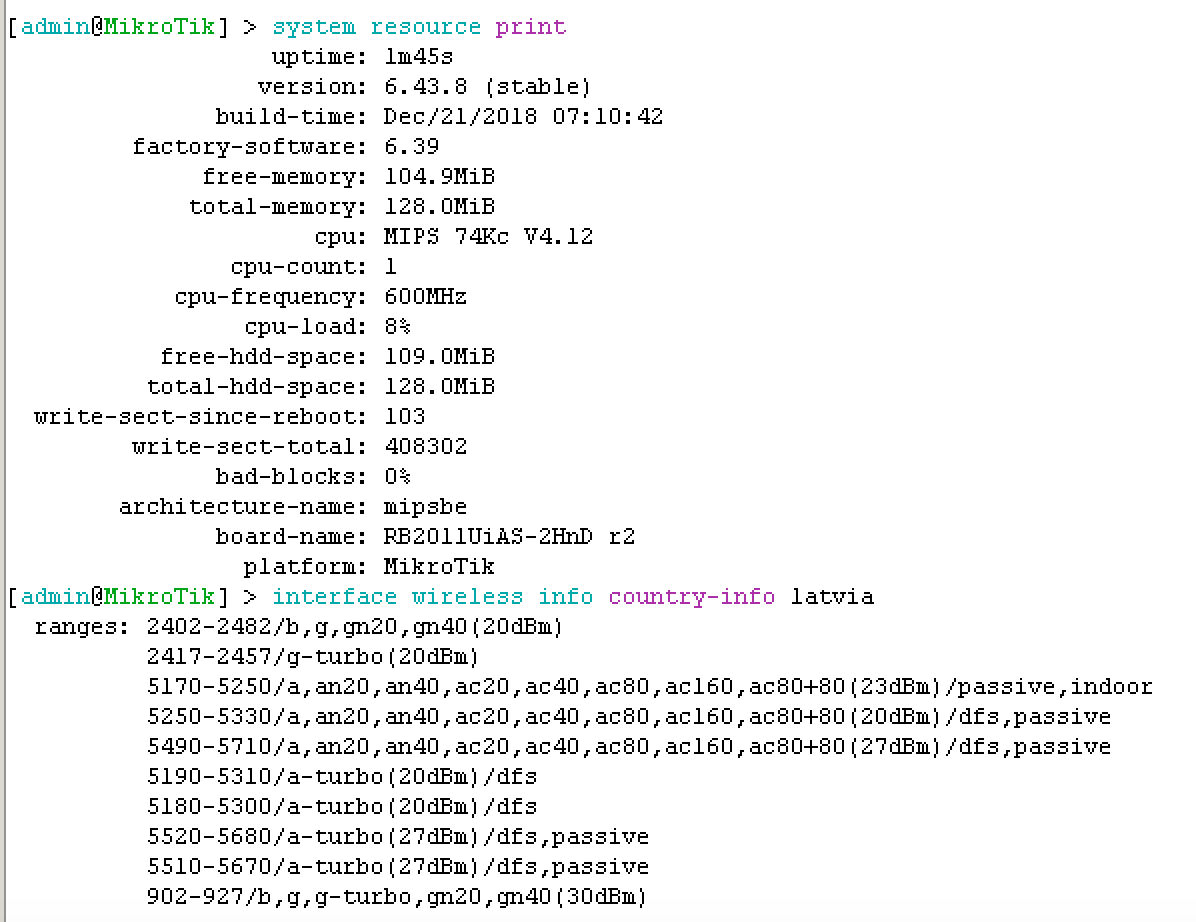
Here you can see info for Latvia:
/interface wireless info country-info latvia
ranges: 2402-2482/b,g,gn20,gn40(20dBm)
2417-2457/g-turbo(20dBm)
5170-5250/a,an20,an40,ac20,ac40,ac80,ac160,ac80+80(23dBm)/passive,indoor
5250-5330/a,an20,an40,ac20,ac40,ac80,ac160,ac80+80(20dBm)/dfs,passive
5490-5710/a,an20,an40,ac20,ac40,ac80,ac160,ac80+80(27dBm)/dfs,passive
5190-5310/a-turbo(20dBm)/dfs
5180-5300/a-turbo(20dBm)/dfs
5520-5680/a-turbo(27dBm)/dfs,passive
5510-5670/a-turbo(27dBm)/dfs,passive
902-927/b,g,g-turbo,gn20,gn40(30dBm)
These settings can be used only if any or indoor is selected on wireless interface. If you select outdoor, then you can not use this part. Same rules apply if info says “outdoor” - indoor configuration will not be able to use it:
“5170-5250/a,an20,an40,ac20,ac40,ac80,ac160,ac80+80(23dBm)/passive,indoor”
strods I’m not saying that this change is wrong, it should work like that, but:
- Write it in changelog
- If you have to update and set regulatory domain for countries, why removing superchannel with country set instead of unsetting country with superchannel set?
You are right that there could have been two ways to adjust the inaccurate setting for some users.
We chose to adjust towards compliance, not towards incompliance. If user has set a country, he possibly wanted to be compliant already.
All of my MIPS devices (5x hAP ac, 2x RB951) upgraded automatically last night by script.
My one ARM device (hAP ac2) did not upgrade, logging that there were no updates available.
I tried to update it this morning from /system packages, and it still reports no updates are available. It’s still on 6.43.7.
Was the upgrade removed for ARM?
The file downloads successfully from the Mikrotik webpage.
Sent from my Pixel 3 using Tapatalk
yottabit - To which IP address does your router resolve upgrade.mikrotik.com (:put [:resolve upgrade.mikrotik.com])? Upgrade should work on this router without any problems. There might be some proxy server between your router and upgrade server causing this.
[yottabit@rb1] > /ip dns print
                      servers: 8.8.8.8,8.8.4.4
              dynamic-servers:
        allow-remote-requests: yes
          max-udp-packet-size: 4096
         query-server-timeout: 2s
          query-total-timeout: 10s
       max-concurrent-queries: 100
  max-concurrent-tcp-sessions: 20
                   cache-size: 2048KiB
                cache-max-ttl: 1w
                   cache-used: 205KiB
[yottabit@rb1] > :put [:resolve upgrade.mikrotik.com]
159.148.147.204
[yottabit@rb1] > /system package update check-for-updates
            channel: stable
  installed-version: 6.43.7
             status: ERROR: connection timed out
Strange, right? It’s also worth noting that all but 2 of the other routers I mentioned above are behind this router that won’t upgrade, and are forced to use this router for DNS. There is no proxy.
Edit: switched to OpenDNS, and the resolve is the same, but still can’t connect.
[yottabit@rb1] > /ip dns print
                      servers: 208.67.222.123,208.67.220.123
              dynamic-servers:
        allow-remote-requests: yes
          max-udp-packet-size: 4096
         query-server-timeout: 2s
          query-total-timeout: 10s
       max-concurrent-queries: 100
  max-concurrent-tcp-sessions: 20
                   cache-size: 2048KiB
                cache-max-ttl: 1w
                   cache-used: 139KiB
[yottabit@rb1] > /ip dns cache flush
[yottabit@rb1] > :put [:resolve upgrade.mikrotik.com]
159.148.172.226
[yottabit@rb1] > :put [:resolve upgrade.mikrotik.com]
159.148.147.204
[yottabit@rb1] > /system package update check-for-updates
            channel: stable
  installed-version: 6.43.7
             status: ERROR: connection timed out
Edit again, nevermind, figured it out. It was new firewall rule I had implemented a while back, since the last upgrade. I guess I need to add an “allow related, etc.” rule above the tarpit rule:
 3    ;;; tarpit WAN
      chain=input action=tarpit protocol=tcp in-interface-list=WAN log=no log-prefix="tarpit"
Sorry for the false alarm. 
This fixed it, for anyone playing along:
 3    ;;; Accept WAN established,related before tarpit
      chain=input action=accept connection-state=established,related in-interface-list=WAN log=no log-prefix=""

 4    ;;; tarpit WAN
      chain=input action=tarpit protocol=tcp in-interface-list=WAN log=no log-prefix="tarpit"
Can i ask you i have already updated to the later Router, why i couldn’t get same result like you? Have a look:
Thanks
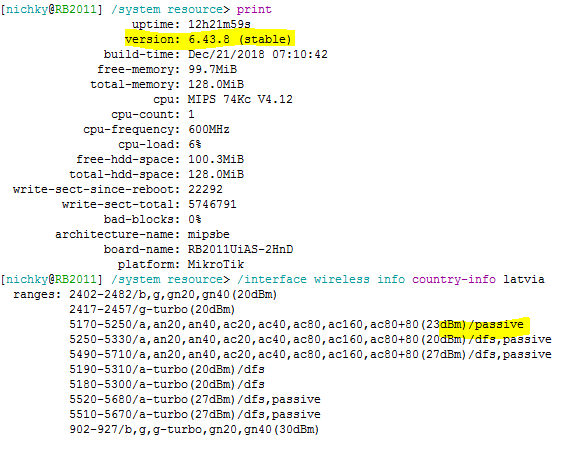
Can you provide supout file to support@mikrotik.com? Honestly, I do not see how (if you did not play around with Photoshop ) you could get this information under country info.
I don’t think that a user using superchannel with a country set wants to be compliant and I think the second option (changing country on update) is the best option.
In the end, these are things that should be written in changelog, I think lots of users lost CPE connection for this update.
I dare not play with you.
you can see from other device