Looks like “Restore default config” functionality is broken on my hap lite on this version. Getting no config at all after the reset.
Hello.
How fix memory leak on my hAPac2 6.45.9?
just 7 days uptime, free memory down from 80Mb to 65Mb
That is not an indication of memory leak on its own. Does the memory usage keep growing? How does it look over time? Do you have a graph to show?
- about 80Mb free memoy after reboot and still decreases every day by ~2-3 MB. It’s happens once per day, not each minute.
- i’m think that graph doesn’t work properly cause it’s empty

You have to enable resource graphing by adding a new rule under “Resource Rules” tab.
Well… I can tell you what is going on - I did a reboot after making supout proved to be impossible and some hours after that it left THIS in LibreNMS log
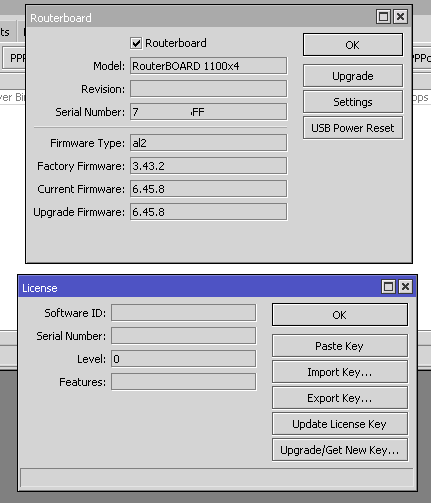
and surprise, surprise - it really shows just that

Is this one also one of these “cosmetic” issues or is 6.45.x crippling 1100x4 and 4011 devices? Fancy a RMA? If device has been in use for years (factory software 6.40.4)?
What next?
@nmt1900 seems this device is still running 6.45.8
Yes it was. As I stated previously, we have 3 1100x4 devices with 6.45.8 and 6.45.9 and they all suffer from same problems to somewhat different extent. Others with 6.44.x versions are functioning without problems.
As update to previous - another reboot “brought” license back and this device now also is updated to 6.45.9. It is interesting to see, which would license level be after next reboot - almost like rolling a dice. This is getting really confusing…
No memory leak for me at all.. Memory usage seems the same like every previous build i have used before, no matter that is stable or long term one.. Currently on latest long-term, all seems fine, 10 days till now.

Now we know, how this starts.

This pops up in log and after that CPU usage goes up and stays there. More than one thing ceases to work after that - commands in terminal produce similar output with suggestion to send supout file.
The license level problem is also related to that because issuing /system license print also puts out similar error message in terminal and “adding insult to injury” - finally new terminal window refuses to open in winbox.
We’ll see if supout can be made with scheduler or not, but after that attempt it is time to downgrade.
After 11 day uptime after flashed this long-term build.
- No memory leak. Still memory is the same !
- No licence Level issues reporeted before for my hAP AC2.
For people who is reported issues. Make sure that you update RoS and Firmware too to latest available compatible to RoS version.
Does anybody check ospf problem?
Hi, do you test OSPF issues yet? Any positive news?
Passed lab test with a couple of Ubnt and Cisco equipment . Going to go put it in a non critical area of the network with and see how it goes .
Not very optimistic as I’ve seen nothing in the changelogs indicating any sort of fix.
Hi,
I will test now on several non critical devices too.
For now - we have no large scale up/down events on core routers with many circuits, so no statistical data on ospf behavior.
I will inform on issue detection.
But it is true - no news on ospf fix in changelog.
Seems random reboots disappeared on HAP AC^2 with 6.45.9.
Uptime is 8 days.
+1
Not just you. Busy deploying The Dude and wanted to create web skin for web access to The Dude this eve and noticed exact same as described
Someone needs to tell Mikrotik that there is a bug in OSPFv3 (tested in 6.44.5, 6.44.6 and 6.45.8) when the router is experiencing high IPv6 traffic (1.5gbps here started to give problems). It is that bug that some complained about in the forum, the adjacency drops, and only goes back until the router deactivates and reactivates the instance of OSPFv3, while OSPFv2 does not present any problems. I believe it is possible to reproduce this bug by closing adjacency between some routers and leaving them with about 5gbps of IPv6 traffic (or more) for at least 2 days.
Yes, I already opened a ticket on the support, I talked a lot with them, and the conclusion I reached was this. Nothing to complain about support, there is only one problem and needs to be fixed. I still need to test version 6.45.9, but by the changelog, it should be the same.
You can do that: support@mikrotik.com
The bug is already reported to Mikrotik support. Do not want to lose sleep over this issue, I’m leaving for another manufacturer to rule my network core. I helped with sniffer, with data, prints, tests, in short, everything that was within my reach.
I hope that Mikrotik will be able to reproduce and fix the bug.