It turns out the CRS106-1C-5S may be faulty, so ignore that report.
Updated a CRS106-1C-5S from RouterOS and RouterBOOT 6.45.9. It wouldn’t boot.
It turns out the CRS106-1C-5S may be faulty, so ignore that report.
Updated a CRS106-1C-5S from RouterOS and RouterBOOT 6.45.9. It wouldn’t boot.
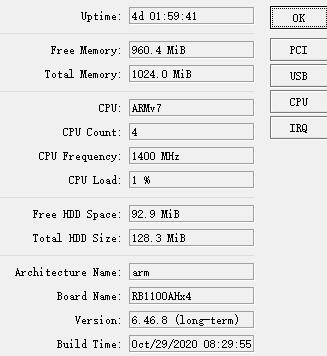
My new RB1100x4 hung twice in last week. I had to make factory reset to return it to life both times
Does anyone have RB1100x4 working stable with this version?
yes,it works fine…
We have same problem on many hEX _POE and PowerBOX PRO… Nothing helps…
Is it rev 2?
/system routerboard print
revision: r2
There is no revision here 
/system routerboard print
routerboard: yes
board-name: RB1100AHx4
model: RB1100x4
serial-number: -----
firmware-type: al2
factory-firmware: 6.44.5
current-firmware: 6.46.8
upgrade-firmware: 6.46.8
Do you mean I’m there?
http://forum.mikrotik.com/t/rb4011-and-rb1100-ahx4-bricks-randomly/130638/1
No revision stated usually means version 1 (not only in the Mikrotik world).
Hi !
I have a RBwAPG-60ad Wireless wire link that came pre-configured. https://mikrotik.com/product/wireless_wire
I make updates via Winbox with “check for updates”
I want you to know if I loose the configuration and the link goes down I do not know to to configure it.
Currently I have 6.47.8 Stable and I want ro know if I can change to 6.46.8 Long term directly from Winbox without loose my configuration.
It is safe ?
it is a good ideea ? Or should I remain on Stable?
You shouldn’t have any issue, but take backups from each end as you should do with any upgrade, or this case downgrade.
Cheers!
I’ve experienced some random reboots on RB4011 with this version. Haven’t been able to pinpoint why (and no supout file is generated). Today again I had a reboot and could see it happen at the same time as I connected a new switch to the network so this made me think it might have something to do with RSTP. I could replicate it by connecting the switch once again. I downgraded to 6.45.9 which worked flawlessly (no reboots). Anyone experincing similar issues?
running this firmware from day 3 it was released on my 4011 (no wifi version)
had first random reboot this week, but have no idea why it happened because it was at night when for sure nobody was doing anything
didn’t found anything to blame (was suspicious about watchdog) and decided to run local syslog server to duplicate all the logs for the next time
I had 1 reboot in the first week or so after I installed it, but I wasn’t sure if it wasn’t due to power outage.
Since that 64 days uptime with no other issues.
DDOS? Some addresses triggered your port-scan-blocker on 192.172.100.225. And now you log any further attempt from those blocked IP address.
add action=drop chain=forward > log=yes > protocol=tcp src-address-list=
PortscanAttacker
This is not related to an upgrade. This is related to what “happens” on you internet connection.
I see no outgoing rules with log enabled. It’s not the only place in MT where src/dst is swapped in the logging. (TORCH can have this too)
Might be triggered by running Torrent or other peer-2-peer network software.
Very stable on all HW we throw this release on. Great Version!
I have just had a strange issue on my RB4011iGS-2HacQ2HnD, after about 80 days uptime on v6.48.8.
I noticed I cannot logon locally nor via VPN from the outside. It was returning the message that the router does not support secure connection, described here: http://forum.mikrotik.com/t/winbox-connection-error/137886/1
I had to force-reboot the router. Checking the logs afterwards showed this, repeating many times, for several of the DHCP pools:
dhcp,error WLAN-Guest_DHCP: failed to give out IP address: unknown pool
dhcp,error LAN_DHCP: failed to give out IP address: unknown pool
After the restart all seems to work ok again.
Has anyone else experienced the same problem?
New version 6.47.9 has been released in long-term RouterOS channel:
http://forum.mikrotik.com/t/v6-47-9-long-term-is-released/146764/1