As I already write on post #29:
ROUTING package are for other services, like BGP / OSPF / RIP etc. that 99% of the AP do not need.
standard /ip routes are part of SYSTEM package
As I already write on post #29:
ROUTING package are for other services, like BGP / OSPF / RIP etc. that 99% of the AP do not need.
standard /ip routes are part of SYSTEM package
That depends on which packages are loaded independently
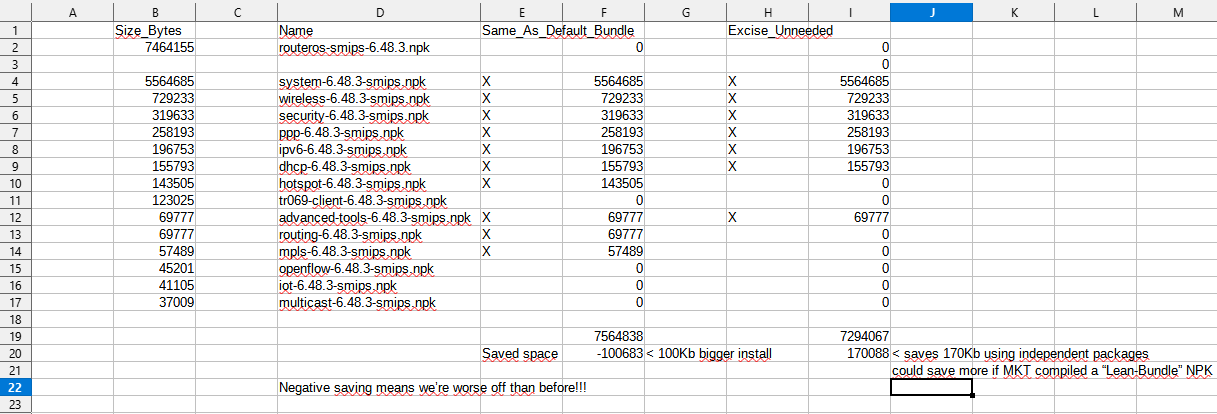
as the “bundle” ls LZMA’ed together, the compression algorithm is more efficient than when compressing the packages independently
the final effect is that if you try to install the same packages as the bundle, but independently, you use more flash space.
(i made an excell sheet to quantify that…)
Mikrotik really should come up with a “lean bundle” NPK, without MPLS/Hotspot/Routing, that really have no place in SOHO.
Usage during training classes is not relevant in this case because in such usage you will also teach the use of netinstall and can easily re-install routers.
The whole update problem is mainly affecting those that have routers installed remotely and want to update them via remote administration.
I think it is a bit unlikely that one would run these packages in production on SMIPS routers. Spend the extra $30 to get a decent router.
I fully agree!
Also note that any space gained is effectively doubled as you need both the space for the installed version and the same space for the download of the new version.
So when you have only 16MB and the package to be installed is 7.3MB, it leaves only 1.4MB (16-2*7.3) for all overhead (formatting overhead, files on the disk for use by RouterOS, etc) but when the package could be reduced to 6MB there suddenly is 2.7MB in the first update and 4MB free in the future. So a small reduction has a lot of effect.
Any trick that moves the stuff to another place during update (like it is done in other routers with 16MB flash which have more RAM and use a RAMdisk) will solve the problem for a long time, because during normal usage half of the flash is free.
dear BartoszP,
yes, on MTCNA class, which topics that the router have to have routing package ?
remember that static routing does NOT need routing package as the function already inside of system.
routing package contain dynamic routing functions such as ospf, rip, and bgp. it only needed on advance routing / mtcre class thus routing+mpls will be needed for mtcine class as well
cheer
This isn’t specifically a response to this post, but:
I’m not sure that these space issues are as much of a problem in ROS v7. I have the main ROS v7.1beta6 package (which includes everything as before) on my hAP mini, latest version, and it reports 7.9 MiB of 16 MiB used (50% free).
It will almost certainly be easier to upgrade to ROS v7 from the bundle package than the individual package installs. I have run into issues trying to upgrade installs with individual packages to installs using the main bundle. As a result, I am not sure about the wisdom of advising people to avoid the bundle package in the long term, since I suspect at the rate things have been going, we might reasonably expect a v7 stable release in Q1 or Q2 next year - possibly a little longer. If this stable release is as small as the current one, or a similar size, it might eliminate the upgrade issues that we have all experienced with the 16MB flash devices.
No that is not at all true, please read back the previous replies and replies given in other topics about this issue.
When you now have 7.9MB in use on a hAP mini, you are right on the edge of being able to update because during update twice the amount of space is required temporarily.
Remember the hAP mini does NOT use a RAMdisk like many other devices with 16MB flash do, because it has too little RAM for that.
I do have personal experience with hAP mini units in the field as we have about 50 of them deployed to customers, with the bundle package and tr069 package (currently running 6.48). I have upgraded them a few times now, but try to make the upgrades infrequent to try to avoid issues with insufficient space. I push down upgrades from the TR069 server - most upgrade OK but usually there are a handful where there is not enough space and I have to upgrade them manually. The typical problem situation I have come across is that when the bundle+tr069 package are uploaded, the disk is basically almost full - it shows either 15.9 MiB in use out of 16 MiB or 16.0 MiB in use out of 16 MiB. The ones that show 16.0 MiB in use out of 16.0 MiB typically fail to upgrade. I have to do some things to free up 0.1 MiB to bring it down to 15.9 MiB in use and then it upgrades successfully on reboot. Sometimes I just have to disable graphing, upgrade, and re-enable afterwards, other times I have to remove the tr069 package, upgrade, and put it back afterwards. I am always a bit nervous when handling the upgrades with that razor thin margin in 6.x - if we upgrade to a version that suddenly uses a lot more space for some reason, it could prevent future upgrades, so I tend to be conservative for that reason.
I only have the one 7 beta hAP mini home device to compare to for 6 vs 7. On that one with both the routeros and tr069 package installed, I have around 300KiB more free space than the units on 6.48. When uploading the bundle and tr069 npk’s to the 6 vs 7 devices, the RouterOS 6 device has only about 300KiB free whereas the RouterOS 7 device has 600 KiB free. I am not saying it is drastically better, but it does seem to be better, at least with this limited sample size. My own personal experience is that the units always seem to upgrade properly in v6 if there is at 0.1MiB free after uploading the npk files, although I would rather have more. It could be this is no longer true in v7 and more space is needed, or that I was lucky to be able to upgrade with only 0.1MiB free and this experience does not agree with what others have found.
After the update, the DHCP-Client stopped working. Problem with obtaining an address from the provider. Back at 6.47.9
google-translate, sorry
Very interesting idea!!!
Сan try to build such “lean bundle” for smips on this week.
I will provide the result as done.
Which version of RouterOS works correctly for igmp-snooping?
I use 6.47.9
Thanks.
Hello, everyone experiencing issues with SMIPS upgrading. Please open a support case by sending an unencrypted backup file together with supout.rif file from a device that is currently unable to upgrade or even better, provide a full remote access to your device.
Yes that is what it is all about: the 16MB flash on these devices both holds the installed version and the downloaded new version.
So when the stuff to download approaches half of the 16MB, it will no longer be possible to do this kind of in-place upgrade and a netinstall is required, which loads the new version into empty flash using only the network bootloader, so it does not have this restriction.
Did you also try other things, like rebooting the 6.47.10 after some time? It may well be that it is not caused by a software change but just by a bad state on the network that got resolved in the time it took you to downgrade (and would also be resolved by just trying again some time later).
Hello Emils, сan you look on my case,
I fully described the situation here on forum
Mikrotik Staff, now you have the EXACT procedure for replicate the problem.
http://forum.mikrotik.com/t/v6-47-10-long-term-is-released/149500/1
I wonder if it would be too hard to check if package upgrade even works on supported platforms because it obviously doesn't on SMIPS using any standard procedure...
Well, the testing being done clearly is not sufficient, but it appears that in this case a requirement to reproduce it is:
Apparently such scenarios (which are common) are not tested. And with “netinstall 6.47.9, then upgrade to 6.47.10” (probably what they test) it works OK.
I already dimonstrate than netinstall full 6.47.9 can be upgraded by drag & drop to 6.47.10
post #45 and 48
http://forum.mikrotik.com/t/v6-47-10-long-term-is-released/149500/1
On others you go without problems.
I wonder why you write if you wonder?
Or you have a problem and with right, if not already writed before, you write here, or all this “wonder” post are useless and confusing only.
Writing assumptions, hypotheses and several times the things already written in previous posts, do nothing but bring the number of posts to 120 when in reality 3 or 4 are needed, also making confusion for the MikroTik assistance
and other lazy users who don’t have the slightest desire to reread everything, rewrite the same things again, lengthening everything and making the thread even more confusing.