Not sure if this is specific to 6.47.4 or not, but we are doing carrier grade NAT on our mikrotik and logging the translations. This has been working great all year. Recently we upgraded to 6.47.4 and found a bug.
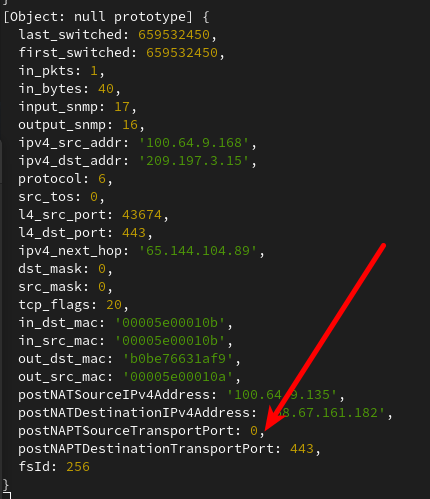
The postNATPTSourceTransportPort value is 0 in 99.999% of the flows. It should be something like 51413.
The router is configured thusly:
/ip traffic-flow
set enabled=yes interfaces=WAN-VRRP,WAN-VRRP-v6
/ip traffic-flow target
add dst-address=100.64.0.10
I also encountered problems with IPTV or multicast in general.
I opened up a ticket with MT support, and currently there seems to be a bug where the “multicast-router=pemanent” bridge setting is ignored after reboot.
Here is the response I got:
The joins are not forwarded to the bridge interface (and further to VLANs) when the bridge thinks it is not a multicast router. I managed to repeat this behavior when rebooting the device. It seems that after reboot, the “multicast-router=permanent” configuration on the bridge interface is ignored and you need to manually disable/enable this property, for example:
/interface bridge set [find name=bridge] multicast-router=disabled
/interface bridge set [find name=bridge] multicast-router=permanent
When a device requests a lease from the DHCP server, then its hostname is changed and the device rebooted so the lease is requested again, the Hostname in the DHCP Leases list is not updated. Only when the lease is deleted in the DHCP Leases list and then re-requested by the device, the Hostname is updated.
It is incovenient because all phones on the network initially connect under a plain standard name which is then later changed to an owner-specific name (e.g. the owner name is appended to it), but this never shows up in the leases list as long as the lease gets renewed.
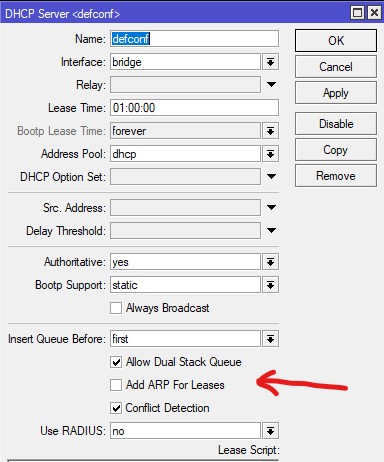
Another DHCP feature I request is when a static lease is added, a static ARP entry for this IP Address should also be created. On Interfaces with arp=reply-only this is very useful. When a device later uses the static address instead of dhcp, communication breaks if the ARP entry is not added manually.
I use reply-only on nearly every interface because I don’t want people to use static IP-Adresses without permission and cause address conflicts.
Hi,
After the upgrade I’m not being able to advertise ip addresses in ospf. Running on x86. Is anyone having the same problem. I can see the peers on both side but no advertisment.
*) filesystem - improved long-term filesystem stability and data integrity;
Uptime 27d 20:08:45
Free Memory 75.3 MiB
Total Memory 128.0 MiB
CPU ARMv7
CPU Count 4
CPU Frequency 716 MHz
CPU Load 0 %
Free HDD Space 2116 KiB
Total HDD Size 15.3 MiB Sector Writes Since Reboot 420 002
Total Sector Writes 980 093
Bad Blocks 0.0 %
Architecture Name arm
Board Name cAP ac
Version 6.47.4 (stable)
Build Time Sep/16/2020 11:32:37
Factory Software 6.43.10
Come on, guys, it wrote 400k in one year and then 400k in one month on 6.47.4. Is this affecting the lifetime of the internal storage or not?
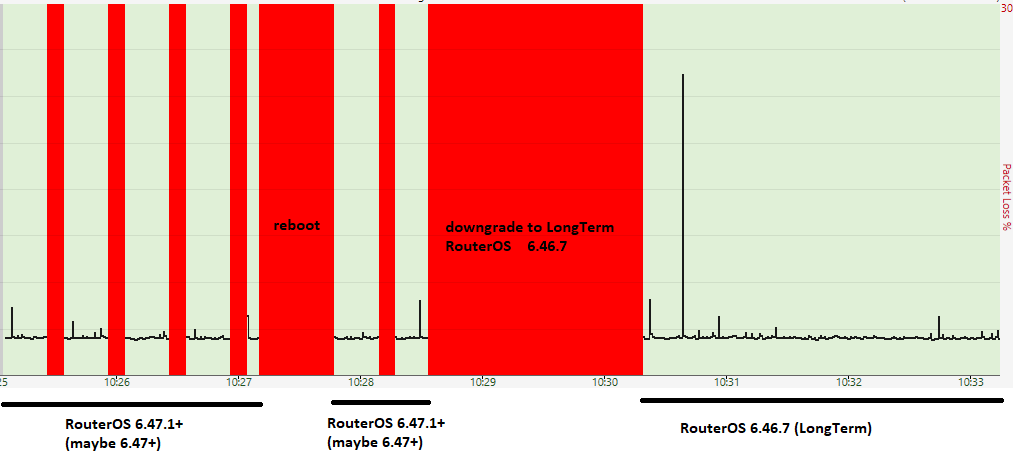
Dear, from version 6.47.1 till now I have problem with WAN connection. My setup is “hex S” connected via SFP (Mikrotik S-31DLC20D) to provider. When I use LongTerm version of RouterOS (6.46.7) everything is fine. After upgrade to version 6.47.1 or newer (don’t know about 6.47 - not tested), my WAN connection is experiencing massive packet loss every 30 seconds. As soon I downgrade to ROS 6.46.7 (Long-Term), everything works flawlessly again. Any help? Screen from PingPlotter attached.
edit: Another SFP module (OEM vendor) - problem persist. I did test with 6.48beta48 - problem disappeared. So it seems it’s 6.47.x related only.
…
After update to 6.57.4 i have a problem with NTP client. I have installed NTP package to use MT as NTP client and server. But ROS 6.47.4 not syncing with external NTP servers (System>NTP Client) i have always status “started”. Could anyone else chect it at x86 machine please?
Edit: I have found that if You have installed NTP package - it’s NOT working. If You use only SNTP client - it worsk. So - there is any BUG with NTP package under ROS 6.47.4
I was thinking about it. If I remember right, Normis said that the flash used is rated to 100k rewrites. He also said it does wear leveling. Now, we need to know the size of the sector. I’d say 512 bytes - but certainly no more than 4 kbytes.
With 512 bytes we would have 16,3MiB (that’s my hEX) x 2048 = 33382,4 sectors (I know, I know. We have a rounding error somewhere here). Times 100k writes = 3.338.240.000. More than 3 billion writes. Let’s be conservative, and say 1,1 billion writes.
With 4 kbytes we would have 3.338.240.000 / 8 = 417.280.000 writes. I’d say we could be pessimistic, and cut it by 3: 417.280.000 / 3 = 139.093.333,33 writes.
That’s still an awful lot of writing. My hEX have 1.663.535 writes total, and I bought it 3 years ago.
Well, according to your calculations, pe1chl’s router is 1/5th of the way there. I do have other concerns:
the recent updates heavily increased the writing on the storage; I have 2 x CAP aC and 1x HAP AC Lite and all 3 of them are writing 10x more than the previous SW versions
considering the internal storage is not easily replaced (like an external CF) it does create a concern to me related to full internal storage failure; if it was an easily removable card I would have had 0 concerns as I keep backups; not all storage will live up to the expected/rated lifetime
the funny thing is that this last update does filesystem - improved long-term filesystem stability and data integrity hence the discussion in this thread and not a separate forum discussion
these numbers may vary with the system configuration. I get 500k/month with very few configuration items in place ( AP managed by remote capsman). What if a CORE router with heavy routing will start to do 20mil writes/month?
But my main question is…why is this parameter reported? What does it help with for the end-user? For it to have relevance we would need a measuring system and some limits, otherwise it is just a number put in the GUI and speculations on what it does
Note that this happened because I had “/tool graphing” with store-on-disk=yes running for some time. That caused a lot of flash writes because it writes the graphs to flash every 5 minutes. I had several interfaces being graphed, so it added up.
I have changed the setting to store-on-disk=no so now my graphs are lost on reboot, but the flash writes are no longer a problem for me.
I currently have an uptime of 45 days and 19189 flash writes (running 6.47.3), and in that time I also made some small config changes which will have caused writes.
So I do not worry.
 and speculations on what it does