8 out of ~100 hap lite were bricked during upgrade from 6.46.8 to 6.47.9 and required netinstall.
In some cases (seems totally random) Avaya IP phones can’t get IP address from Mikrotik with ROS 6.47.9, ROS 6.46.8 is working fine.
Will revert to 6.46.8 everywhere.
Upgraded from 6.44 and 6.46 and went largely without incident. Mix of RB4011, RB3011, RB2011, hAP ac lite, hEX PoE, CRS112-8P, CRS326-24G, hAP ac, hAP ac², wAP ac, and cAP ac. This feels like a good update. Time will tell. I miss antenna gain on the AP’s but at least can get to it via CLI.
I upgraded a hAP mini from 6.47.8 and got the same WiFi problem as with 6.48, fixed by downgrading.
The issue is that on a WiFi connection with 90% CCQ there are interruptions in the traffic every couple of seconds.
As if the retransmit timer is too long (like 200-500ms).
I wonder why this happens on upgrade (nothing is mentioned in the release notes except changes for other countries) and also I do not quite understand why the CCQ is not closer to 100%, the hAP mini is only a meter away from a Chromebook.
After upgrading RouterOS and RouterBOARD, then doing a reset, then adding back your config via console, do you still have the same issues?
No idea, and I don’t think it should be required to do that on upgrade.
The firmware is on 6.47.7 both before and after test.
RB2011 upgraded, works fine so far.
Lost a hAP lite on upgrade from 6.46.8 to 6.47.9 as well. Everything else (2011/3011/OmniTik/RB951) seems to have survived the upgrade just fine.
hAP mini (is about the same thing as hAP lite I think) did upgrade from 6.47.8 to 6.47.9 here OK but I had already reduced my install to 6 packages instead of combined package.
(system/advanced-tools/dhcp/ppp/security/wireless)
This gives it some more breathing space when updating, very important for these devices with only 32MB RAM.
I did not find where to report bugs so…
routerboard: yes
model: 450
serial-number: DELETED
firmware-type: ar7100
factory-firmware: 2.20
current-firmware: 6.47.9
upgrade-firmware: 6.47.9
Issue:
Changing the name of an interface does not update view in all places when using WebFig.
Can reproduce:
Yes
Workaround:
Log out of WebFig and in again.
Not affected:
Terminal, is showing the correct information.
Router, change is commit
Browser used:
Name Firefox
Version 85.0.2
Build ID 20210208133944
Distribution ID
Update Folder
/Users/DELETED/Library/Caches/Mozilla/updates/Applications/Firefox
Update History
Update Channel release
User Agent Mozilla/5.0 (Macintosh; Intel Mac OS X 10.16; rv:85.0) Gecko/20100101 Firefox/85.0
OS Darwin 20.3.0 Darwin Kernel Version 20.3.0: Thu Jan 21 00:07:06 PST 2021; root:xnu-7195.81.3~1/RELEASE_X86_64
Correct is to send this to support@mikrotik.com
This forum is mostly a user forum.
With 6.47.9, there is currently no indication of memory leaking when DoH is used.
/ip dns
set allow-remote-requests=yes use-doh-server=https://dns.adguard.com/dns-query verify-doh-cert=yes
/ip dns static
add address=94.140.14.14 name=dns.adguard.com
add address=94.140.15.15 name=dns.adguard.com
/certificate settings
set crl-download=yes crl-store=system crl-use=yes
/certificate> pr det
Flags: K - private-key, L - crl, C - smart-card-key, A - authority, I - issued, R - revoked, E - expired, T - trusted
 0       T name="DigiCert Global Root CA" issuer=C=US,O=DigiCert Inc,OU=www.digicert.com,CN=DigiCert Global Root CA
           digest-algorithm=sha1 key-type=rsa country="US" organization="DigiCert Inc" unit="www.digicert.com"
           common-name="DigiCert Global Root CA" key-size=2048 subject-alt-name="" days-valid=9131 trusted=yes
           key-usage=digital-signature,key-cert-sign,crl-sign serial-number="083BE056904246B1A1756AC95991C74A"
           fingerprint="4348a0e9444c78cb265e058d5e8944b4d84f9662bd26db257f8934a443c70161"
           akid=03de503556d14cbb66f0a3e21b1bc397b23dd155 skid=03de503556d14cbb66f0a3e21b1bc397b23dd155
           invalid-before=nov/10/2006 01:00:00 invalid-after=nov/10/2031 01:00:00 expires-after=560w2d11h1m35s

 1  L    T name="DigiCertTLSHybridECCSHA3842020CA1 (1).crt_0"
           issuer=C=US,O=DigiCert Inc,OU=www.digicert.com,CN=DigiCert Global Root CA digest-algorithm=sha384 key-type=ec
           country="US" organization="DigiCert Inc" common-name="DigiCert TLS Hybrid ECC SHA384 2020 CA1" key-size=secp384r1
           subject-alt-name="" days-valid=3651 trusted=yes
           key-usage=digital-signature,key-cert-sign,crl-sign,tls-server,tls-client
           serial-number="0A275FE704D6EECB23D5CD5B4B1A4E04"
           fingerprint="d79a2d5e03295c0e9feae36d021ebd5209700ab1a9e817a43f30fa3c66f78d21"
           akid=03de503556d14cbb66f0a3e21b1bc397b23dd155 skid=0abc0829178ca5396d7a0ece33c72eb3edfbc37a
           invalid-before=sep/23/2020 01:00:00 invalid-after=sep/23/2030 00:59:59 expires-after=501w2d11h1m34s
/certificate crl> pr det
Flags: E - expired, D - dynamic, I - invalid
 0  D  cert=DigiCertTLSHybridECCSHA3842020CA1 (1).crt_0 url="http://crl3.digicert.com/DigiCertGlobalRootCA.crl" num=557 revoked=3
       next-update=mar/05/2021 02:29:49 last-update=feb/12/2021 05:54:06 fingerprint="65e210870319eb7c4a8622071fe4b4fa3b2995c9"
       signature="e182e50b0462f80521116059a3fe28df8bee8c96f840614347defb57bd1023da7a45c2bab89cf16012a6edb2161aded65ab512f2ca788fa20
          444467b0cd961ba0c44155149ee196bd04f721ad8037c20acd6a38047f11c7f401a967114c646ef3ea16f25f8856c490c525a5b2ab6f3b987b1e44a94
          94a76e563a5ce0a116a4dce417b578a9be2d6945ec55d1d70c5a087125a9ac301affbf90c0c5c490ba256a6b0702aaa451f9cae56b9a741fc13ca08dc
          1416743f3ebc7c764743f88995e4e79cc72e89e0218394c64e7e77499905a7c2d2dc1a3bd8e997b26726c9ecda42f73ccf1047e80917aa2ae4f44e5de
          9dcc51559dac7b3b49010102897acce6fd5f"

 1  D  cert=DigiCertTLSHybridECCSHA3842020CA1 (1).crt_0 url="http://crl4.digicert.com/DigiCertGlobalRootCA.crl" num=557 revoked=3
       next-update=mar/05/2021 02:29:49 last-update=feb/12/2021 04:54:05 fingerprint="65e210870319eb7c4a8622071fe4b4fa3b2995c9"
       signature="e182e50b0462f80521116059a3fe28df8bee8c96f840614347defb57bd1023da7a45c2bab89cf16012a6edb2161aded65ab512f2ca788fa20
          444467b0cd961ba0c44155149ee196bd04f721ad8037c20acd6a38047f11c7f401a967114c646ef3ea16f25f8856c490c525a5b2ab6f3b987b1e44a94
          94a76e563a5ce0a116a4dce417b578a9be2d6945ec55d1d70c5a087125a9ac301affbf90c0c5c490ba256a6b0702aaa451f9cae56b9a741fc13ca08dc
          1416743f3ebc7c764743f88995e4e79cc72e89e0218394c64e7e77499905a7c2d2dc1a3bd8e997b26726c9ecda42f73ccf1047e80917aa2ae4f44e5de
          9dcc51559dac7b3b49010102897acce6fd5f"
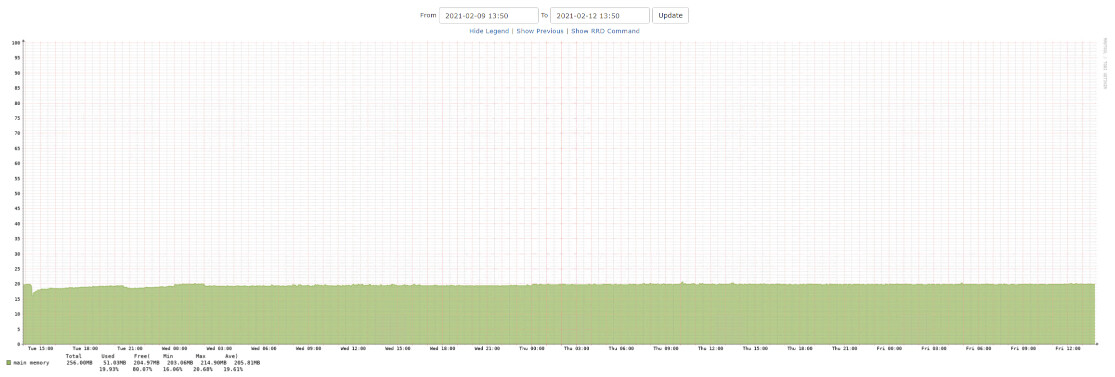
Will upgrade my CCR but leave my capacs where they are for now. To many indications of wifi issues.
That is a plus, but strange it was not in the change log.
Didn't memory issue appear in 6.48 branch, not 6.47?
I upgraded all my devices to 6.47.9 with no immediate issues.
No, the DNS server change to enable DoH caused problems from the beginning. In my case the solution is simple: do not use DoH.
Memory leak on my hap ac^2 after upgrade
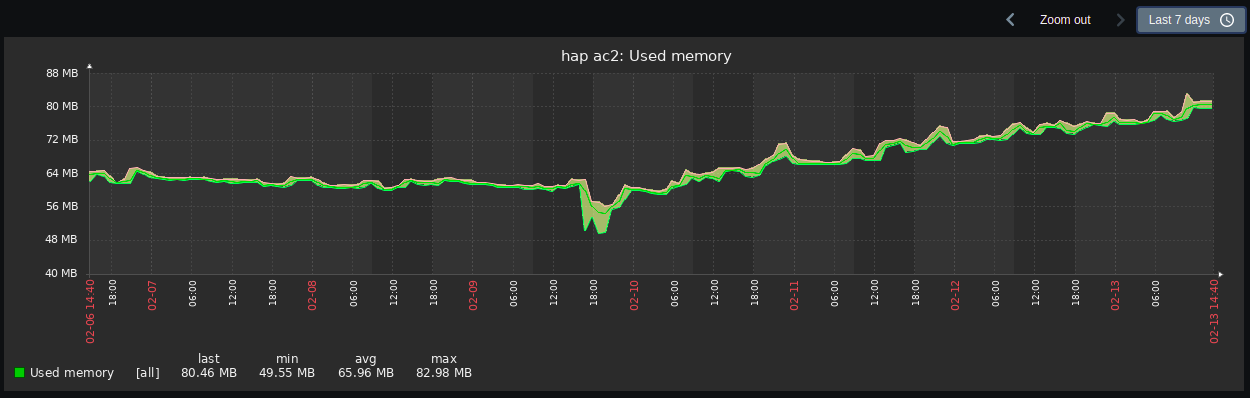
Memory leakage may have come with the fist version of 6.47 (that wast the first with DoH support), but since not everyone measure memory level its not easy say when it was there first (at least som 6.47.x version and above. It does not break the router, but usage of memory slowly increases over days, before it drop down and goes up again. Saw-toot wave.
strange, I still see no increase in memory usage. The screenshot I posted is from a 750G r3 (hEX). Does this only occur on arm devices?
We use this device at work to provide internet access to guests, not too much traffic, around 100GB/month.
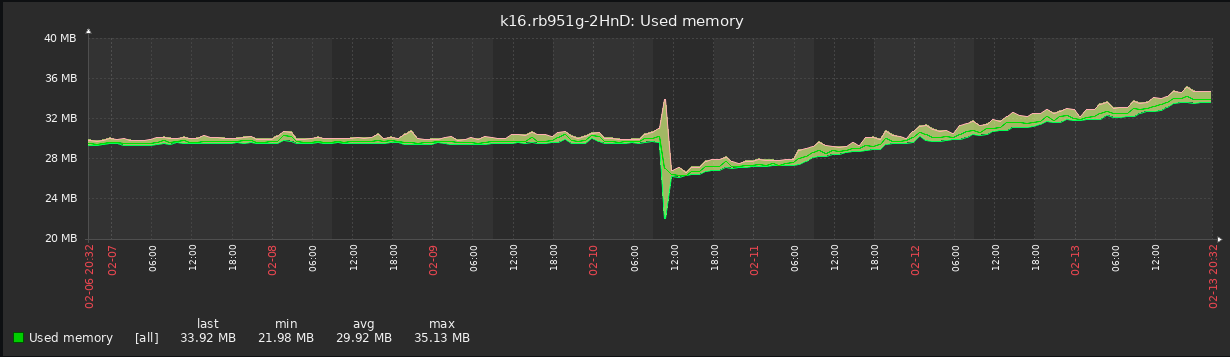
hap ac2, exact same dns configuration. There must be something different on those devices showing this problem. Maybe it’s a service or setting interacting with the dns, which is disabled on my devices.. just a guess. (Graph)