I would recommend to do a manual upgrade in any case. You can control what version gets installed rather than the actual version offered by MikroTik, which could change halfway through your update project.
You can write some script that will upload the desired version to the devices and issues a reboot command, or to make the devices download it and reboot.
I would advise to check if you can use a subset of the available packages (e.g. you do not need routing or mpls or ipv6 etc) and install only those packages that you require instead of the whole “combined” package.
That will save some valuable space on these tiny devices.
I would love to stay on long-term branch as I have good experience with stability and preformace of those bits so far. What I am asking for is a confirmed safe way how to upgrade hap lite to from 6.46.8 to 6.47.9. As I wrote this upgrade is done remotely and I do not have possibility to travel to fix those devices physically :(. Thank You
No problems so far, Updated my Mikrotikerl… all fine
Mikrotik HEX S (RB760iGS), CRS109-8G-1S-2HnD-IN, CRS-112-8G-4S, hAP RBD52G-5HacD2HnD-TC, cAP ac RBcAPGi-5acD2nD.
Bug (/system health) in WebFig and Winbox for the Mikrotik hEX RB760GS
Firmware v6.47.9
Bootloader v6.47.9
WebFig and Winbox
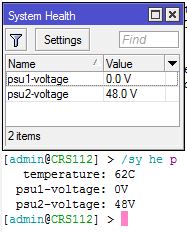
(/System health) from WebFig and Winbox does not display system voltage or system temperature
Terminal
system health print
voltage: 12.9V
temperature: 44C
It does on my hEX S, @yreks. Are you using the default power adapter? I thought it was either 24V or 48V (where I’m using an 48V adapter. Not sure if that is related.