v6.47 [stable] is released!

I don’t think it was a good idea. Probably the “MikroTik anwer” only described what was done in the actual implementation, not what should have been done.

IMHO the DNS resolver should take DNS (UDP/TCP port 53) requests from the clients, then:

- lookup the requested data in the static/cache table to find any static records or cached items.  if found, return them.
- when the found item is FWD, forward the query to specified server using DNS (UDP/TCP port 53)
- when not found, check the configuration:
  - when DoH is configured, forward the query over DoH.
  - when DoH is not configured, forward it to one of the configured DNS servers (as before DoH was added).
- when the reply is received, store it in the cache and return it to the client.

One could also state that when DoH is configured using a hostname and DNS servers are configured as well, the lookup of the DoH hostname should automatically be done using the DNS servers. But such “fallback” action may or may not be what you want for normal operation, maybe there should be a config checkmark for that.
(“use DNS servers when DoH fails”)
Totally agree. There’s no need to have the same log a gazillion times. This pretty much happens with every DoH dns warning and error. Not the topic is the issue here. It’s the amount of messages in the log.

cAP ac with 6.47 no brodcast 5G network, but in WinBox no errors. All seems fine.
Downgrade it to LongTerm - all now works fine.
Ideas?

most probably dfs channel, wait or set a non dfs one

I did not get IPv6 DNS Server’s IP addresses with RA. Neither with LAN and neither with WLAN connections. I did disable IPv6 firewall, but nothing. 6.47 version of ROS.

Downgrading to 6.45.9 while the problem with sector recording is not resolved.
When the fix is ​​released, I’ll be back again.

“Delegated-IPv6-Prefix” attribute for PPPoE still doesn’t work… Please…

http://forum.mikrotik.com/t/report-delegated-ipv6-prefix-attribute-for-pppoe/81239/1

I don’t think there was a change in this functionality, do you know how (limited) it worked in previous versions?

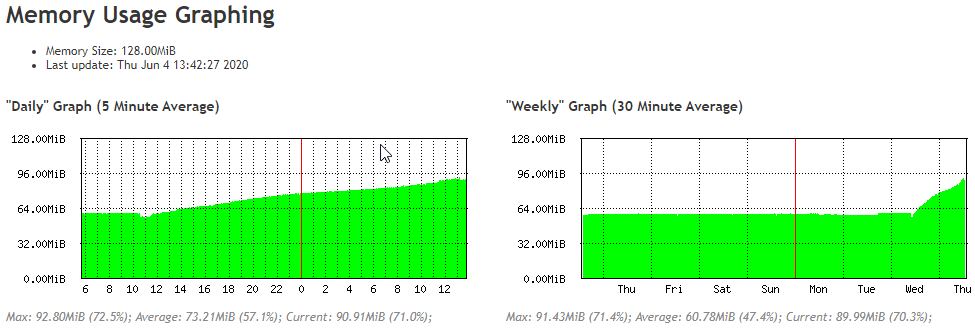
Memory just keeps increasing since upgrade on my 2011UiAS
2020-06-04 13_48_03-Window.png

I was getting the same until I got the proper root cert imported for cloudflare-dns.com. Once the CRL’s were udpated, it stopped. Been clean for almost a day now. And I dont use cloudflare-dns.com I actually use 1.1.1.1/dns-query instead so I dont have to do a local DNS lookup and dont have to have non-DOH addresses in my DNS settings…

where did you get the “the proper root cert for cloudflare-dns.com” ?
Richard

Ok! Thx you! Now upgrade to 6.47 again and check! Post here later…

@eworm: There’s a difference whether queried name doesn’t exist at all (NXDOMAIN, i.e. there are no records for it of any type) or only records of requested type don’t exist (but records of other types do).

But otherwise you’re right, DoH behaviour is terribly inconsistent with non-DoH, and it’s not just support for FWD:

In previous RouterOS and in current RouterOS without DoH, when you add static record of any type, it in fact “blocks” all record types for the name. E.g. if has A/AAAA/TXT in public DNS and you add only static A for to router, then when you ask router for AAAA or TXT for , it will say there’s none (returns zero answers). To be honest, I never noticed this before and I’m not yet sure if it’s correct/wanted or not. But when you use DoH, it doesn’t happen anymore. When you add static A for , it overrides only type A. Queries for other types are forwarded to DoH resolver and you get the behaviour you’re seeing.

If the behaviour used by DoH is correct, then (aside from that it should be the same for both) you don’t need NXDOMAIN, but something like (one of):

/ip dns static add name=<name> type=AAAA address=<some special value indicating that there's no data>
/ip dns static add name=<name> type=AAAA no-data=yes

Better the latter, because it would be useful for all record types. Perhaps also special “type=ALL no-data=yes” as fallback.

And about regexps, I never liked them in DNS. So far they were avoidable, but not anymore, and I think it’s wrong decision. If I have local domain.tld, I want type=FWD to forward all subdomains, it’s the most common and logical use case. Same for type=NXDOMAIN, it should automatically cover all subdomains, because if “domain.tld” doesn’t exist, then “sub.domain.tld” can’t either.

I don’t think you want this. The nice thing about DNS is that it’s hierarchical and searches can be optimized, so even when you have many records, it can be very fast. That’s until you introduce non-DNS-like things like regexps, they ruin the simplicity, because it’s another layer that requires different processing. They are useful, but they should be and extra tool and all simple configs should be possible without them.

This is all you need:

/tool fetch url=https://cacerts.digicert.com/DigiCertGlobalRootCA.crt.pem
/certificate import file-name=DigiCertGlobalRootCA.crt.pem passphrase=""
/ip dns set use-doh-server=https://1.1.1.1/dns-query verify-doh-cert=yes

Anyone else with a large number (over 130) of L2TP clients (only L2TP i.e. not L2TP/IPSec) notice that with 6.47, only a fraction (about 30 to 40) are able to connect to the router? I had to revert to 6.46.x to get my tunnels connected again.

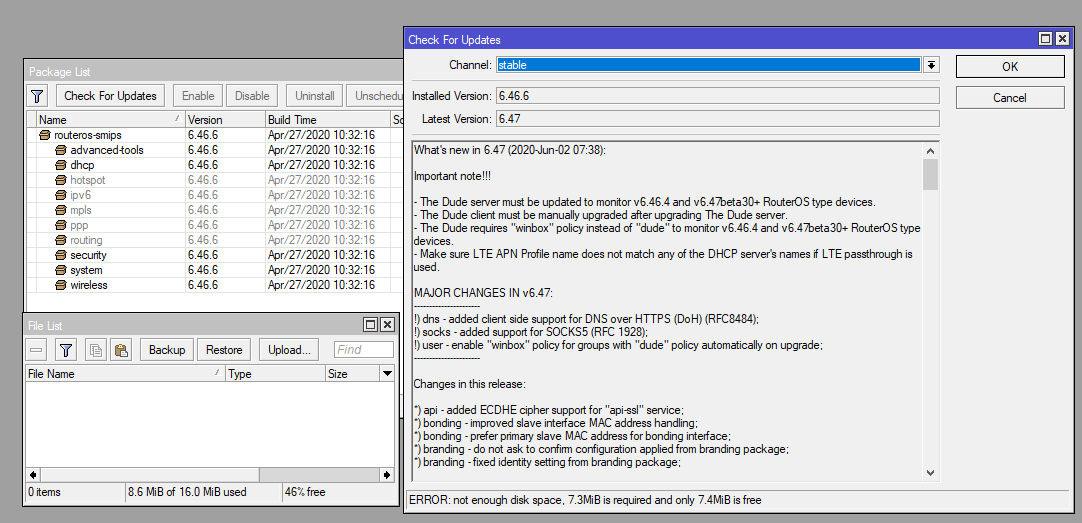
i have no idea how to make more free space…
hAP lite
hap.PNG

Install an older smaller image, then upgrade to latest.

Install an older smaller image, then upgrade to latest.

Can’t really recommend this. The past has shown that constantly downgrading and upgrading between different versions can lead to a corrupted configuration or an unstable system.
The scripts used for converting the configuration are not perfect (like the ipsec issue pe1chl reported)
I’ve experienced this myself more than one time.
Better make a full backup of the current installation, netinstall the latest version and import the backup.

Hi,
I have two devices CRS328-24P-4S+RM + hAP ac and I have upgraded to 6.47. All done via Winbox 3.24. Here are some bugs:

  1. Previously the icon for disabled user was gray, currently is red. Should be gray. Happens on both devices.
  2. When I exported my settings with command export file=yyyy-mm-dd-export all ports are exported with speed=100Mbps, so the export looks like:
set [ find default-name=ether15 ] speed=100Mbps
set [ find default-name=ether16 ] speed=100Mbps
set [ find default-name=ether17 ] disabled=yes speed=100Mbps
set [ find default-name=ether18 ] disabled=yes speed=100Mbps
  • This is wrong, because I use 1Gbps. It is added by mistake and it may cause troubles when restoring backup. Happens on both devices.
  1. I have downloaded certificates for DoH with commands
/tool fetch url=https://cacerts.digicert.com/DigiCertECCSecureServerCA.crt.pem
/tool fetch url=https://cacerts.digicert.com/DigiCertGlobalRootCA.crt.pem
  • Then I have imported both of them.
  • Then enabled DoH (DoH running fine)
  • Then I have deleted DigiCertECCSecureServerCA and “autosupout.rif” was created wtin about 560 Kb. I think that something crashed.
  1. I was not able to make Certificate Revovation List work

In my experience it sometimes happens that “System->Packages->Check for updates” does not work even though upgrade.mikrotik.com can be pinged.
E.g. yesterday one of the routers I wanted to upgrade (a CCR1009) displayed only the empty window where the release-notes would be displayed and the “latest version” field showed the 6.46.x version that it had last shown when I checked before (6.46.5 if I remember well).
I let it sit for a couple of minutes but no change. I then rebooted the router and checked again, this time it worked on first try. Download&Install went without trouble.

I have seen that before. Of course I am aware of issues with firewall or DNS setup that can cause problems, but that wasn’t it (or reboot would not fix it). Also, when there is a connectivity issue there usually is an error message quite quickly (failure to lookup the hostname, failure to connect the upgrade server). That wasn’t happening here.