Most interesting question here is - what would be possible consequences of “NAND memory going into read-only mode or becoming unstable over time” in context of this fix???
I have to join other DNS fans, I’m grateful for improvements, but it’s like you stopped just few steps before finish line.
If I have regular resolver in global config (/ip dns set servers=<…>), then all local overrides (/ip dns static add <…>) are preferred, whether it’s single hostname or new FWD. But if I use global DoH resolver, then static records still have preference, except just one type (FWD), which is suddenly ignored. What’s the logical explanation for this inconsistency?
Then there are still other things about FWD. Possibility to have redundancy would be very nice. There’s already first step with round-robin when forward-to contains hostname with multiple addresses. And the whole thing with regexp being the only way for forwarding .domain.tld, it would deserve at least an explanation, why it should be the best solution. Current behaviour, where name=domain.tld for FWD means exact hostname “domain.tld”, is strange. Who even needs that? Maybe there are some use cases, but IMHO the expected behaviour is to forward all subdomains. Can’t that be made optional (new parameter forward-subdomains=<yes|no> for FWD would do the trick)? Then you can combine it together, get addresses from all FWDs with same name, and use something more intelligent for redundancy, at least simple fallback to next server. And everyone would love it.
There’s problem with SOCKS’s bind command. It’s supposed to return external address to which someone else can connect (e.g. if client wants to use active FTP with PORT command). Old SOCKS4 work correctly, it returns WAN address (192.168.80.183 in this example):
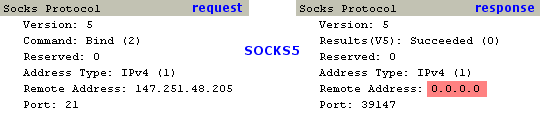
But new SOCKS5 doesn’t:

+1
It is so annoying not being able to do this.
+1 Such configuration (forward for specific zones + DoH for everything else) should be quite common
Hi,
I keep getting errors on DoH in the logs:
DoH max concurrent queries reached, ignoring queries
How do I increase the limit? (increasing the max concurrent queries setting doesn’t help)

there is still issue about ARP and Bonding (802.3ad) interfaces!!! at least on CCR tilera platform.
update: the problem is present when the link monitoring is arp mode; if I disable it, works fine.
log - made startup script failures log as critical errors;
god bless you!!!
@rpingar - We have included a bonding fix that should solve the previously reported non-complete ARP entries. However, ARP link monitoring is not recommended for the LACP mode due to transmit hash policy on the peer device (the ARPs for link monitoring might arrive only on one slave port). This behavior is not related to 6.47 version.
Hey All,
Sorry to asking this questions, 1- can we get feature add in Netwatch for adding srcaddress or ping from interface, and 2- did the fix applied for IPSec mode config spilt subnet?
Thanks for all your hard work.
Parham
When ipv6 changes, win10 can get the new address normally, but it cannot be used. It is necessary to disconnect the network port and restart. When can it be fixed, this problem has been for many years.
I am wondering if the certificate check issue with openvpn was fixed.
It would be better if MT, actually published their requirements documents and associated use cases.
It seems as if they are often incomplete based on these sorts of discussions (seems being the operative word).
In the above discussion, people are saying great we now functionality X so we should be able to do Y.
Why is it that MT stops at X and does not produce X+Y.
I find it hard to believe they do not know about Y!!
The truth is probably in between… In that MT has a long term plan and they are very disciplined into breaking out functionality in use-able chunks.
So X must provide some amount of use-able functionality (otherwise wasted code), however to do X+Y at once is too much effort or too much risk or lack of resources.
In other words, without seeing their LONGER term planning documents, it impossible for us to make any judgements. Probably for competitor reasons these plans are not public.
It may very well be that due to developing RoS7, they are implementing similar changes and want to make sure of stability in 6, before porting to 7 etc.
Or they are working on X+Y in Ro7 and want to test the X they have developed in version 6.
Does it work after half an hour? That is the RA Lifetime defined in IPv6->ND.
A known bug is that the RA services does not send an informational message with zero lifetime for the old address when an address is changed.
Maybe you can mitigate that by lowering the RA lifetime (and interval) to something more acceptable than half an hour.
Setting attributes for static DNS records changes other attributes unintentionally:
[admin@mt] /ip dns static> add forward-to=10.0.0.1 regexp="example.com" type=FWD
[admin@mt] /ip dns static> set regexp="example\\.com\$" [ find where regexp="example.com" ]
[admin@mt] /ip dns static> export
[...]
add address=10.0.0.1 regexp="example\\.com\$" type=A
Note that type changed to “A” without actually changing it.
+1
So, is this a bug in ROS or Windows? This is so annoying, my workaround currently is to disable ipv6 protocol in network adapter settings and re-enable it.
Same issue pops up here.Log and Terminal say same System Error message, but no details.
Is this System Error message serious??? And where is it?
hi.
it depends on the value of ra-prefix-lifetime. it’s 30mins or so. SLAAC is stateless - hence the name. the router is not interested, what address your pc holds. it will just send RAs periodically. you seem to receive it, as your win10 can generate a new EUI based on the changed address. the default gw doesn’t change, as it’s a link-local address.
most probably your pc still wants to use the ‘older’ ipv6 addresses, as they ‘seem’ to be still valid.
the host is responsible for tracking the prefix validity, based on the received prefix-lifetime value.
When the lifetime expires the address is marked as depreciated and should not be used as the source for future communication, but it should still be used to receive communications on.
can you do a packet capture on your PC? just look for RA/RS messages. after your address changes (maybe you receive a new prefix via dhcpv6-pd) there shouldn’t be any more RA messages arriving with the old prefix information. also, the value of prefix-lifetime must be according to the ipv6 PD lease your router received from the upstream server.
well, to me it seems to be an issue, as dynamic ND prefix entries have their valid-lifetime independently from the dhcpv6 PD lease the system used to generate addresses for the respective interfaces.
[admin@router] /ipv6 nd prefix> print
Flags: X - disabled, I - invalid, D - dynamic
 0  D prefix=2001:1234:5678:b600::/64 6to4-interface=none interface=lan on-link=yes autonomous=yes valid-lifetime=4w2d
      preferred-lifetime=1w

 1  D prefix=2001:1234:5678:b601::/64 6to4-interface=none interface=internet on-link=yes autonomous=yes
      valid-lifetime=4w2d preferred-lifetime=1w
i filed a new support ticket about this.