only a narcissist would say this.
Error I’m getting on mikrotik is:
invalid MSK length
I suppose that’s caused by the patch note:
*) ike2 - fixed EAP MSK length validation;
I don’t know, doesn’t seem fixed if standard windows 10 client is now invalid, but worked before.
Changing on windows client EAP from EAP-PEAP to EAP-MSCHAP2 fixes (“=>EAP MSK (size 0x20))” is in debug. But this setting is not preferred.

Hi
just want to add some information to the Multicast related discussions.
Upgraded my CRS326 to 6.48 and MDB was not filling. Enabling Multicast snooping (which was disabled) → MDB was filling.
But still no Multicast traffic going through. How do i know ?
Easy answer my SatIP setup is no longer working. The clients no longer see the SatIP server.
[admin@CRS326] /system routerboard> print
                ;;; Firmware upgraded successfully, please reboot for changes
                    to take effect!
       routerboard: yes
             model: CRS326-24G-2S+
     serial-number: 94550966B962
     firmware-type: dx3230L
  factory-firmware: 6.42.7
  current-firmware: 6.47.8
  upgrade-firmware: 6.48

[admin@CRS326] /interface bridge> print
Flags: X - disabled, R - running
 0 R name="bridge" mtu=auto actual-mtu=1500 l2mtu=1592 arp=enabled
     arp-timeout=auto mac-address=B8:69:F4:8D:F3:76 protocol-mode=none
     fast-forward=yes igmp-snooping=yes multicast-router=temporary-query
     multicast-querier=no startup-query-count=2 last-member-query-count=2
     last-member-interval=1s membership-interval=4m20s querier-interval=4m15s
     query-interval=2m5s query-response-interval=10s
     startup-query-interval=31s250ms igmp-version=2 mld-version=1 auto-mac=no
     admin-mac=B8:69:F4:8D:F3:76 ageing-time=5m vlan-filtering=no
     dhcp-snooping=no


[admin@CRS326] /interface bridge mdb> print
GROUP                                                VID PORTS      BRIDGE
239.255.255.250                                          sfp-sfp... bridge
                                                         ether23...
                                                         sfp-sfp...
                                                         ether3
                                                         ether1 ...
                                                         ether9 ...
                                                         ether12...
                                                         ether19...
ff02::fb                                                 ether1 ... bridge
                                                         ether12...
Applied the 6.48 on my CRS354 in my fully functional environment. After i could not access the device and it created loops so the entire network went down until i turned the CRS354 off. I’m running MSTP that was working 100% in 6.47.8. After downgrade back to 6.47.8 everything works. I run two bonding interfaces with 802.3ad that works in 6.47.8, i suspect the loops could be related to those but i haven’t had time to do more testing as it cost me a few hours just to fix this downgrade and troubleshoot. I will wait until a more stable release before i try again, i might configure the device from scratch next time to see whats causing issues.
m33g - added support for “/system gpio” menu (CLI only);
Could we please, please, please have the documentation for the RBM33G Header and instructions on how to trigger the gpio pins as inputs? (Pull up, pull down, resistor?, etc…)
Did I say PLEASE?
After reboot and new firmware it is working.
Lets see if it stops after some time. As mentioned in a post before.
[admin@CRS326] /system routerboard> print
       routerboard: yes
             model: CRS326-24G-2S+
     serial-number: 94550966B962
     firmware-type: dx3230L
  factory-firmware: 6.42.7
  current-firmware: 6.48
  upgrade-firmware: 6.48
Found change in logging that was not mention in the DHCP logs.
&MT Please also list these type of changes as well, since my Splunk for Mikrotik did stop showing DHCP logs due to this.
Its positive that you finally have stated to clean up the logs mess  http://forum.mikrotik.com/t/logging-prefix-is-a-mess-sup-105353-sup-144261-waiting-for-mt-to-support-rfc-5424/111067/1
Old format
dhcp,debug,packet MikroTik: DHCP-Main received request with id 2264044792 from 192.168.10.230
New format
dhcp,debug MikroTik: DHCP-Main received request id 212743147 from 192.168.10.230 '1:c4:ad:34:c3:37:xx'
packet is removed and mac added to this log line
MikroTik: is a prefix I have added.
What other logs has changed?
I noticed that when using a CRS317 as Port Controller and a CRS309 as Port Extender, once the link between the two devices fails the Port Controller completely stops forwarding and is not accessible anymore. It stays in the locked up state until the link to the Port Extender is restored. This behavior makes it some what risky to use this new feature but i hope this will be fixed in future versions.
Really hope they fix the RB3011 finally.
Mine has been flapping for years, I have 2 years of logs to prove it. Some updates ware better some worse, but none fixed it truly.
set X cpu-flow-control=no name=“Switch x” does help a bit, but never really went away, just went from many flaps a day to some flaps per week.
Im honestly half way to asking for a refund, since the product just does not work in the current state. It has caused corrupted backups in the past when the flap landed on the backup schedule.
I have two 3011 and I have none of these issue. Are your sure it is not the connected devices or cable?
I use to have a flapping issue on my RB750gr3 but after I disabled EEE on the port in the Zyxel switch this issue went away.
same here. IT was not mikrotik. at anotzer location I had serious electrical Problems. I needed to use a special cat2 safety poweradapter to get rid of the Port disconnects.
Hm.. the only thing honestly that could be a problem is a SFP module. Ok thanks for the idea guys, Ill play around with switching if for a different one, perhaps it could be causing problems.. Did not try that, because it works fine.
Yes, there is a bug at least in PWR-LINE AP: The problem is that interface “pwr-line” is reported as not running despite the fact that it is sending and receiving frames, see the screenshot from WinBox. If the interface is part of bridge, then it is reported as invalid.
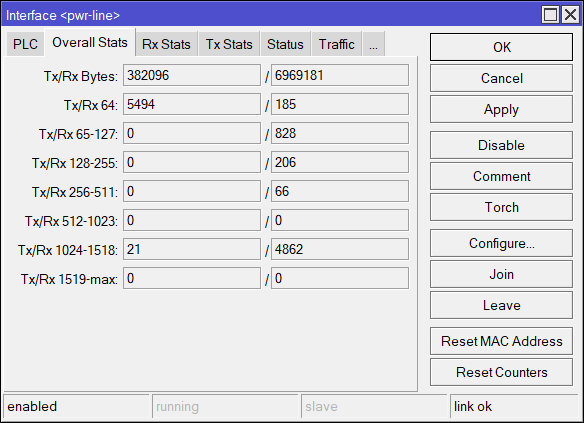
ccr 1016-12g
resetted all ppp secrets after upgrade
this build is a pure disaster
I absolute love the wireless improvement I’m experiencing. More stability and higher speeds.
Unfortunately I noticed periodic “link down”, strangely enough only between my RB4011 and my CRS112-8P-4S. This is not occurring between the RB4011 and a cAP ac and not between CRS112-8P-4S and the cAP ac and wAP ac. Have not excluded possible cable problems, but on the other hand, I never noticed it on the LTS I was running previously.
*) ppp - store “last-caller-id” for PPP secrets;
how that one works?
Although v6.48 is perfectly stable for my RB450Gx4. I agree with you and the other members here.
Eventually, I will be forced to move to a different vendor with a more reliable "stable" channel for patches/updates.
... or use the Long-term version if you want a more stable version. 
OK then find equal vendor with handy console, cheap devices with support and a lot of features.
Did you also upgrade the firmware.