It can check gateway on PPPoE link and other connection such as wireguard interface with v7.8 but it does not work after my Hex S upgraded to v7.10, not only on PPPoE but also any other link.
By the way, v7.10 x86 can check gateway normally.
Maybe before it appeared to work, but just by accident.
I suggest you just stop using it. It makes no sense.
Updated from 7.9.1 to 7.10.1.
Worked well on
7x RBwAPG-5HacT2HnD (wap ac first gen)
1x CRS112-8P-4S
1x CRS226-24G-2S+
1x CRS328-24P-4S+
1x RBwAPG-5HacD2HnD (wap ac second gen)
Did NOT work on
2x RBwAPG-5HacD2HnD (wap ac second gen)
Did not have much time for debug, but device was not visible in RoMON, also powercycling did not help. Netinstall with keep config did not work either, netinstall without keep config did work in the end. It seems as if the device booted to a certain stage and at some point the NIC LEDs were not doing anything anymore. Connected via ether1, with PoE injector.
OSPF was down the following morning, had to also change point-to-point to broadcast, to get it to form adjacency again (yes, this required the other end to also be reconfigured to broadcast as well).
INFO ONLY:
1/ There were some EXE files re-signed due to the certificate expiration, so expect they are now not binary same, even the version is unchanged.
2/ The file <dude-install-7.10.1.exe> now has wrong sha256 stated on the download page
(it is the sha256 of the old file - with the wrong digi cert).
OLD ver <dude-install-7.10.1.exe> SHA256: a22cd6b3d7ccc6568a19b54fbaf33f4fb228b328d7a9e346c18a269a1e60d0f3
NEW ver <dude-install-7.10.1.exe> SHA256: d3cdb9d7cfdede737ad7f8fcd00cac54e116e503662177c17d624fc8e5636f66
Original posts & thread: Different-changed files in same ver. ROS 7.10.1
(Thanks to rextended)
A file signed in the past, with a certificate that was valid at the time, but has now expired, does not mean that the file is corrupted or that the signature is forged…
Obviously the different signature added to the file alters the SHA…
You are creating Alerts for nothing…
Instead for the new 7.10.1 version they realized late that they signed with an already expired (but still valid) certificate and they re-signed the files with new certificate.
Obviously not to make a fool of themselves, do not have wrote it…
The wrong (not updated) SHA256 published on the download page should be updated so it would reflect the current file, not the old one.
After upgrading RB5009UPr+S+ to RouterOS 7.10 and 7.10.1, the following issues occur:
Power supply problems with the 2.5G PoE port
Random negotiation of 100M speed with the 2.5G PoE port
AP unable to obtain DHCP, along with other related issues with the 2.5G PoE port
When connected to ether1(2.5G PoE port), the device is U6-Enterprise. Downgrading to version 7.9 resolves the problems.
The following is a relevant excerpt from the changelog for version 7.10, which I believe is the cause of the issue:
*) poe - fixed bogus “poe-in-voltage” values when using DC jack for RB5009.
Hi could you please send me links to thread where it is discussed. ?I have same issue but with Iphone + Android and Windows 10 too.
Thanks.
Now you can upgrade to 7.11 beta4 there is fix for the WiFi issue
do you mean:
*) wifiwave2 - fixed interface hangs on IPQ6010-based boards (introduced in v7.9);
Yes, this should fix WiFi issues
Hello everybody,
I have 3x RBwAPG:
RBwAPG-5HacD2HnD
RBwAPGR-5HacD2HnD
that got bricked and stuck in a boot loop.
1x RBwAPG-5HacT2HnD still works after update to 7.10.1.
Do you guys know about this bug on ARM RBwAPG devices ?
regards,
Vlad
Maybe the flash was almost full at the time you upgraded them?
build 7.10 and 7.10.1 is no stable… is BUGGED release.
On RB760iGS pppoe-client and interfaces crash every 5-15 minutes.
Can you give me a list of software that you have that do not have any bug?
For me 7.10 and 7.10.1 works fine.
I guess that MTs goal is to make a bug free stable software as possible.
Look at Cisco, there you pay for upgrade, and its still not bug free. Here its free for you to use.
After upgrading RB5009UPr+S+ to version 7.10.1, the 2.5G PoE port started flickering again.
Random occurrences of “link up” and “link down” are observed.
The 2.5G port is connected to a UBNT U6-Enterprise.
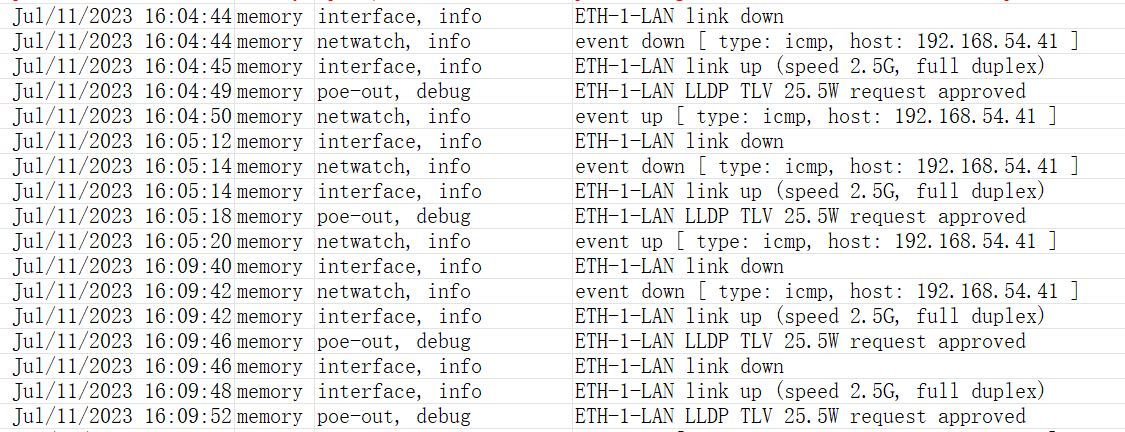
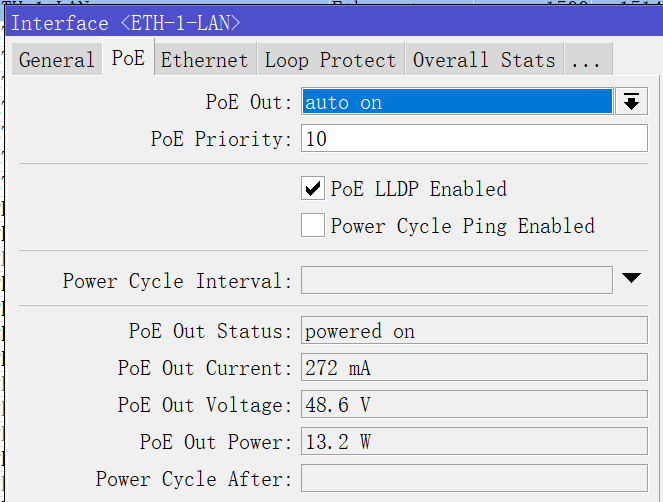
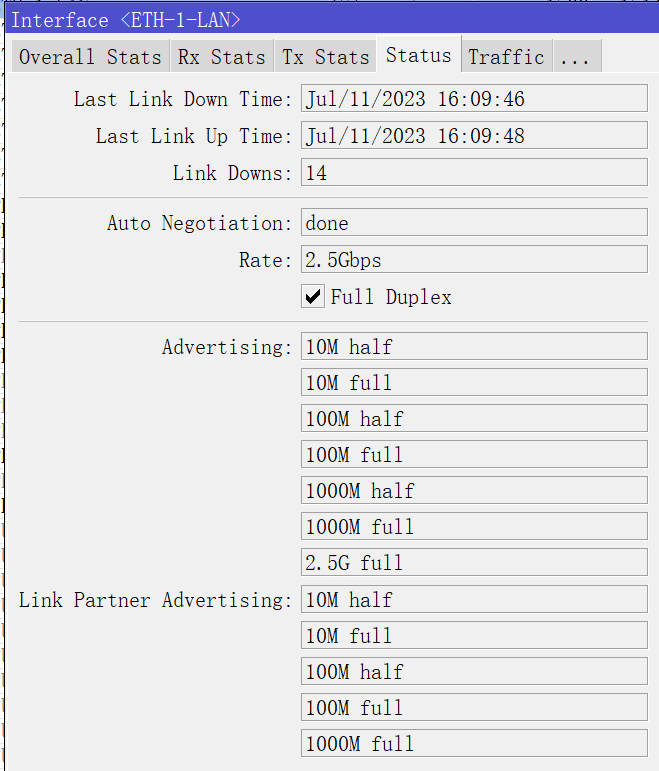
After upgrading to 7.10.1 from 7.8 same issue as in 7.10 occurs. OpenVPN is connected but no data is going through.
There is a change in wireguard ? Now the VPN doesn’t mount itself if no traffic inside ?
You read previos comments other customers? You answer to get +1 message counter?
This is “stable” release and they have critical issues. You have testing releases and RC releases - go and do anything. But in stable releases… with no fixes in few days.
I use v7 at least 1 year, but after this fail i downgraded to v6 and will not use v7 next month or year.
Earlier i buy not cheap CCR2116 and can NOT use this device in production, because 2116 only v7 and have some specific bugs with OSPF.
If you use routeros just for home or small office - good luck, you can use v7.