No, it’s the numbers of steering configuration profiles, of which you have none.
The ‘/interface/wifiwave2/steering’ menu is a where you can, optionally, create configuration profiles for distinct neighbour groups, if for some reason you do not like the default neighbour groups created by RouterOS.
As I stated in this thread before, steering is enabled by default.
I think I don’t have default neighbour group, when i go to print neighbour group i get bad command.
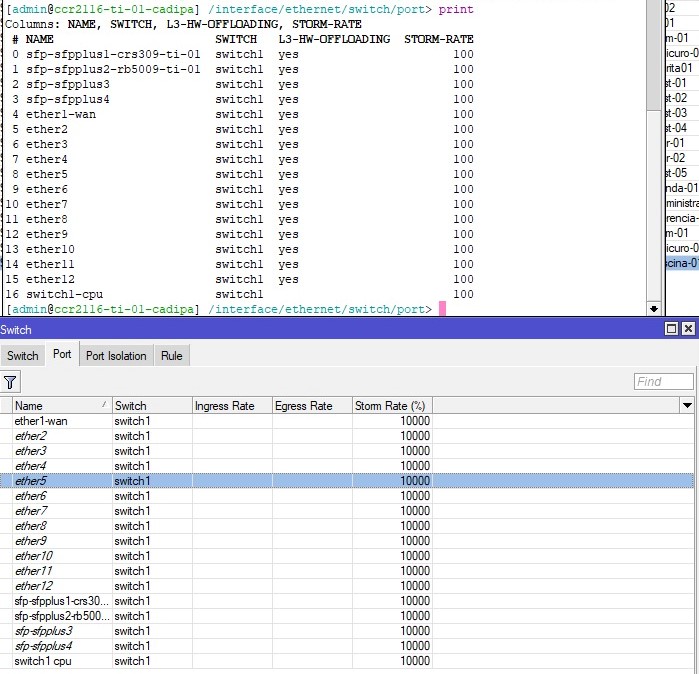
Storm rate via winbox…
ROS 7.11beta6 on hAP ax2 works very well - no wireless clients issues (also will try BTH soon).
(Config: home 2.4ax+5ax and guest 2.4ax (w/ VLAN), both WPA2/3 and disabled PMKID)
Fixed in Release 7.11beta4
https://mikrotik.com/download/changelogs/testing-release-tree
*) winbox - fixed “Storm Rate” property under “Switch/Port” menu;
I have some issues with my Macbook Pro being tossed out from wifi with SA Query Timeout. Have issued a ticket (SUP-122243) and received answer from Support stating this is normal behaviour, and possibly a client issue. Still, would be of interest to know if this is encountered by other clients using the 7.11 Beta. Have never encountered this before, when using ASUS gear. And I am only 3 m away from a HAP AX3, so should not be related to low signal…
Really annoying - bouncing in and out means file copying etc impossible…
21:35:26 wireless,info 9C:3E:53:70:A6:22@Nere-50 disconnected, SA Query timeout, signal strength -54
21:35:27 wireless,info 9C:3E:53:70:A6:22@Nere-50 connected, signal strength -58
21:35:34 wireless,info 9C:3E:53:70:A6:22@Nere-50 disconnected, SA Query timeout, signal strength -54
21:35:34 wireless,info 9C:3E:53:70:A6:22@Nere-50 connected, signal strength -57
21:36:01 wireless,info 9C:3E:53:70:A6:22@Nere-50 disconnected, connection lost, signal strength -54
21:36:05 wireless,info 9C:3E:53:70:A6:22@Nere-50 connected, signal strength -59
21:36:13 wireless,info 9C:3E:53:70:A6:22@Nere-50 disconnected, SA Query timeout, signal strength -54
21:36:13 wireless,info 9C:3E:53:70:A6:22@Nere-50 connected, signal strength -56
21:36:22 wireless,info 9C:3E:53:70:A6:22@Nere-50 disconnected, SA Query timeout, signal strength -54
21:36:22 wireless,info 9C:3E:53:70:A6:22@Nere-50 connected, signal strength -58
Signal strength is strange also - I am located 3 m from the router…
7.11 beta5 had some fixes for VLANs over wireless interfaces:
*) wifiwave2 - automatically add wifi interfaces to appropriate bridge VLAN when wireless clients with new VLAN IDs connect;
And beta5 did fix some issues with wireless clients on VLANs. However, I think there might still be some problems. I am actually testing with 7.11 beta6.
Using a hAP AX2, I have a simple setup: a guest VLAN (PVID 3) and a hosts VLAN (PVID 99). The hAP is connected with a trunk line to switch. Connected to the switch is a PC, which is on an access port that is part of the guest VLAN. Connected to the hAP is a laptop.
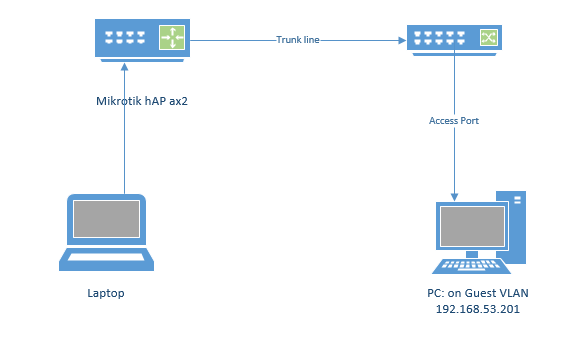
- When the laptop is connected with a wire to a port on the hAP that is an access port on the guest VLAN, everything works. (The laptop can ping the PC.)
- When the laptop is connected wirelessly to one of the “master” wireless SSIDs on the hAP, and that SSID is PVID’ed to be part of the guest VLAN, everything works. (The laptop can ping the PC.)
- When the laptop is connected wirelessly to a wireless SSID that is derived from one of the master wireless interfaces, e.g.:
/interface/wifiwave2 add name=wifiguest1 master-interface=wifi1 configuration.ssid=guest security=guest disabled=no
/interface/bridge/port/add bridge="bridge" interface=wifiguest1
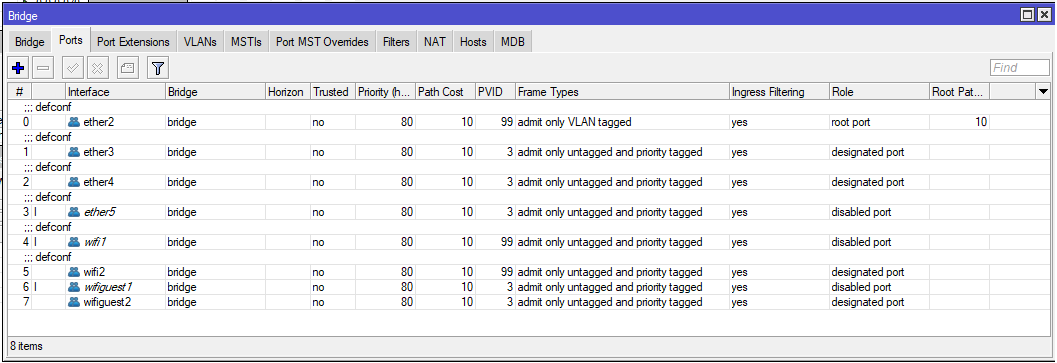
The master interface is part of the hosts VLAN (PVID 99). However, the derived wifiguest1 interface is configured as part of the guest VLAN (PVID 3). In this case, the laptop is not able to ping the PC…the laptop is not correctly treated as part of the guest VLAN. I believe this is a bug.
In instance 3, this is what the bridge ports look like:
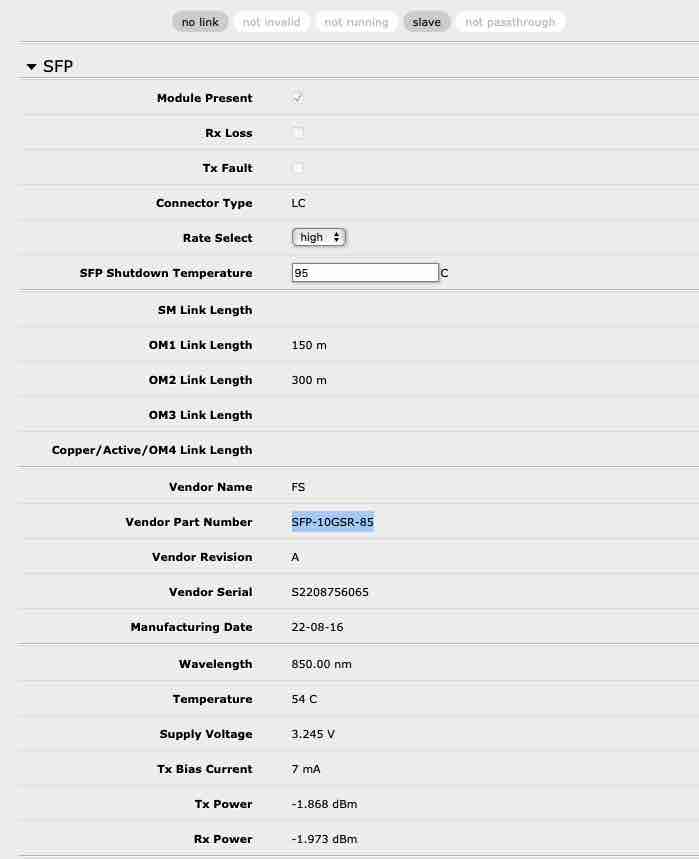
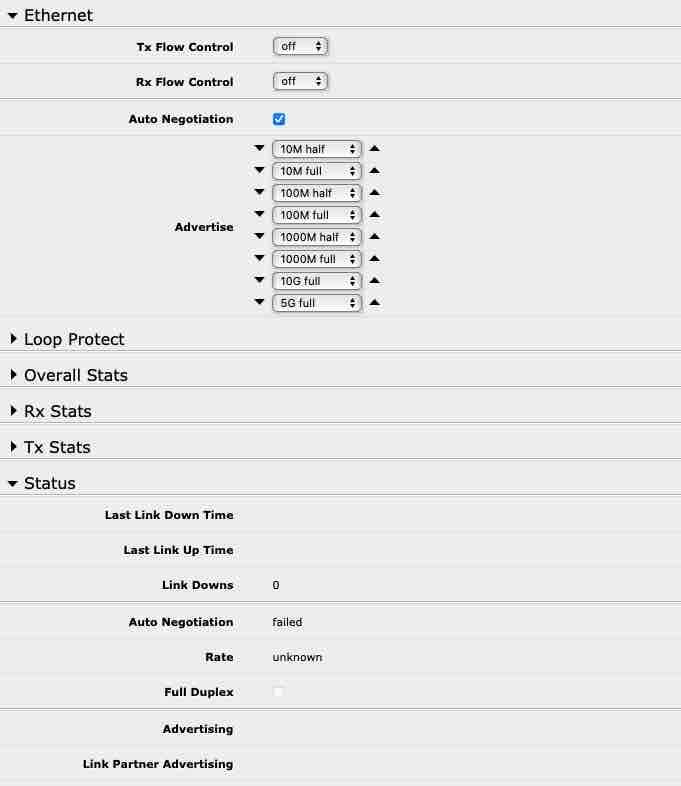
I’m having trouble with FS SFP MM fiber adapters (SFP-10GSR-85) no longer negotiating a link. I’ve tried changing advertisements and rate without luck. I’ve got a 4 links with 3 different switches all on 7.11 beta 6 with the same behavior. This worked fine on a previous version around 7.10 and with SwOS - I’m not sure when it stopped working since I have redundant copper 1G connections as well. I have other SFP (MikroTik S+RJ10) in the same switches working fine. Anyone experiencing this?
hAP AX lite, default password written on a router and reset configuration returns to this.
Upgraded to 7.11b6, logged into webfig, cancelled changing default password, and accidentally found it’s really easy to half-accidentally NULLIFY admin password: open webfig Terminal, it orders to set a new admin password, tap enter 2 times as to cancel to this action, done: no admin password, although I just didn’t want to change it. If there’s cancel button in the UI, there should be possibility to cancel it in webfig Terminal also, or explanation or prevention or warning for zero password.
DHCP snooping is an issue on RouterOS 7.10.2 on the following devices. I don’t see this in the change logs, is this a known issue?
- CRS328-24P-4S+
- CRS112-8P-4S
- CRS354-48P-4S+2Q+
- RB5009UG+S+
It either filters all DHCP queries, or sometimes works intermittently. In the case of the RB5009 it’s the DHCP server itself so no interface has trusted=yes configured and in the case of a CRS328 some ports work whilst others don’t although the correct interfaces have trusted=yes set on them.
Every uplink port on every switch between the dhcp server and client needs to have trusted=yes set (both directions).
What’s new in 7.11beta7 (2023-Jul-24 14:45):
*) certificate - allow to import certificate with DNS name constraint;
*) certificate - require CRL presence when using “crl-use=yes” setting;
*) conntrack - fixed “active-ipv4” property;
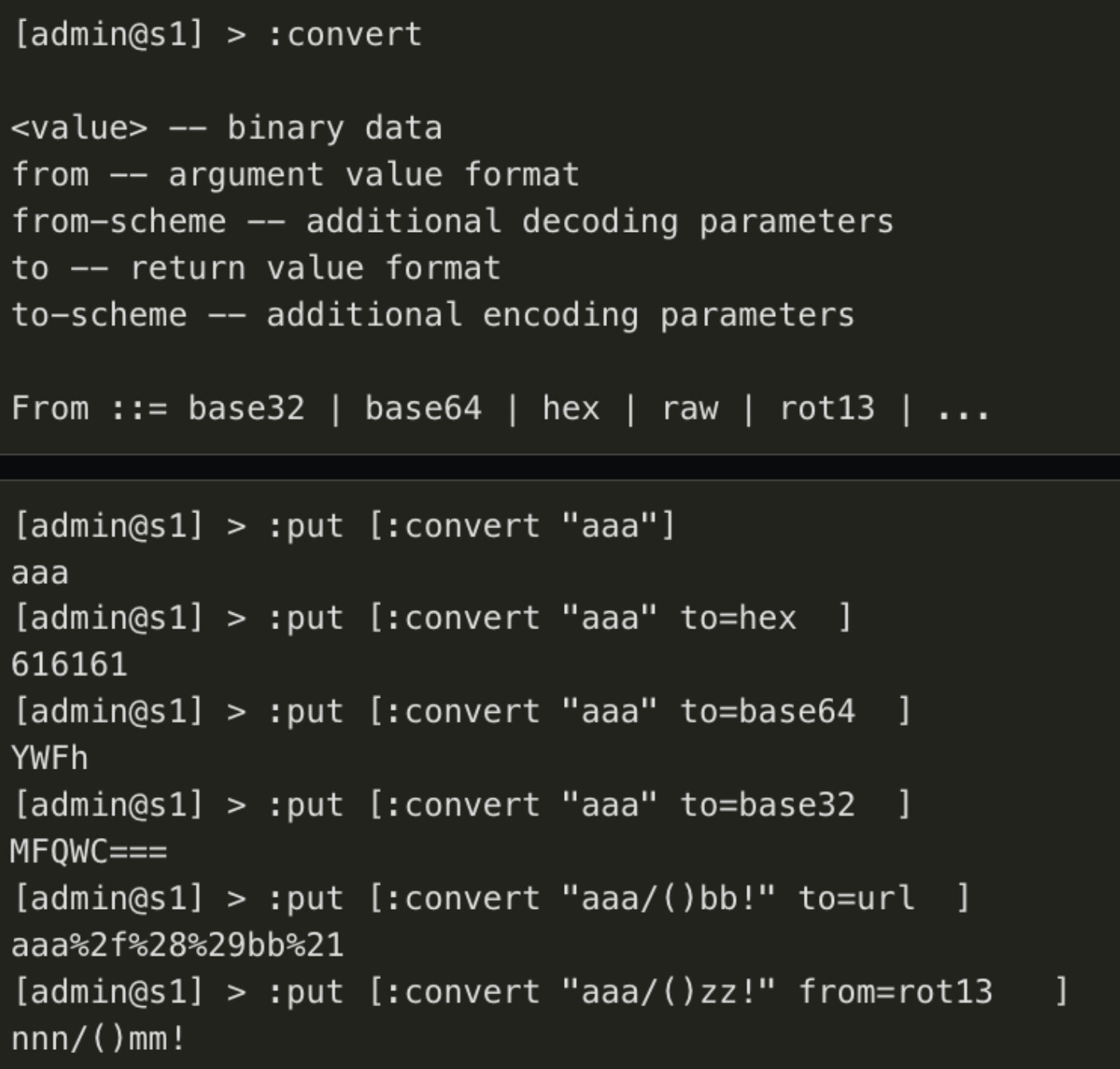
*) console - added “:convert” command;
*) dhcp-server - fixed setting “bootp-lease-time=lease-time”;
*) ike2 - log “reply ignored” as non-debug log message;
*) modem - added initial support for BG77 modem DFOTA firmware update;
*) modem - changed Quectel EC25 portmap to expose DM (diag port), DM channel=0, GPS channel=1;
*) ovpn - do not try to use the “bridge” setting from PPP/Profile, if the OVPN server is used in IP mode (introduced in v7.10);
*) ovpn - improved key renegotiation process;
*) ovpn - include “connect-retry 1” and “reneg-sec” parameters into the OVPN configuration export file;
*) routerboot - increased etherboot bootp timeout to 40s on MIPSBE and MMIPS devices (“/system routerboard upgrade” required);
*) ssh - fixed private key import (introduced in v7.9);
*) user - added “sensitive” policy requirement for SSH key and certificate export;
*) webfig - fixed gray-out italic font for entries after enable;
When you are busy with maintenance of user info, please cleanup the situation with export of users/groups.
/user is not exported in a global /export, but it is exported in a export from /user.
However, even with show-sensitive the (encrypted) password is not exported.
But /user/group is always exported.
This should be made consistent so that user information can be more easily transferred from one router to another via export/import.
(and the same is in fact true for all info not being exported but only being stored in backups)
Good news, this is fixed at least.
LetsEncrypt certificates still broken when the DNS name only has a IPv6 AAAA address no IPv4 .
[yaofei@MikrotikAX2] > /certificate/enable-ssl-certificate dns-name=XXXX.dynv6.net
progress: [error] could not resolve ‘XXXX.dynv6.net’
This is done on purpose and supout file includes export, not “/user export”. So the supout does not contain any user configuration information besides groups. This works properly as designed. You can see user configuration if you run export manually
The problem is that when you re-import a previously exported file after reset configuration, depending on if you choose “keep user configuration”, you either end up with missing users, or your import fails with a fatal error because the export contains user groups which are kept.
It is so annoying that export information is not complete and in this regard is even inconsistent.
/user export show-sensitive should include a password field that can be transported to another device (of course the password cannot be shown because it is hashed, but the hash value can).
What does this convert?
What do, please?
About /user export: is more logical how actually work, please do not change,
but if possible “/user export” export also disabled usernames and assigned group (everytime with NO password, hashed or not.)
:put [:convert value=001 to=hex ]
:put [convert [/ip/dhcp-client/option/get hostname raw-value ] from=hex to=raw ]
MikroTik