In this case, it’s against a VPN provider (surfshark in this case), which I don’t know will use on your side.
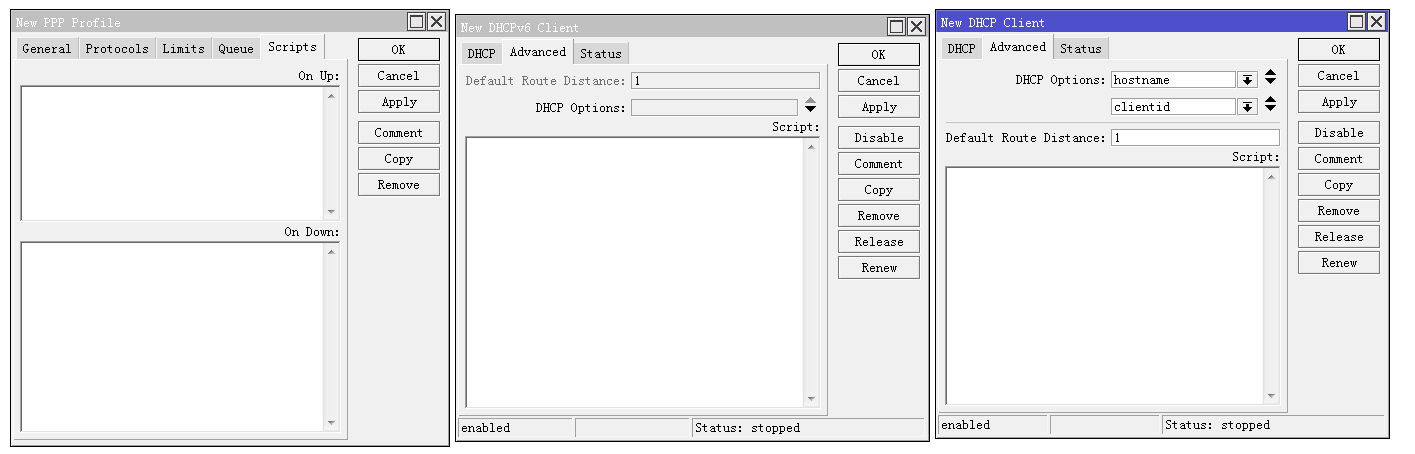
In PPP, it is possible to call scripts separately for going online and going offline. Why doesn’t the dhcp client distinguish between going online and going offline? Many scripts are specified to be used when going online or when going offline.
@solaoxo dhcp client is not one pppoe-client that have on-up and on-down, but have more status
:if ($bound = 1) do={ } else={ }
It’s not a bad idea to read the manual…
https://wiki.mikrotik.com/wiki/Manual:IP/DHCP_Client#Lease_script_example
/routing/route/print where received-from=bgp1
or
/routing/route/print where received-from bgp1
did not works, wait for hours and no prefix has displayed
thx
It crashed again after 2 days and no devices can connect: bad password error.
Incredible how unstable the wireless is in this 7.11beta2 …
it is not only in 7.11beta2…this happend to me on 7.9 and even on 7.10 so the last stable is 7.8
Mine hAP ax3 with 7.9 crashed after about 20 days but with 7.11beta2 it’s almost unusable, it crashes too often.
I will downgrade, I am very disappointed because I thought it was much more stable…
That is correct. You need to use “belongs-to”.
received-from is a field from RouterOS v6 that is no longer supported in any 7.x version, it would be better if it were removed from the list.
(or it should be fixed so it works again)
Anyone can confirm if the CPU and rebooting problems with OVPN since 7.8 have been fixed?
The line “properly close OVPN session on the server when client gets disconnected” in the log seems to be related about this problem.
Randomly causing internet downtime or very slow speeds and after some time back to previous state. I cant even load video into 1080p with my hAP AX3. Wired connection !
Apart from 7.9, both ax2 and ax3 have been pretty solid for me, some occasional hiccup on wifi on 7.10. Never reboot. Never wired problems.
Couldn’t accept it otherwise with at least 2 days a week working from home.
Maybe your hardware is faulty ? I mean, my devices are rock solid now and i never had problems with wired connections to router…
Is it true?
I use wireguard to connect AX2 and RB4011 in two ISPs , RB4011 use dynamic domain name to as a HUB, wait AX2 connect.
Once RB4011 reboot, change to a new IP, and update domain name (xxx.dyndns.info ), the ax2 resolv the new domain name correctly, but wireguard peer still attemp to connect old IP, so must reboot AX2 to resolv it.
That’s WG behaviour by design, and people solve that problem with scripts: http://forum.mikrotik.com/t/wireguard-use-hostname-in-endpoint/143014/1
So, your explanation brings even more questions: when does router decide that it needs to resolve the name again? With scripts, I control that; with unknown automagic - hmmm…
Is keep-alive being used on peer side (I suppose AX2, then) ?
Already tried to just wait until the DNS resolution has had its time (it can take a while …) ?
But the script-workaround is the most certain, that’s true. I still use it myself.
) wireguard - fixed peer connection using DNS name on IP change
I removed all scripts and this finally fixes WG and it works properly with dynamic hosts on ip change
@mantouboji for a client the IP address does not to be renewed until TTL expires.
So what is the TTL of your DNS registration?
WG will renew the resolve on restart of the WG peer. You can’t check every so many seconds if the DNS changes brcause of Round Robin when having multiple IP addresses. Then MT could have built-in a option that enables to say it is using a dynamic DNS that only will return one IP address.
Automating that, ckeck DNS and accept different IP when connection is lost. User needs to activate that procedure.
TTL doesn’t matter, i have hosts with 15 sec TTL and after ip changes WG never connects back even after several days unless you re-toogle it, which also requires scripts or netwatch for monitoring.
Anyway i repeat, Mikrotiks fix works and issue is solved!
Once RB4011 reboot, change to a new IP, and update domain name (xxx.dyndns.info ), the ax2 resolv the new domain name correctly, but wireguard peer still attemp to connect old IP, so must reboot AX2 to resolv it.
True. But there is another WG behaviour, by design, that should solve this with the use of keep alive:
One host should update the other address if it got a message signed with the correct key. So, with keep alive on, in theory we should only need DNS to establish the initian connection. After this one host will (should) update the other address if it changes. And this is by design.