You can configure an L2 tunnel (EoIP, for example) to run on the wireless link, then bridge that tunnel on the AP and the station.
It’s more complicated to set up and the performance won’t be as good, but doable in principle.
Failed to create the L2TP Server Binding interface
Router OS version: 7.12beta7
Steps for reproduce:
- Open router webfig web interface. Lead to menu: Interfaces > [Add New] - select option L2TP Server Binding.
- Set “name” and “username” (optional)
- Click to save.
- It show an error: “Couldn’t add New Interface - unsupported device type (6)”
Expect the interface to be created and it can bed used it in IP > Routes
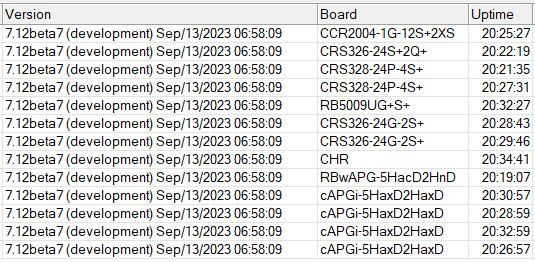
Update from 7.12Beta3 to Beta7 went smooth on all my devices. Uptime now >20h.
No new problems detected.
@new AP and Bridge mode: I can´t understand when MT implements a new feature in the WifiWave2 package some of your guys start grumbling why this new feature can´t do this and that also.
Instead to be glad that MT hasn´t finished the journey in development. 
Will you install completly different generations of Ruckus, to be on pair with your MT complaints? If you are ready to buy new Ruckus-everything, go scrap your old MT stuff and go wifiwave ax full-force too?
My point was that if I’m going to have to buy new MikroTik APs to get better performance, I may as well buy Ruckus instead since they dramatically outperform MikroTik in speed and coverage.
In one location I already replaced 3 MikroTik full-power/gain APs with a single Ruckus and I have the same coverage and faster speeds. It’s well known in the industry that Ruckus has the best coverage of all vendors, and nearly the fastest (I think Aruba was faster at short range, iirc).
Ruckus supports wireless bridge, which is what I really need at the other location where I’m currently using 4 MikroTik APs. And they allow setting DTIM to help with mobile power saving, which almost all vendors except MikroTik have supported for ages. This particular feature has been requested from MikroTik as far back as I can remember, and I started using MikroTik around 15 years ago. I’ve installed hundreds of MikroTik routers and APs in homes and businesses, but I think it’s time to move on from the wireless side unless cost is the most important factor. But I digress.
Once again - you are using crapload of mixed generation of devices and complain. Throw it out and stick to wifivave2, as it will improve over time. Noone’s going to fix the old stuff.
And btw - we use Aruba at work, 11 locations. Don’t get me even started upon multiple generations of those devices not being operable together with various firmware generations.
version 7 was an anti-climax for Mikrotik, not as expected.
I have some TCP performance issue on a CCR2004 (Router B) running 7.12beta3 and beta7, but just on forwarding plane.
This is the result of a simple speed test to and from the router itself:
Router A (CCR2216) ↔ Router B (CCR2004)
status: done
time-remaining: 0s
ping-min-avg-max: 9.44ms / 9.49ms / 9.81ms
jitter-min-avg-max: 0s / 33us / 343us
loss: 0% (0/200)
tcp-download: 801Mbps local-cpu-load:19%
tcp-upload: 947Mbps local-cpu-load:18% remote-cpu-load:9%
udp-upload: 959Mbps local-cpu-load:15% remote-cpu-load:8%
Router B (CCR2004) ↔ Router C (CCR2004)
status: done
time-remaining: 0s
ping-min-avg-max: 366us / 420us / 911us
jitter-min-avg-max: 0s / 48us / 523us
loss: 0% (0/200)
tcp-download: 583Mbps local-cpu-load:14%
tcp-upload: 690Mbps local-cpu-load:15% remote-cpu-load:57%
udp-download: 639Mbps local-cpu-load:6% remote-cpu-load:59%
udp-upload: 695Mbps local-cpu-load:12% remote-cpu-load:59%
And finally Router A (CCR2216) ↔ Router C (CCR2004)
status: done
time-remaining: 0s
ping-min-avg-max: 9.78ms / 9.87ms / 10.4ms
jitter-min-avg-max: 0s / 96us / 609us
loss: 0% (0/200)
tcp-download: 501Mbps local-cpu-load:37%
tcp-upload: 23.0Mbps local-cpu-load:21% remote-cpu-load:8%
udp-download: 590Mbps local-cpu-load:8% remote-cpu-load:11%
udp-upload: 660Mbps local-cpu-load:22% remote-cpu-load:11%
Anyone having similar issues?
Stupid comment without telling why.
I do find this thread about your problem, but do not see any support number on the problem.
http://forum.mikrotik.com/t/vpls-mtu-problem-on-v7-7-9beta4/165519/1
Forum only will not solve it.
For me and many other v7 works fine.
You say forwarding but then you are testing from router to router?
To test forwarding performance, put an end-system (e.g. a PC) at each end behind the routers, and test between the PCs.
E.g. running iperf3 on each of them.
No, how far away is that router 10ms?
status: done
time-remaining: 0s
ping-min-avg-max: 192us / 242us / 524us
jitter-min-avg-max: 0s / 29us / 279us
loss: 0% (0/200)
tcp-download: 927Mbps local-cpu-load:93%
tcp-upload: 920Mbps local-cpu-load:62% remote-cpu-load:57%
udp-download: 944Mbps local-cpu-load:41% remote-cpu-load:42%
udp-upload: 957Mbps local-cpu-load:55% remote-cpu-load:29%
cAP ax >> Hap ax
status: done
time-remaining: 0s
ping-min-avg-max: 168us / 227us / 509us
jitter-min-avg-max: 0s / 38us / 295us
loss: 0% (0/200)
tcp-download: 932Mbps local-cpu-load:64%
tcp-upload: 934Mbps local-cpu-load:42% remote-cpu-load:84%
udp-download: 943Mbps local-cpu-load:26% remote-cpu-load:58%
udp-upload: 955Mbps local-cpu-load:36% remote-cpu-load:48%
…
FYI - Fibocom NL952 modem stopped working in 7.12 beta.
going back to stable appears to have resolved it.
hAPac2 failed to boot normally after the RouterBOOT upgrade from 7.11.2 to 7.12beta7.
I had to reset it via Reset button and then it booted without any default configuration. At the end I’ve downgraded to 7.11.2 and restored the backup.
The router that I’m having issues with is router B, the one in the middle, which is running 7.12beta7. The other two are running 7.10.2. I was testing from router to router to actually see if there are issues on links. The last measurement is end to end, and the CCR (Router B) is the only router in the middle. These are two segments of our core network.
The link with 10ms is a L2 link, approximately 500km long.
Forgotten line:
*) sfp - broke negotiation of working SFP28 completly. Now we can not even find any combination of setting to get SFP28 to work. We had several CCR2004 which we could only revive by doing a downgrade to 7.11.2. Downgrading to 7.12beta3 would also have worked but you can’t download that release anymore.
*) qsfp - didnt fix auto-negotiation of QSFP28 transceiver and AOC cables. While in 7.11.2, autonegotiation works, in 7.12beta3 it needed manual settings. In 7.12beta7 this is still the case, despite above claim.
doesnt help. I need arm64 and the other packages as well. but thanks for sharing… Ill try again with 7.12 release when mikrotik finally figured out all its (Q)SFP negotiation mysteries.
Just change the URL to whatever version/arch you need.
The files are all there. You take the official latest link and modify it.