/system logging
set 0 disabled=yes
add topics=info,!fetch
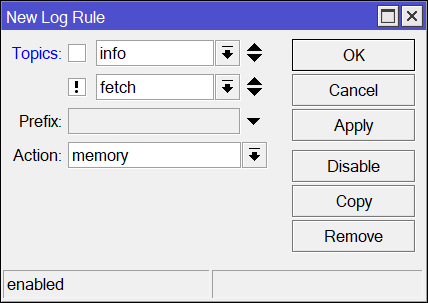
/system logging
set 0 disabled=yes
add topics=info,!fetch
I just edited default info rule. Is it correct?
Yes.
You have already added it in the new rule

Hi Everyone,
So I spent a bit of time moving one of my to hAPac2’s to the new wave2 firmware and then setting up CAPsMAN for the Wave2 on my RB3011 to control it, everything works except when an iphone tries to connect, works fine on the old CAPsMAN with the old firmware but will not associate with the new wave2.
Android, Linux, Windows, even the Google Chromecast with Google TV was fine. iphone just did not get past initial connection.
Tried even locking it back to 20Mhz channels, has anyone seen similar behavior?
Kind Regards,
Jim.
Can you create a new topic and add your config to it, @jimmer?
IDK if someone else agrees but Mikrotik Versioning is broken.
It happened before with 7.10 where “They” released as stable a beta software, where lot of features where broken, like openvpn, and now they are pushing 7.13 which changes the drivers paradigm which, IMO, it should be a MAJOR VERSION, e.g. 8.0.0 instead of 7.13.
Now my old devices are not supported, and will not have any security updates after 7.12.1
Very dissapointed about this development movement…
Why do you think so? That’s simply not true.
should there be a wifi menu on a device with no wifi hardware? (RB750GR2 updated from 7.12.1)
I understand the need for wireless menu if using capsman but not the wifi menu. I assume I am now able to remove the wireless package if not using capsman?
I have removed it to test and the wireless menu disappears as expected but I still have the Wifi menu
https://help.mikrotik.com/docs/display/ROS/WiFi#WiFi-Replacing'wireless'package
Incompatible RB4011iGS+5HacQ2HnD-IN (no support for the 2.4GHz interface), Cube 60Pro ac (no support for 60GHz interface), wAP ac (RBwAPG-5HacT2HnD) and all other devices with a MIPSBE CPU
Lost features
The following notable features are lost when running 802.11ac products with drivers that are compatible with the ‘wifi’ management interfaceNstreme and Nv2 wireless protocols
VLAN configuration in the wireless settings (Per-interface VLANs can be configured in bridge settings)
Compatibility with station-bridging as implemented in the ‘wireless’ package
News for you, I have many MIPSBE devices, and I use those “lost” features…
capsman for wave2/wifi is part of main bundle and hence wifi menu will always be present. wireless package contains legacy wireless drivers and legacy capsman. If you don’t need either of them, then it’s fine to remove wireless package altogether.
mipsbe devices don’t qualify for wave2/wifi drivers, so you have to keep using legacy wireless package. And that one provides all the “lost” features, so don’t worry, you can still use them.
Well, when using old products with the old drivers at least you “lose” the functionality of winbox remembering the window settings for your wireless menus… because apparently it confuses the old and new wireless menus, just like the users do.
I think no, but MikroTik think yes. So that is what we have.
It also takes space on devices that already are very short on space.
And having both the old and new wireless menus on the same device is all the more frustrating on e.g. the RB4011 where only one of them can work (it has both WiFi supported by the old driver and only the 5GHz supported by the new driver).
I guess this is fixed in 7.14, changelog says menu was renamed.
I just hope, once the situation settles, that WiFi gets renamed to Wireless. I somehow don’t like that word at all. But that would mean even more confusion. Let’s give it another 1-2 years, where everybody forgets pre wave2 era 
“Legacy” wireless package is still available for MIPSBE devices, is fully supported and (as I understand) will keep receiving security fixes. And there are no “lost feature” in the legacy wireless package as compared to what you had in versions before 7.13.
Hi, I have updated my hAP ac2 and switched to wifi-qcom-ac drivers.
Seems there is problem with my old ipad mini 2 running software version 12.5.7. Ipad is unable to connect to wifi network, it is reporting invalid password.
But password is correct. Androids works ok, windows 10 ok, even old rpi connects ok.
AP shows only this in log:
debug: 6C:70:9F:1F:49:86@wifi5g associated, signal strength -80
debug: 6C:70:9F:1F:49:86@wifi5g disassociated, connection lost, signal strength -80
Can somebody confirm that olders apple devices works with this wifi-qcom-ac drivers. Then it may be some config issue, but I am not sure what it can be, when other OS works ok.
DNS DoH Error
Hello everyone, after updating to version 7.13 I am now increasingly getting the error message: DoH server connection error: remote disconnected while in HTTP exchange
I use a 5009 router, before that it was version 7.12.1, in this version I never saw the error message.
Secure DNS works as far as can be seen, no failures, just the sporadic error message. About 5 -10 per day.
Has anyone had similar experiences? No settings was changed only install the update …
You are not alone. If you are on Cloudflare I noticed the same thing.

Yes, I also use Cloudflare for this.
Then it’s probably a general problem.