I tried the 32-bit Windows netinstall binary too–no luck. But the good news is that the LINUX binary finally worked. It was scary for a while, because I couldn’t get the GrooveA 52ac to show up to netinstall by holding down the hardware reset button. By accident, I happened to NOT be holding down the hardware reset button (while it was boot looping) when I re-ran LINUX netinstall, and it was suddenly detected.
So I’m now fully-upgraded to 7.13.4, but it effectively meant that I had to wipe the OS and the config to do it, instead of the typical graceful in-place upgrade that I’m used to seeing.
I can confirm that there is something strange with Wireguard on 7.13.4. My HAP AC2 has always worked perfectly with this version of ROS and all remote RBs via Wireguard. I updated two remote AX2s and never reached them again. The two AX2s work perfectly, but Wireguard somehow goes down. Yesterday I tried to restart my AC2 and surprisingly I resumed the connection with both of them. I had tried to turn off the Wireguard interface but it wasn’t helpful, only the reboot was helpful. This morning I lost the connection with one of the two and not even restarting my AC2 again I’m solving. I should restart the remote AX2. Never had such problems, all RBs have the 7.13.4 with updated firmware. The configuration of these RBs is very simple being three houses with simple configurations. Has anyone found any quirks with Wireguard and this build of ROS?
I’m not 100% sure it’s related to this release but I haven’t seen this in any earlier ones and I had all of 7.13.0-7.13.3 before.
Hardware: hAP ac2 with 7.13.4 and wifi-qcom-ac configured as CAP with some vlan extras.
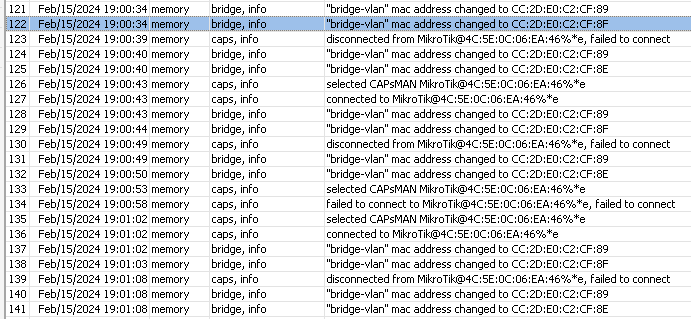
Since 7.13.4 the vlan bridge is changing its MAC address multiple times. After the last reboot this was going on for 5 minutes until it stabilized on one MAC. During that time CAPsMAN connection breaks after every change.
Log snippet:
Anyone can give me a pointer what could be wrong? Or could it really be related to this version?
Can someone confirm this ? -> Rest API user stuck as 'active'
The number increase proportionally to uptime, I've already seen 4k active users (via "unknown").
Sample output from RB4011 (7.13.4), uptime 10d
[admin@RB4011] > /user/active/print
Columns: WHEN, NAME, ADDRESS, VIA
RB450Gx4 was upgraded from 6.49.13 and all RIP configuration had to be recreated.
All was fine for a while and then I see entries in log about creating RIP instances (same ones that do already exist). After that route list is populated with duplicate entries for all these instances. At same time autosupout file is created as well. It seems like route list would not be cleared if RIP instance interface(s) go down as route entries do not time out. Only way to ger route list cleared is reboot.
Same happens again after some time and then there are 3 instances of every RIP route and another autosupout file is created. After longer uptime dynamic routing stops working alltogether and route list or ip/route/print do not display anything while one CPU core is maxed out (log has entries “timeout while waiting for program 44”). Only way out is reboot.
Other endpoints see everything as normal and traffic flows normally unless routing stops working as described above.
What’s new in 7.13.5 (2024-Feb-16 19:35):
*) bridge - fixed MLAG connection after peer-link flap (introduced in v7.13);
*) bridge - fixed packet forwarding after changing HW offloaded bridge interface settings in certain cases (introduced in v7.13);
*) dns - do not close connection with DoH server after query execution (introduced in v7.13.3);
*) leds - fixed modem signal strength for RBSXTR&R11e-LTE (introduced in v7.13);
*) sms - increased SMS read timeout;
*) wifi-qcom - improved memory allocating process;
*) wifi-qcom - improved regulatory compliance for L11, L22 devices;
*) wifi-qcom - improved system stability for L11, L22 devices;
Thank you Mikrotik for the work and, above all, for not abandoning the AC devices. A question: I see that a lot of work is being done with the wifi-qcom driver, but do these changes indirectly also affect the wifi-qcom-ac or not?
Upgrading from v7.13.4 to v7.13.5 bricked 02 of my hEXs RB760iGS routers. Unable to Netinstall v7.13.5 from scratch. Never got to the “formatting disk” message. Needed to Netinstall V7.12.2 to restore both boxes.
-My HEX running 7.13.3 for 14 days, then i made update to 7.13.4 two days ago, and today to 7.13.5. All work without any problem. Maybe not the biggest config, but 4 vlan, WG, and 45 fw rules…
-The first install was with netinstall from ROS v6 to ROS 7.13.3. Not updated from any ROS 6 or ROS 7.12. So a clean install!
Hi!
I have the same issue on wAP ac (RBwAPG-5HacT2HnD). RouterOS and Firmware are v7.13.4, and after a reboot the MAC addr. of bridge is changed every time… This will be a bug.
I can handle this with a fix ip instead of using dhcp, but I’m using it a simple AP without capsman.
So you are saying that we should just forcefully set an Admin MAC to workaround the issue? Still the question remains why this suddenly is a problem as it may be a bug? In any case I reported to support@ and waiting for feedback.
Not a bug, if you look at the CAP default config, that script actually sets bridge MAC to ether1 MAC.
If you cleared it afterwards, it is user error not an bug.

 and Amen