Upgraded without issues.
Thanks and regards.
I try today v7.15 on 3 different 4011.
VPLS vs 7.14 2216 doesn’t go running.
After dowgrade it to 7.14 interface goes up with no configuration change.
Anyone noticed this issue?
RB4011iGS+ seems to shut ethernet ports randomly.
CRS518CRS518-16XS-2XQ, CRS326-24S+2Q+, and CRS106-1C-5S are experiencing lags, timeouts, and reduced throughput
Downgrade back to 7.14.3 all fine is fine.
Hello pe1chl,
Thank you very much for your help!
But the log posted is with a single CAP, with a single SSID and without roaming.
I’ve had the CAPs since late last summer. Since then I’ve read tons of forum posts, wikis, user manuals and watched videos. I’ve tried all of the tips recommended there. ALL of them didn’t work. The device won’t log into the WIFI with a CAP.
This isn’t a problem with the configuration, it’s a problem that only Mikrotik support can solve.
By the way, the washer connects to an AVM Fritzbox 7590 or 7530 without the slightest problem.
Best regards, Jörg
I have the same device and that’s why I checked specifically; I haven’t seen any port failure for about 18 hours.
best regards
Jörg
Does it also mean ZeroTier finally comes to CHR? Has anybody tried to install zerotier.npk on ARM64 CHR?
CHR:
/system/routerboard disappeared?
If you want to reject connections when signal level is under -75 dBm, then only one rule should be needed which rejects signals in range -120..-75. Anything not matching the rule would be accepted.
signal-range=-120..-75 allow-signal-out-of-range=10s ssid-regexp="" action=reject
RB4011iGS+ seems to shut ethernet ports randomly.
CRS518CRS518-16XS-2XQ, CRS326-24S+2Q+, and CRS106-1C-5S are experiencing lags, timeouts, and reduced throughput
most likely it’s something in your configuration ; these are too much different hardware and would be already reported by massive amounts of people.
Dare to say more or post configuration without private/sensitive data ?
CCR1009 RoS v 7.15 stable
All my scripts shown below run without error when launched from scripts or CLI or from scheduler under RoS 7.14.2
Under RoS 7.15 if they are launched from scheduler I get an error in log to check manually … when run from scripts or CLI no issue
I have a STARTUP script
:delay 10
/system script run dynu
:delay 5
/system script run roguevpn
:delay 5
/system script run RogueIP
:delay 5
/system script run pulldiff
:delay 5
/system script run fileiptik
Same here, but not consistently each time it runs, just occasionally.
We had to disable MPLS on all our 2216 because of substantial packet drops on 7.14.3. The VPLS tunnels were running but unusable due to packet loss, which was also present in packets routed on the core network. We are still investigating, cause the issue is present only on 2216. There has been no reply from support jet.
Something is weird with 7.15: I had lots of dropped packet on some ports on a RB1100AHx4, downgrading to 7.14.3 solved the problem. This happened after the router ran for several hours on 7.15. Re-booting did not help. Very weird - I did not investigate it in more details, since it more or less brought down the whole LAN.
The warning about checking the script execution manually also disappeared after downgrading to 7.14.3.
Disappointed too, tried mangling and route rules, all goes back to main route table, hope to see this in the next release!
Any chateau LTE 12 users with 16Mb flash upgraded to this release?
Upgraded a pair of RB4011 here, selected as one is original and other is a rev2. Ethernet ports stable for 24 hours - early days. Will keep monitoring …
ps. off topic I know, but anyone else experience the rev2 rb4011 running about 10deg cooler? (al31400 vs al21400 ? )
I did, only issue I have so far is this. I’m still using legacy wireless package since I was unable to install combination of wifi-qcom-ac with containers and larger custom config on 16MB device. Now I noticed that some space is freed (approx. 450KiB free before, now 1040 KiB) and maybe wifi-qcom-ac will fit now, will try it when I find time.
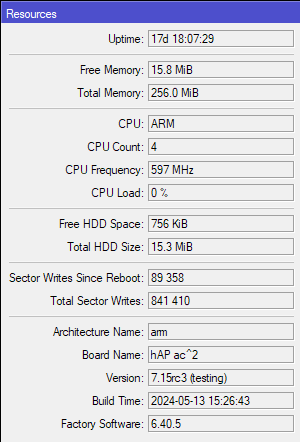
Did you fix the memory leak issue in 7.15 final? I’m still running 7.15RC3 to prove to this forum that RouterOS 7.x has a SERIOUS memory problem for the non-believers. Now after about 18 days I only have 15.8 MiB memory free (from 256 MiB). And the memory constantly and regularly decreases.
There seems to be stability issues with Chateau 5G after modem firmware and ROS upgrade.
After upgrading the modem firmware to the latest version along with upgrading to ROS v7.15 the modem has become very unstable with either randomly resetting itself with error “lte1 mbim: modem’s control interface have reset (4)” in the logs or with completely getting into an invalid state with repeated “lte1: no response for: AT E0 V1” errors in the log and needing to restart the whole device to recover itself.
[SUP-154766]
On every other device that I’ve installed v7.15 (CCR2116, CCR2004, CCR1036, CRS326, CRS318, RB5009, RB4011, RB3011, hAP Lite, CHR), I’ve got no issues whatsoever.
hAP ax3, 7.15 and Chromecast strange behaviour.
When I cast a movie from my smartphone to my TV via Chromecast, in a few seconds —no more than 10–20 seconds— all the WiFi devices in the house get disconnected. I mean all of them, 2 phones, 1 laptop and Chromecast itself.
Downgrading to 7.14.3 solved the problem.